Constraints - Servo vs Motor vs Limit
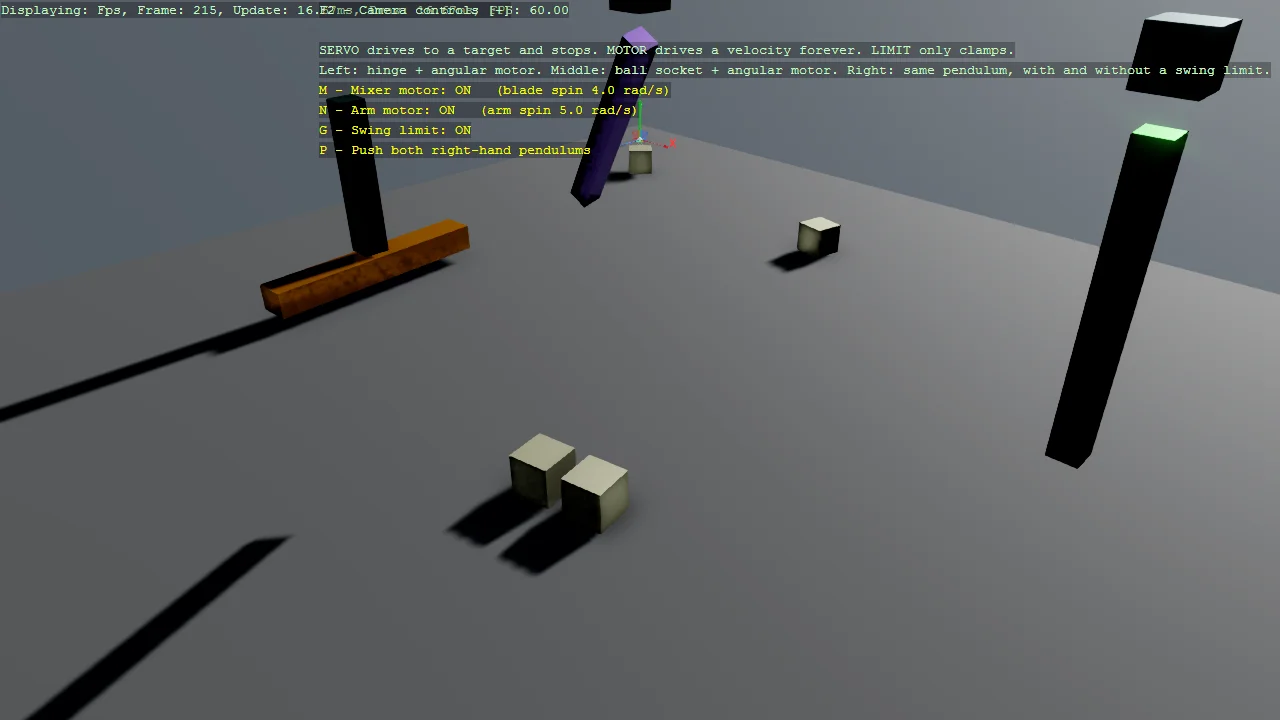
The three kinds of Bepu constraint, side by side. A servo drives towards a target position or orientation and then stops; a motor drives towards a target velocity and never stops; a limit drives nothing at all and only clamps a range. A mixer blade shows the motor case - a HingeConstraint decides which way it may turn and a OneBodyAngularMotor makes it turn, and neither does the job alone. Two identical pendulums show the limit case, where only one carries a SwingLimit. Every constraint can be switched off while the scene is running, which is the quickest way to see what it was contributing. The example also shows the trap that catches most hand-built joints: a constraint does not stop two bodies colliding, so a joint whose parts share space simply jams. Extends E05_3D_Constraints, which covers servos and limits but never motors.
The Program.cs file shows how to:
- The difference between a servo, a motor and a limit
- Restricting rotation to one axis with HingeConstraintComponent
- Driving continuous rotation with OneBodyAngularMotorConstraintComponent
- Sweeping a tilted arm with AngularAxisMotorConstraintComponent
- Why a whole-vector motor target flattens a cone and a single-axis one does not
- Clamping swing range with SwingLimitConstraintComponent
- Why a constraint does not stop the joined bodies colliding
- Placing a pivot in clear air so the joint does not jam
- Why BallSocketMotor drives linear, not angular, velocity
- Why MotorDamping does not read back the value passed to the constructor
- Switching a motor off does not brake anything, it only stops pushing
- Constraint offsets and axes are in each body's local space
- Enabling and disabling a constraint at runtime
- Why a constraint anchor must be a kinematic body, not a static one
- Why a velocity set from the start callback is lost
- Picking up and throwing bodies with GrabberScript
- Using helpers: SetupBase3DScene, AddSkybox, AddGroundGizmo, AddProfiler
View on GitHub.
using Stride.BepuPhysics;
using Stride.BepuPhysics.Constraints;
using Stride.CommunityToolkit.Bepu;
using Stride.CommunityToolkit.Engine;
using Stride.CommunityToolkit.Rendering.ProceduralModels;
using Stride.CommunityToolkit.Scripts.Utilities;
using Stride.CommunityToolkit.Skyboxes;
using Stride.Core.Mathematics;
using Stride.Engine;
using Stride.Games;
using Stride.Input;
using System.Globalization;

// Bepu constraints come in three flavours, and picking the wrong one is the usual reason a joint
// "does nothing" or "never stops". This example puts all three on screen at once:
//
//   Servo  - drives towards a target POSITION or ORIENTATION, then holds it and stops.
//   Motor  - drives towards a target VELOCITY, forever. It has no destination.
//   Limit  - drives nothing. It only clamps a range and lets the solver do the rest.
//
// E05_3D_Constraints already covers servos and limits, so the star here is the motor.
//
// One rule shapes every measurement below: A CONSTRAINT DOES NOT STOP TWO BODIES COLLIDING. Joining
// two boxes with a ball socket does not let them share space - they still push each other apart, and
// a joint built so the parts overlap simply jams and never moves. Every pivot here is placed in
// clear air.

// --- Mixer (hinge + angular motor) -------------------------------------------------------------
const float MixerX = -6f;
const float BladeCenterY = 0.4f;
const float BladeThickness = 0.4f;

// The post starts above the blade rather than running down through it, so the two never share space.
const float PostBottomY = 0.65f;
const float PostTopY = 3f;

const float MotorSpeed = 4f;
const int LooseCubeCount = 8;

// Target angular speed for the cone-swept pendulum, in radians per second.
//
// Well clear of the arm's own pendulum frequency, sqrt(3g/2L) which is about 2.4 rad/s here. Driving
// a pendulum at its natural frequency makes the two beat against each other and the orbit wanders
// into shifting polygons instead of settling into a circle.
const float ConeSpeed = 5f;

// The arm is a spherical pendulum: the motor fixes how fast it goes round, but its swing in and out
// is free motion that nothing damps. Expect the cone to breathe by roughly a fifth of its radius
// rather than tracing a perfect circle, and expect no value here to remove that - it is the pendulum
// nutating, not the motor faltering. This one keeps the breathing reasonably tight.
const float MotorArmTilt = 1.3f;

// Motor strength. Beware that MotorDamping does NOT read back the number the component was built
// with: the constructors pass a damping value to Bepu's MotorSettings, which stores its reciprocal,
// so a component created with 0.02 reports a MotorDamping of 50. Read the property to learn the real
// default before overriding it - guessing from the constructor gives a value 2500x too small, and a
// motor set that soft produces no visible force at all.
const float MotorDampingValue = 50f;
const float MotorForceValue = 10_000_000f;

// --- Pendulums (ball socket, motor, swing limit) ------------------------------------------------
const float AnchorHeight = 5f;
const float AnchorSize = 0.4f;
const float ArmLength = 2.5f;

// The joint sits below the anchor box instead of at its centre. Pinning the arm's top to the
// anchor's centre would force the arm inside the anchor, and the jammed pendulum would never swing.
const float PinDrop = 0.45f;

// Both comparison pendulums start tilted, so gravity gets them moving without any push. It also
// makes the middle pendulum's motor visible: a perfectly vertical arm driven about Y just spins
// about its own axis, which looks like nothing happening at all.
const float StartTilt = 0.75f;

// Roughly 20 degrees. SwingLimit takes radians.
const float MaxSwingAngle = 0.35f;

const float MotorPendulumX = 0f;
const float LimitedPendulumX = 4.5f;
const float FreePendulumX = 7.5f;

// A pendulum swings along Z, across the line the three stations are laid out on, so neighbouring
// stations never touch each other.
var pushVelocity = new Vector3(0, 0, 4.5f);

DebugOverlaySection? instructions = null;

// Kept so the update loop can switch them off at runtime - the fastest way to feel what a
// constraint is actually contributing is to remove it while everything is moving.
OneBodyAngularMotorConstraintComponent? mixerMotor = null;
AngularAxisMotorConstraintComponent? armMotor = null;
SwingLimitConstraintComponent? swingLimit = null;

BodyComponent? limitedArm = null;
BodyComponent? freeArm = null;

using var game = new Game();

game.Run(start: Start, update: Update);

void Start(Scene scene)
{
    game.SetupBase3DScene();
    game.SetCameraPosition(new(2.5f, 9, 19));
    game.SetCameraRotation(new(3, -25, 0));

    // Pick up and throw any body with the left mouse button (GrabberScript, see E05_3D_Grabber).
    game.AddGrabber();
    game.AddSkybox();
    game.AddProfiler();
    game.AddGroundGizmo(new Vector3(-9, 0, -9), showAxisName: true);

    InitializeDebugOverlay();

    CreateMixer(scene);
    CreateMotorisedPendulum(scene);
    CreateSwingLimitComparison(scene);
}

void Update(Scene scene, GameTime time)
{
    if (game.Input.IsKeyPressed(Keys.M) && mixerMotor is not null)
    {
        // The blade does not stop dead: the hinge still holds it, so it coasts down under friction.
        // That is the difference between removing a motor and freezing a body.
        mixerMotor.Enabled = !mixerMotor.Enabled;
    }

    if (game.Input.IsKeyPressed(Keys.N) && armMotor is not null)
    {
        // Switch this off and the arm stops being swept around, decays into a plain swing, and
        // eventually hangs still. Nothing brakes it - it just loses its driver.
        armMotor.Enabled = !armMotor.Enabled;
    }

    if (game.Input.IsKeyPressed(Keys.G) && swingLimit is not null)
    {
        // With the limit off, the two right-hand pendulums behave identically - which is the point.
        swingLimit.Enabled = !swingLimit.Enabled;
    }

    if (game.Input.IsKeyPressed(Keys.P))
    {
        PushPendulums();
    }

}

/// <summary>
/// A kitchen-mixer blade: a hinge decides which way it may turn, a motor makes it turn.
/// </summary>
/// <remarks>
/// Neither constraint can do this alone. Without the hinge the motor would spin the blade about its
/// own axis wherever it happened to drift; without the motor the hinge is just a bearing.
/// </remarks>
void CreateMixer(Scene scene)
{
    var postHeight = PostTopY - PostBottomY;
    var postCenterY = (PostTopY + PostBottomY) / 2;

    // Kinematic: it holds the blade up and is never pushed around by it. A constraint needs a
    // BodyComponent at both ends, so the post cannot be a StaticComponent.
    var post = CreateBox("Mixer Post", Color.DarkSlateGray,
        new Vector3(MixerX, postCenterY, 0),
        new Vector3(0.4f, postHeight, 0.4f),
        kinematic: true);

    var blade = CreateBox("Mixer Blade", Color.Orange,
        new Vector3(MixerX, BladeCenterY, 0),
        new Vector3(3.5f, BladeThickness, 0.5f));

    var postBody = post.Get<BodyComponent>();
    var bladeBody = blade.Get<BodyComponent>();

    // Pin the blade to a point below the post and allow rotation about Y only. The offsets are in
    // each body's LOCAL space, so LocalOffsetA is measured from the post's centre, not from the
    // world - which is why it is negative here.
    var hinge = new HingeConstraintComponent
    {
        A = postBody,
        B = bladeBody,
        LocalOffsetA = new Vector3(0, BladeCenterY - postCenterY, 0),
        LocalOffsetB = Vector3.Zero,
        LocalHingeAxisA = Vector3.UnitY,
        LocalHingeAxisB = Vector3.UnitY,
        SpringFrequency = 30,
        SpringDampingRatio = 5,
    };

    // A motor targets a VELOCITY, so there is no "finished" state - it keeps pushing for as long as
    // it is enabled. The default MotorMaximumForce is the budget it may spend to reach that
    // velocity; lower it and the cubes would stall the blade instead of being swept aside.
    mixerMotor = new OneBodyAngularMotorConstraintComponent
    {
        A = bladeBody,
        TargetVelocity = new Vector3(0, MotorSpeed, 0),
    };

    mixerMotor.MotorDamping = MotorDampingValue;
    mixerMotor.MotorMaximumForce = MotorForceValue;

    post.Add(hinge);
    blade.Add(mixerMotor);

    post.Scene = scene;
    blade.Scene = scene;

    CreateLooseCubes(scene);
}

/// <summary>
/// Small cubes for the blade to sweep, so the motor's effect is visible rather than theoretical.
/// </summary>
void CreateLooseCubes(Scene scene)
{
    for (var i = 0; i < LooseCubeCount; i++)
    {
        // The half step keeps every cube clear of the blade's own footprint at spawn - bodies that
        // start interpenetrating get shoved apart hard and can jam the joint on the first frame.
        var angle = MathF.Tau * (i + 0.5f) / LooseCubeCount;

        var cube = CreateBox("Loose Cube", Color.LightGoldenrodYellow,
            new Vector3(MixerX + MathF.Sin(angle) * 1.3f, 0.25f, MathF.Cos(angle) * 1.3f),
            new Vector3(0.5f));

        cube.Scene = scene;
    }
}

/// <summary>
/// A pendulum hanging from a ball-socket joint, swept around a cone by a ball-socket motor.
/// </summary>
void CreateMotorisedPendulum(Scene scene)
{
    var (anchor, arm) = CreatePendulum(scene, MotorPendulumX, "Motorised", Color.MediumPurple, MotorArmTilt);

    // Sweep the tilted arm around a cone by driving rotation about ONE axis only. The arm has to
    // start tilted for this to be visible at all - a perfectly vertical arm driven about Y just
    // spins about its own axis and looks completely still.
    //
    // Constraining a single axis is what keeps the cone alive. The whole-vector motors take a target
    // like (0, speed, 0), which also demands ZERO rotation about X and Z - exactly the rotation the
    // arm needs to swing back out against gravity. They hold the spin but flatten the cone into a
    // vertical spin within seconds. AngularAxisMotor leaves the other two axes to gravity, so the
    // arm keeps its angle.
    //
    // Two other constraints were tried here first and are worth knowing about:
    //
    //   BallSocketMotor drives LINEAR velocity at the socket point, despite the name suggesting it
    //   pairs with a ball socket. Pointing it at the very point a stiff BallSocketConstraint is
    //   already pinning gives a tug of war the rigid joint always wins, and the arm never moves.
    //
    //   AngularMotor is the two-body whole-vector motor. It turns the arm, but ships with a force
    //   budget of 1000 and a damping of 0.1, which is far too soft to swing an arm against gravity -
    //   it creeps at a fraction of the requested speed until both are raised.
    armMotor = new AngularAxisMotorConstraintComponent
    {
        A = anchor.Get<BodyComponent>(),
        B = arm.Get<BodyComponent>(),
        LocalAxisA = Vector3.UnitY,
        TargetVelocity = ConeSpeed,
        MotorDamping = MotorDampingValue,
        MotorMaximumForce = MotorForceValue,
    };

    anchor.Add(armMotor);
}

/// <summary>
/// Two identical pendulums where only one carries a <see cref="SwingLimitConstraintComponent"/>.
/// </summary>
/// <remarks>
/// A limit adds no energy of its own. Both start from the same tilt and get the same push from P;
/// the limited one simply runs out of allowed angle first.
/// </remarks>
void CreateSwingLimitComparison(Scene scene)
{
    var (limitedAnchor, limitedArmEntity) = CreatePendulum(scene, LimitedPendulumX, "Limited", Color.LimeGreen, StartTilt);
    var (_, freeArmEntity) = CreatePendulum(scene, FreePendulumX, "Free", Color.OrangeRed, StartTilt);

    limitedArm = limitedArmEntity.Get<BodyComponent>();
    freeArm = freeArmEntity.Get<BodyComponent>();

    // The limit measures the angle between an axis on each body. Both point straight down, so a
    // pendulum hanging at rest sits at zero and the angle grows as it swings away.
    swingLimit = new SwingLimitConstraintComponent
    {
        A = limitedAnchor.Get<BodyComponent>(),
        B = limitedArm,
        AxisLocalA = -Vector3.UnitY,
        AxisLocalB = -Vector3.UnitY,
        MaximumSwingAngle = MaxSwingAngle,
        SpringFrequency = 30,
        SpringDampingRatio = 5,
    };

    limitedAnchor.Add(swingLimit);
}

/// <summary>
/// Builds a kinematic anchor with an arm hanging from it on a ball-socket joint, and returns both so
/// the caller can add whatever motor or limit it wants to demonstrate.
/// </summary>
/// <remarks>
/// The arm starts tilted by <see cref="StartTilt"/>. Its position is derived from the joint rather
/// than written by hand: the ball socket will drag the arm until the two pivot points coincide, so
/// placing the arm anywhere else just means it snaps on the first frame.
/// </remarks>
(Entity Anchor, Entity Arm) CreatePendulum(Scene scene, float x, string name, Color color, float tilt)
{
    var anchor = CreateBox($"{name} Anchor", Color.DarkSlateGray,
        new Vector3(x, AnchorHeight, 0),
        new Vector3(AnchorSize),
        kinematic: true);

    // Where the joint actually lives: below the anchor box, in clear air.
    var pivot = new Vector3(x, AnchorHeight - PinDrop, 0);

    // Rotating the arm about X moves its top away from the pivot, so the centre has to be offset by
    // the rotated half-length to put the top back on the pivot.
    var halfArm = ArmLength / 2;
    var armCenter = pivot - new Vector3(0, halfArm * MathF.Cos(tilt), halfArm * MathF.Sin(tilt));

    var arm = CreateBox($"{name} Arm", color,
        armCenter,
        new Vector3(0.25f, ArmLength, 0.25f));

    arm.Transform.Rotation = Quaternion.RotationX(tilt);

    // Pins the top of the arm to the pivot while leaving rotation completely free - the joint itself
    // imposes no angle limit at all.
    var ballSocket = new BallSocketConstraintComponent
    {
        A = anchor.Get<BodyComponent>(),
        B = arm.Get<BodyComponent>(),
        LocalOffsetA = new Vector3(0, -PinDrop, 0),
        LocalOffsetB = new Vector3(0, halfArm, 0),
    };

    anchor.Add(ballSocket);

    anchor.Scene = scene;
    arm.Scene = scene;

    return (anchor, arm);
}

/// <summary>
/// Gives both comparison pendulums the same sideways shove, so any difference in how far they travel
/// comes from the constraints rather than from the push.
/// </summary>
/// <remarks>
/// Only callable once the game is running. Setting a velocity from the start callback is silently
/// lost, because the body has not been handed to the simulation yet.
/// </remarks>
void PushPendulums()
{
    if (limitedArm is null || freeArm is null) return;

    limitedArm.LinearVelocity = pushVelocity;
    limitedArm.Awake = true;

    freeArm.LinearVelocity = pushVelocity;
    freeArm.Awake = true;
}

Entity CreateBox(string name, Color color, Vector3 position, Vector3 size, bool kinematic = false)
{
    var entity = game.Create3DPrimitive(PrimitiveModelType.Cube, new Bepu3DPhysicsOptions
    {
        EntityName = name,
        Material = game.CreateMaterial(color),
        Size = size,
    });

    entity.Transform.Position = position;

    if (kinematic)
    {
        entity.Get<BodyComponent>().Kinematic = true;
    }

    return entity;
}

IReadOnlyList<TextElement> BuildInstructions()
{


    // Rebuilt every frame rather than patched line by line. Indexing into the existing list means
    // the labels written here and the placeholders written at startup have to be kept in step by
    // hand, and they drift apart the moment a line is renamed.
    //
    // The live spin readouts matter: switching a motor off does not brake anything, it just stops
    // pushing. A hinged blade carrying momentum coasts for a very long time, so without a number on
    // screen turning the motor off looks exactly like nothing happening.
    return [
        new("M", $"Mixer motor {OnOff(mixerMotor?.Enabled)}, blade spin {Spin(mixerMotor?.A)} rad/s", Color.Yellow),
        new("N", $"Arm motor {OnOff(armMotor?.Enabled)}, arm spin {Spin(armMotor?.B)} rad/s", Color.Yellow),
        new("G", $"Swing limit {OnOff(swingLimit?.Enabled)}", Color.Yellow),
        new("P", "Push both right-hand pendulums", Color.Yellow),
        new("Left mouse", "Pick up any body and throw it", Color.Yellow),
        new(""),
        new("SERVO drives to a target and stops", Color.LightGray),
        new("MOTOR drives a velocity forever", Color.LightGray),
        new("LIMIT only clamps", Color.LightGray),
        new("Left: hinge + angular motor", Color.LightGray),
        new("Middle: ball socket + angular motor", Color.LightGray),
        new("Right: the same pendulum with", Color.LightGray),
        new("and without a swing limit.", Color.LightGray),
    ];
}

static string OnOff(bool? enabled) => enabled == true ? "ON" : "OFF";

static string Spin(BodyComponent? body) => body is null ? "-" : MathF.Abs(body.AngularVelocity.Y).ToString("0.0", CultureInfo.InvariantCulture);

void InitializeDebugOverlay()
{
    var overlay = DebugOverlay.GetOrCreate(game);

    // BuildInstructions runs every frame the overlay is drawn, which is what puts the live spin
    // readouts on screen without anything having to push them
    instructions = overlay.AddSection("Game", BuildInstructions);
}