Easing Basics
Easing from the ground up, in four lanes that move a disc over the same two seconds: by hand with no easing, by hand with one formula, with the toolkit's easing functions, and with a Tween. The last three use the same curve and move in lockstep, while each needs less code than the one above it, printed beside its lane. Dots along every lane show the spacing that makes easing visible.
The Program.cs file shows how to:
- Progress as elapsed time divided by duration, clamped to 0 to 1
- Easing as one formula that bends the progress before a lerp
- EasingFunction.Interpolate, which also clamps the time
- Tween, which also keeps the clock
- Evenly spaced positions for no easing, bunched positions for an ease-out
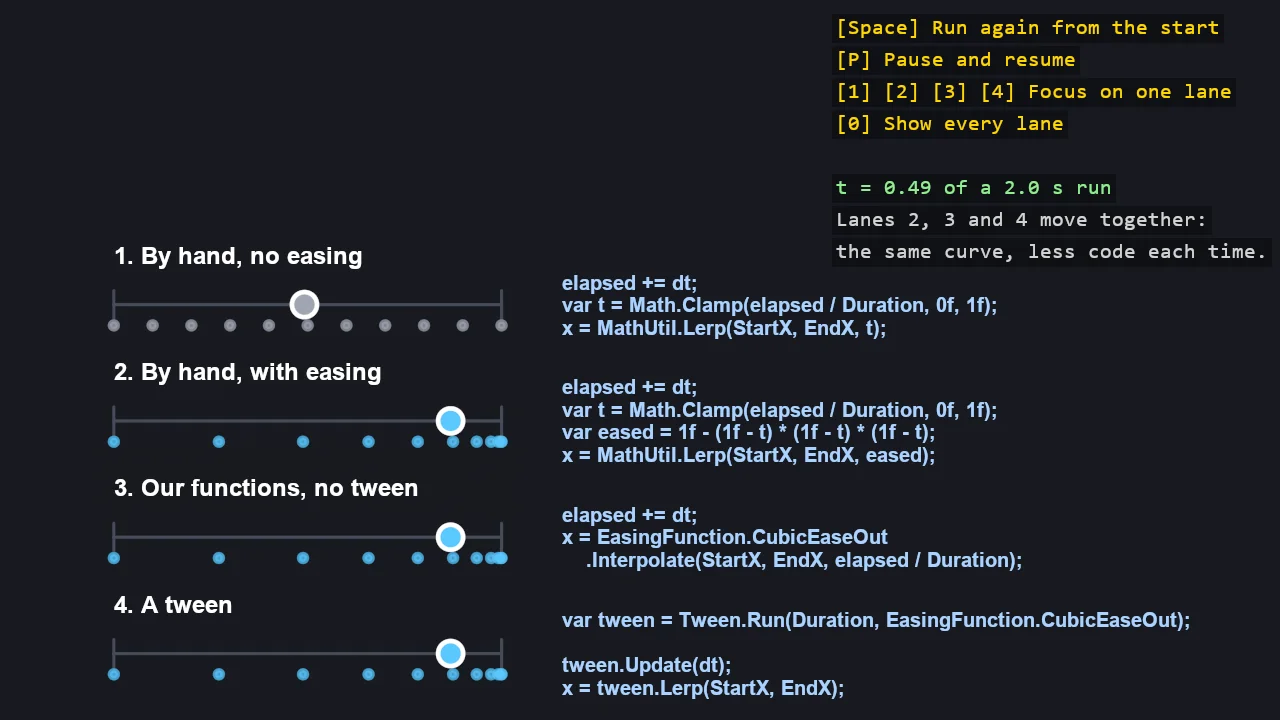
View on GitHub.
using Stride.CommunityToolkit.Engine;
using Stride.CommunityToolkit.Mathematics;
using Stride.CommunityToolkit.Rendering.Text;
using Stride.CommunityToolkit.Scripts.Utilities;
using Stride.CommunityToolkit.Shapes;
using Stride.CommunityToolkit.Windows;
using Stride.Core.Mathematics;
using Stride.Engine;
using Stride.Games;
using Stride.Graphics;
using Stride.Input;

// Easing from the ground up, in four lanes. A disc slides from left to right in each lane over the
// same two seconds, and the code that moves it is printed beside it:
//
//   1. By hand, no easing: track the time, divide by the duration, clamp, lerp. Constant speed.
//   2. By hand, with easing: the same, plus one formula that bends the progress, 1 - (1 - t)³.
//   3. Our functions, no tween: the formula and the clamp come from EasingFunction.
//   4. A tween: the timekeeping comes from Tween as well.
//
// Lanes 2, 3 and 4 use the same cubic ease-out, so their discs move in lockstep while the first one
// drifts: the library gives the same answer as the maths, and each lane needs less code than the one
// above. The dots along each lane are where the disc is at every tenth of the run - evenly spaced
// for no easing, bunched towards the end for an ease-out, which is what "slowing down" looks like.
//
// Next: E02_2D_Easing shows every curve at once; E02_2D_EasingInGame and E02_3D_EasingInGame use
// tweens in physics scenes.

WindowsDpiManager.EnablePerMonitorV2();

const float Duration = 2f;
const float Hold = 1f;
const float StartX = -19f;
const float EndX = -5f;

float[] laneY = [2f, -2.2f, -6.4f, -10.6f];
string[] titles = ["1. By hand, no easing", "2. By hand, with easing", "3. Our functions, no tween", "4. A tween"];
string[] code =
[
    "elapsed += dt;\nvar t = Math.Clamp(elapsed / Duration, 0f, 1f);\nx = MathUtil.Lerp(StartX, EndX, t);",
    "elapsed += dt;\nvar t = Math.Clamp(elapsed / Duration, 0f, 1f);\nvar eased = 1f - (1f - t) * (1f - t) * (1f - t);\nx = MathUtil.Lerp(StartX, EndX, eased);",
    "elapsed += dt;\nx = EasingFunction.CubicEaseOut\n    .Interpolate(StartX, EndX, elapsed / Duration);",
    "var tween = Tween.Run(Duration, EasingFunction.CubicEaseOut);\n\ntween.Update(dt);\nx = tween.Lerp(StartX, EndX);",
];

// Lanes 1 to 3 keep their own clock, because keeping it is part of what they teach
var elapsed1 = 0f;
var elapsed2 = 0f;
var elapsed3 = 0f;

// Lane 4 hands its clock to the tween
var tween = Tween.Run(Duration, EasingFunction.CubicEaseOut);

var positions = new float[4];
var paused = false;
var focus = -1;
var holding = 0f;

ShapeBatch? shapes = null;

using var game = new Game();

game.Run(start: Start, update: Update);

void Start(Scene rootScene)
{
    game.Window.AllowUserResizing = true;
    game.Window.Title = "Easing Basics - Stride Community Toolkit";

    game.SetupBase2D(new Color(24, 26, 32));
    game.AddEntityTextRenderer();

    var camera = rootScene.GetCamera() ?? throw new InvalidOperationException("The 2D scene has no camera.");

    camera.OrthographicSize = 26f;

    shapes = game.AddShapeBatch();

    for (var lane = 0; lane < laneY.Length; lane++)
    {
        rootScene.Entities.Add(Label(titles[lane], new Vector2(StartX, laneY[lane] + 1.3f), 16, Color.White, TextAnchor.BottomLeft));
        rootScene.Entities.Add(Label(code[lane], new Vector2(EndX + 2.2f, laneY[lane]), 13, new Color(170, 210, 255), TextAnchor.MiddleLeft));
    }

    DebugOverlay.GetOrCreate(game).AddSection("Easing basics", BuildOverlayLines);
}

void Update(Scene scene, GameTime time)
{
    HandleInput();

    var dt = paused ? 0f : (float)time.Elapsed.TotalSeconds;

    // 1. By hand, no easing: the progress is the time, so the speed never changes
    elapsed1 += dt;
    var t1 = Math.Clamp(elapsed1 / Duration, 0f, 1f);
    positions[0] = MathUtil.Lerp(StartX, EndX, t1);

    // 2. By hand, with easing: one formula bends the progress before the lerp
    elapsed2 += dt;
    var t2 = Math.Clamp(elapsed2 / Duration, 0f, 1f);
    var eased2 = 1f - (1f - t2) * (1f - t2) * (1f - t2);
    positions[1] = MathUtil.Lerp(StartX, EndX, eased2);

    // 3. Our functions, no tween: the curve and the clamp come from the library
    elapsed3 += dt;
    positions[2] = EasingFunction.CubicEaseOut.Interpolate(StartX, EndX, elapsed3 / Duration);

    // 4. A tween: the clock comes from the library too
    tween.Update(dt);
    positions[3] = tween.Lerp(StartX, EndX);

    // Every lane has arrived: wait a moment on the finish line, then run again
    if (tween.IsComplete)
    {
        holding += dt;

        if (holding >= Hold) Restart();
    }

    if (shapes is not null) Draw(shapes);
}

void Draw(ShapeBatch shapes)
{
    for (var lane = 0; lane < laneY.Length; lane++)
    {
        var y = laneY[lane];
        var colour = lane == 0 ? new Color(160, 166, 180) : new Color(90, 200, 255);

        shapes.Opacity = focus < 0 || focus == lane ? 1f : 0.2f;

        // The track, with a mark at the start and at the finish
        shapes.DrawPixelLine(new Vector3(StartX, y, 0f), new Vector3(EndX, y, 0f), 2f, new Color(70, 76, 90));
        shapes.DrawPixelLine(new Vector3(StartX, y - 0.5f, 0f), new Vector3(StartX, y + 0.5f, 0f), 2f, new Color(70, 76, 90));
        shapes.DrawPixelLine(new Vector3(EndX, y - 0.5f, 0f), new Vector3(EndX, y + 0.5f, 0f), 2f, new Color(70, 76, 90));

        // Where the disc is at every tenth of the run: the spacing is the easing
        for (var i = 0; i <= 10; i++)
        {
            shapes.DrawPixelDisc(new Vector3(MathUtil.Lerp(StartX, EndX, Spacing(lane, i / 10f)), y - 0.75f, 0f), 2.5f, new Color(colour.R, colour.G, colour.B, (byte)150));
        }

        shapes.Fill.Set(colour, 1f);
        shapes.DrawDisc(new Vector3(positions[lane], y, 0f), Vector3.UnitZ, 0.45f, Color.White);
        shapes.Fill.Set(null, 1f);
    }

    shapes.Opacity = 1f;
}

// The eased progress each lane follows, for drawing its spacing: linear for lane 1, the cubic
// ease-out for the rest
static float Spacing(int lane, float t) => lane == 0 ? t : Easing.CubicEaseOut(t);

void Restart()
{
    elapsed1 = 0f;
    elapsed2 = 0f;
    elapsed3 = 0f;
    tween.Start();
    holding = 0f;
}

void HandleInput()
{
    var input = game.Input;

    if (input.IsKeyPressed(Keys.Space)) Restart();
    if (input.IsKeyPressed(Keys.P)) paused = !paused;
    if (input.IsKeyPressed(Keys.D0) || input.IsKeyPressed(Keys.NumPad0)) focus = -1;
    if (input.IsKeyPressed(Keys.D1) || input.IsKeyPressed(Keys.NumPad1)) focus = 0;
    if (input.IsKeyPressed(Keys.D2) || input.IsKeyPressed(Keys.NumPad2)) focus = 1;
    if (input.IsKeyPressed(Keys.D3) || input.IsKeyPressed(Keys.NumPad3)) focus = 2;
    if (input.IsKeyPressed(Keys.D4) || input.IsKeyPressed(Keys.NumPad4)) focus = 3;
}

IReadOnlyList<TextElement> BuildOverlayLines() =>
[
    new("Space", "Run again from the start", Color.Gold),
    new("P", "Pause and resume", Color.Gold),
    new(["1", "2", "3", "4"], "Focus on one lane", Color.Gold),
    new("0", "Show every lane", Color.Gold),
    new(""),
    new($"t = {Math.Clamp(elapsed1 / Duration, 0f, 1f):0.00} of a {Duration:0.0} s run" + (paused ? ", paused" : ""), Color.LightGreen),
    new("Lanes 2, 3 and 4 move together:", Color.LightGray),
    new("the same curve, less code each time.", Color.LightGray),
];

static Entity Label(string text, Vector2 position, float fontSize, Color colour, TextAnchor anchor)
{
    var entity = new Entity($"Label {text.Split('\n')[0]}")
    {
        new EntityTextComponent
        {
            Text = text,
            FontSize = fontSize,
            TextColor = colour,
            Anchor = anchor,
            Alignment = TextAlignment.Left,
        },
    };

    entity.Transform.Position = new Vector3(position, 0f);

    return entity;
}