Entity Text (Screen-Space)
A gallery of everything EntityTextComponent can do, one feature per pole: anchoring, shadows, backgrounds, scaling, rotation, opacity, distance fading, several texts on one entity, and HUD text pinned to window corners that survives resizing. Screen-space text keeps its pixel size at any distance and is never hidden by geometry.
The Program.cs file shows how to:
- Registering the text renderer once: AddEntityTextRenderer
- Centring a label over an object with TextAnchor, not TextAlignment
- Shadow and background for readability over a 3D scene
- Animating Scale instead of FontSize
- Distance fading with FadeStartDistance and MaxDistance
- Several EntityTextComponents on one entity
- HUD text that survives window resizing: TextPositionMode.Anchored
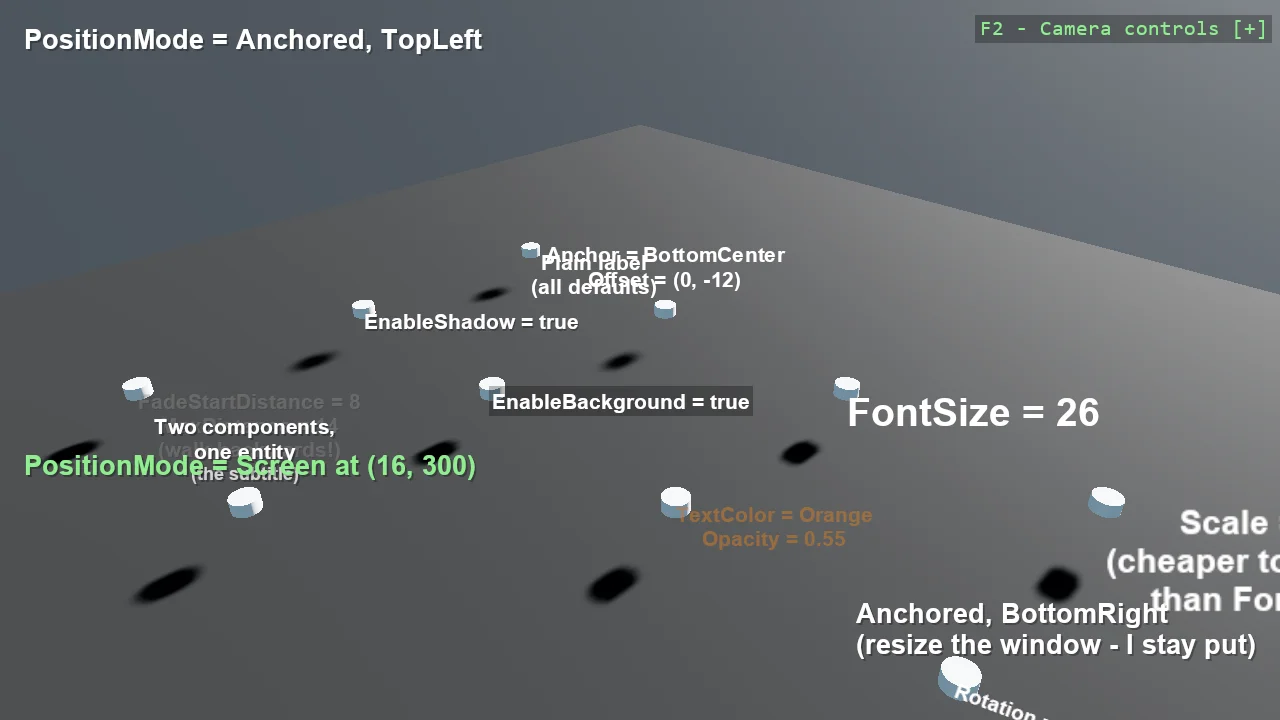
View on GitHub.
using Stride.CommunityToolkit.Bepu;
using Stride.CommunityToolkit.Engine;
using Stride.CommunityToolkit.Rendering.ProceduralModels;
using Stride.CommunityToolkit.Rendering.Text;
using Stride.CommunityToolkit.Skyboxes;
using Stride.CommunityToolkit.Windows;
using Stride.Core.Mathematics;
using Stride.Engine;
using Stride.Graphics;

// A gallery of everything EntityTextComponent can do. Each pole on the ground carries a label whose
// text describes the settings that produced it, so the scene is its own documentation.
//
// EntityTextComponent is SCREEN-SPACE text: the entity's position is projected to a point on the
// screen and flat pixels are drawn there. The text is always the same size however far away the
// entity is, and it is never hidden by geometry. For text that lives inside the scene - shrinking
// with distance, blocked by walls - see E03_3D_WorldText.

// Before the window exists: a sharp window on a scaled display, and every label then sizes itself -
// this is screen-space text, so a 150% display draws it 1.5x, rasterised at that size rather than stretched
WindowsDpiManager.EnablePerMonitorV2();

using var game = new Game();

game.Run(start: Start);

void Start(Scene scene)
{
    game.Window.AllowUserResizing = true;
    //DisplayScale.GetOrCreate(game).Override = 1f;
    game.SetupBase3DScene();
    game.AddSkybox();

    // One call, however much text the scene has. Without the renderer, components collect quietly
    // and nothing appears - there is no error for a missing renderer.
    game.AddEntityTextRenderer();

    // --- Row 1: placement ----------------------------------------------------------------------

    AddStation(scene, new Vector3(-4.5f, 0, -2), "Plain label\n(all defaults)", station => { });

    AddStation(scene, new Vector3(-1.5f, 0, -2), "Anchor = BottomCenter\nOffset = (0, -12)", station =>
    {
        // The label floats centred above its pole. This pairing is what "put a name over a thing"
        // means, and it is Anchor doing the centring - not Alignment, which only arranges the lines
        // of a multi-line block relative to each other.
        station.Anchor = TextAnchor.BottomCenter;
        station.Offset = new Vector2(0, -12);
    });

    AddStation(scene, new Vector3(1.5f, 0, -2), "FontSize = 26", station =>
    {
        station.FontSize = 26;
    });

    AddStation(scene, new Vector3(4.5f, 0, -2), "Scale = 1.6\n(cheaper to animate\nthan FontSize)", station =>
    {
        // Scale multiplies the drawn size without re-rasterising glyphs, which is why a score punch
        // animates Scale and leaves FontSize alone
        station.Scale = 1.6f;
    });

    // --- Row 2: readability --------------------------------------------------------------------

    AddStation(scene, new Vector3(-4.5f, 0, 1), "EnableShadow = true", station =>
    {
        station.EnableShadow = true;
    });

    AddStation(scene, new Vector3(-1.5f, 0, 1), "EnableBackground = true", station =>
    {
        station.EnableBackground = true;
    });

    AddStation(scene, new Vector3(1.5f, 0, 1), "TextColor = Orange\nOpacity = 0.55", station =>
    {
        station.TextColor = Color.Orange;
        station.Opacity = 0.55f;
    });

    AddStation(scene, new Vector3(4.5f, 0, 1), "Rotation = 0.35 rad", station =>
    {
        station.Rotation = 0.35f;
    });

    // --- Row 3: distance -----------------------------------------------------------------------

    AddStation(scene, new Vector3(-4.5f, 0, 4), "FadeStartDistance = 8\nMaxDistance = 14\n(walk backwards!)", station =>
    {
        // World-positioned text can fade with camera distance; past MaxDistance it stops drawing
        station.EnableShadow = true;
        station.FadeStartDistance = 8;
        station.MaxDistance = 14;
    });

    // Two components on one entity: a name and a subtitle. LayerDepth decides who wins overlaps.
    var titled = AddStation(scene, new Vector3(-1.5f, 0, 4), "Two components,\none entity", station =>
    {
        station.Anchor = TextAnchor.BottomCenter;
        station.Offset = new Vector2(0, -26);
        station.EnableShadow = true;
    });

    titled.Add(new EntityTextComponent
    {
        Text = "(the subtitle)",
        FontSize = 12,
        TextColor = Color.LightGray,
        Anchor = TextAnchor.BottomCenter,
        Offset = new Vector2(0, -12),
        EnableShadow = true,
    });

    // --- HUD: not attached to anything in the scene --------------------------------------------

    // Anchored mode snaps to a window corner and survives resizing; the entity's own position is
    // ignored entirely, so a HUD entity can sit anywhere
    var hud = new Entity("Hud");

    hud.Add(new EntityTextComponent
    {
        Text = "PositionMode = Anchored, TopLeft",
        PositionMode = TextPositionMode.Anchored,
        ScreenAnchor = DisplayPosition.TopLeft,
        Offset = new Vector2(16, 16),
        EnableShadow = true,
    });

    hud.Add(new EntityTextComponent
    {
        Text = "Anchored, BottomRight\n(resize the window - I stay put)",
        PositionMode = TextPositionMode.Anchored,
        ScreenAnchor = DisplayPosition.BottomRight,
        Offset = new Vector2(16, 40),
        EnableShadow = true,
    });

    hud.Add(new EntityTextComponent
    {
        Text = "PositionMode = Screen at (16, 300)",
        PositionMode = TextPositionMode.Screen,
        ScreenPosition = new Vector2(16, 300),
        TextColor = Color.LightGreen,
        EnableShadow = true,
    });

    hud.Scene = scene;
}

// Creates one gallery station: a pole with a label above it, then hands the label over for the
// station's own settings. Returns the pole so a station can add more components to it.
Entity AddStation(Scene scene, Vector3 position, string text, Action<EntityTextComponent> configure)
{
    var pole = game.Create3DPrimitive(PrimitiveModelType.Cylinder, new Primitive3DEntityOptions
    {
        EntityName = "Pole",
        Size = new Vector3(0.15f, 1f, 0.15f),
    });

    pole.Transform.Position = position + new Vector3(0, 0.5f, 0);

    var label = new EntityTextComponent
    {
        Text = text,
        FontSize = 14,
        Alignment = TextAlignment.Center,
    };

    configure(label);
    pole.Add(label);

    pole.Scene = scene;

    return pole;
}