GPU Picking
What is under the mouse, answered by the renderer instead of by physics. Nothing in the scene has a collider - a teapot, a ring of pillars, a few primitives and a field of crates drawn as one instanced model - and the GPU picker names the entity, mesh, material, instance and surface point under the pointer by drawing ids into a hidden target and reading back one pixel. One call, AddGpuPicker, and a result two frames later.
The Program.cs file shows how to:
- Picking without colliders through AddGpuPicker, and what the call builds in the compositor
- A hover highlight with no render feature - HighlightShell, kept out of the picking pass by its render group
- Why the answer is two frames late, and why that does not matter for hover and click
- Reading the entity, mesh, material and instance index from a PickResult
- The hit point rebuilt from the depth the picking pass wrote
- Picking an instanced model and highlighting the one instance under the pointer
- Where physics raycasts still win, and where they cannot see at all
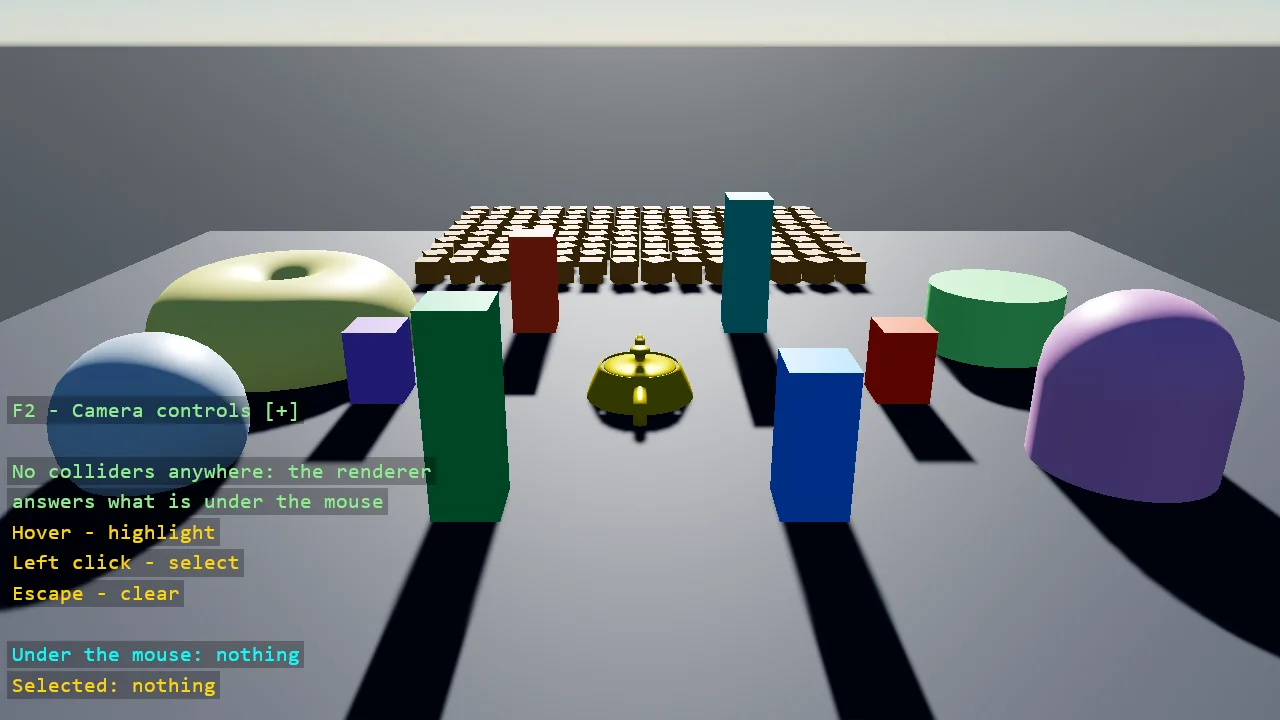
View on GitHub.
using Stride.CommunityToolkit.Effects.Picking;
using Stride.CommunityToolkit.Engine;
using Stride.CommunityToolkit.Rendering;
using Stride.CommunityToolkit.Rendering.Instancing;
using Stride.CommunityToolkit.Rendering.ProceduralModels;
using Stride.CommunityToolkit.Rendering.Text;
using Stride.CommunityToolkit.Scripts.Utilities;
using Stride.CommunityToolkit.Shapes;
using Stride.CommunityToolkit.Skyboxes;
using Stride.CommunityToolkit.Windows;
using Stride.Core.Mathematics;
using Stride.Engine;
using Stride.Games;
using Stride.Input;
using Stride.Rendering;

// What is under the mouse, answered by the renderer instead of by physics. There is no physics
// package in this example and nothing has a collider: a teapot, a ring of pillars, a few
// primitives and a field of crates drawn as one instanced model. The GPU picker draws the scene
// once more into a hidden target, each mesh writing its id instead of its colour, and reads back
// the one pixel under the mouse. The answer names the entity, the mesh, the material, the
// instance and the point on the surface - per pixel, through the same vertex pipeline that drew
// the frame, so an instanced crate is as pickable as a hand-placed pillar.
//
// The answer arrives two frames after the request, because the GPU is asked and the readback
// waits for it without stalling. For hovering and clicking that is invisible.
//
// The hover highlight is a HighlightShell: the hovered model drawn again a little larger with a faint
// glow, no render feature and no post effect - the TopDownRPG template's loot highlight. It draws in
// its own render group, which the picker is told to leave out, or the shell would be what is under
// the mouse the moment it appeared.
//
// Mouse: hover to highlight, left click to select, Escape to clear the selection.

const int CrateColumns = 14;
const int CrateRows = 10;
const float CrateSpacing = 1.3f;

Matrix[] crateMatrices = [];
Entity? crates = null;
GpuPicker? picker = null;
ShapeBatch? shapes = null;
PickResult? selected = null;
HighlightShell? hover = null;

WindowsDpiManager.EnablePerMonitorV2();

using var game = new Game();

game.Run(start: Start, update: Update);

void Start(Scene scene)
{
    game.Window.AllowUserResizing = true;
    game.Window.Title = "GPU Picking - Stride Community Toolkit";

    // SetupBase3D, not SetupBase3DScene: no ground entity with a collider, no physics at all
    game.SetupBase3D();
    game.Add3DCameraController();
    game.AddSkybox();
    game.AddProfiler();
    game.AddInstancingSupport();
    game.SetCameraPosition(new Vector3(0f, 9f, 22f));
    game.SetCameraRotation(new Vector3(0f, -20f, 0f));

    BuildScene(scene);

    shapes = game.AddShapeBatch(depthTest: false);

    // One call. From here on the picker answers every frame it is asked; Continuous asks at the mouse
    picker = game.AddGpuPicker();
    picker.Continuous = true;

    // The hover glow, a shell that moves onto whatever is under the mouse, kept out of the picking pass
    hover = new HighlightShell(game.CreateMaterial(MaterialDescriptors.Highlight(Color.Cyan)));
    picker.Pickable = RenderGroupMask.All & ~RenderGroupMask.Group30;

    var overlay = DebugOverlay.GetOrCreate(game);
    overlay.AddSection("Picking", OverlayLines);
    overlay.SetPosition(DisplayPosition.BottomLeft);
}

void Update(Scene scene, GameTime time)
{
    if (picker is null || shapes is null) return;

    if (game.Input.IsMouseButtonPressed(MouseButton.Left) && picker.Result is { Hit: true } hit)
    {
        selected = hit;
    }

    if (game.Input.IsKeyPressed(Keys.Escape))
    {
        selected = null;
    }

    if (picker.Result is { Hit: true, ModelComponent: { } model } hovered)
    {
        // A crate has no entity of its own: the shell goes to the instance's matrix instead
        if (model.Entity == crates) hover?.Show(model, crateMatrices[Math.Clamp(hovered.InstanceIndex, 0, crateMatrices.Length - 1)]);
        else hover?.Show(model);

        DrawRing(hovered, Color.Cyan, 10f);
    }
    else
    {
        hover?.Hide();
    }

    if (selected is { } chosen)
    {
        DrawHighlight(chosen, Color.Gold, 16f);
    }
}

/// <summary>
/// Something to pick: a ground, a teapot in the middle (no collider fits a teapot), a ring of
/// pillars of different heights, a few primitives, and a field of crates drawn as one instanced
/// model - one entity, one draw call, many pickable instances.
/// </summary>
void BuildScene(Scene scene)
{
    var ground = game.Create3DPrimitive(PrimitiveModelType.Cube, new Primitive3DEntityOptions
    {
        EntityName = "Ground",
        Material = game.CreateMaterial(new Color(52, 56, 64), metalness: 0.05f, glossiness: 0.3f),
        Size = new Vector3(44f, 0.5f, 44f),
        Position = new Vector3(0f, -0.25f, 0f),
    });

    ground.Scene = scene;

    var teapot = game.Create3DPrimitive(PrimitiveModelType.Teapot, new Primitive3DEntityOptions
    {
        EntityName = "Teapot",
        Material = game.CreateMaterial(Color.Gold, metalness: 0.6f, glossiness: 0.8f),
        Size = new Vector3(3f),
        Position = new Vector3(0f, 0f, 0f),
    });

    teapot.Scene = scene;

    ReadOnlySpan<Color> colours = [Color.OrangeRed, Color.DodgerBlue, Color.MediumSeaGreen, Color.MediumPurple, Color.Tomato, Color.LightSeaGreen];

    for (var i = 0; i < colours.Length; i++)
    {
        var angle = i * MathF.Tau / colours.Length;
        var height = 2f + (i % 3) * 1.2f;

        var pillar = game.Create3DPrimitive(PrimitiveModelType.Cube, new Primitive3DEntityOptions
        {
            EntityName = $"Pillar {i + 1}",
            Material = game.CreateMaterial(colours[i], metalness: 0.2f, glossiness: 0.5f),
            Size = new Vector3(1.4f, height, 1.4f),
            Position = new Vector3(MathF.Cos(angle) * 7f, height * 0.5f, MathF.Sin(angle) * 7f),
        });

        pillar.Scene = scene;
    }

    ReadOnlySpan<(string Name, PrimitiveModelType Type, Vector3 At, Color Colour)> primitives =
    [
        ("Sphere", PrimitiveModelType.Sphere, new Vector3(-11f, 1f, 4f), Color.LightSteelBlue),
        ("Capsule", PrimitiveModelType.Capsule, new Vector3(11f, 1f, 4f), Color.Plum),
        ("Torus", PrimitiveModelType.Torus, new Vector3(-11f, 0.6f, -4f), Color.Khaki),
        ("Cylinder", PrimitiveModelType.Cylinder, new Vector3(11f, 1f, -4f), Color.PaleGreen),
    ];

    foreach (var (name, type, at, colour) in primitives)
    {
        var entity = game.Create3DPrimitive(type, new Primitive3DEntityOptions
        {
            EntityName = name,
            Material = game.CreateMaterial(colour, metalness: 0.3f, glossiness: 0.6f),
            Size = new Vector3(2f),
            Position = at,
        });

        entity.Scene = scene;
    }

    BuildCrates(scene);
}

/// <summary>
/// A field of crates as one instanced model. The picker reports which instance a pixel belongs to,
/// so the matrices are kept to draw a box around the picked one.
/// </summary>
void BuildCrates(Scene scene)
{
    crateMatrices = new Matrix[CrateColumns * CrateRows];

    var index = 0;

    for (var row = 0; row < CrateRows; row++)
    {
        for (var column = 0; column < CrateColumns; column++)
        {
            var x = (column - (CrateColumns - 1) * 0.5f) * CrateSpacing;
            var z = -12f - row * CrateSpacing;
            var turn = (column * 7 + row * 3) % 5 * 0.15f;

            crateMatrices[index++] = Matrix.RotationY(turn) * Matrix.Translation(x, 0.45f, z);
        }
    }

    var instancing = new InstancingUserArray();

    instancing.UpdateWorldMatrices(crateMatrices);

    crates = game.Create3DPrimitive(PrimitiveModelType.Cube, new Primitive3DEntityOptions
    {
        EntityName = "Crates",
        Material = game.CreateMaterial(new Color(176, 120, 64), metalness: 0.1f, glossiness: 0.4f),
        Size = new Vector3(0.9f),
    });

    crates.Add(new InstancingComponent { Type = instancing });
    crates.Scene = scene;
}

/// <summary>
/// The selection: a ring at the point on the surface, and a box around what was picked - the model's
/// bounds for an entity of its own, the instance's cube for a crate, because the instanced model's
/// bounds are the whole field.
/// </summary>
void DrawHighlight(PickResult result, Color colour, float ringPixels)
{
    if (shapes is null || result is not { Hit: true, Entity: { } entity, ModelComponent: { } model }) return;

    DrawRing(result, colour, ringPixels);

    if (entity == crates)
    {
        var instance = crateMatrices[Math.Clamp(result.InstanceIndex, 0, crateMatrices.Length - 1)];

        shapes.DrawWireBox(instance.TranslationVector, new Vector3(1f), 0.03f, colour);
    }
    else
    {
        var bounds = model.BoundingBox;

        shapes.DrawWireBox(bounds.Center, bounds.Extent * 2f + new Vector3(0.1f), 0.03f, colour);
    }
}

/// <summary>A ring at the point on the surface the pick hit.</summary>
void DrawRing(PickResult result, Color colour, float ringPixels)
{
    if (shapes is null || result is not { Hit: true, WorldPosition: { } at }) return;

    shapes.BorderWidth = 2f;
    shapes.Fill.Alpha = 0f;
    shapes.DrawPixelRing(at, ringPixels, colour);
}

IReadOnlyList<TextElement> OverlayLines()
{
    List<TextElement> lines =
    [
        new("Hover", "Highlight", Color.Gold),
        new("Left click", "Select", Color.Gold),
        new("Escape", "Clear", Color.Gold),
        new(""),
        new($"Under the mouse: {Describe(picker?.Result)}", Color.Cyan),
        new($"Selected: {Describe(selected)}", Color.Gold),
        new("No colliders anywhere: the renderer", Color.LightGreen),
        new("answers what is under the mouse", Color.LightGreen),
    ];

    return lines;
}

string Describe(PickResult? result)
{
    if (result is not { Hit: true, Entity: { } entity, WorldPosition: { } at }) return "nothing";

    var instance = entity == crates ? $", instance {result.InstanceIndex}" : "";

    return $"{entity.Name} (mesh {result.MeshIndex}, material {result.MaterialIndex}{instance}) at {at.X:F2}, {at.Y:F2}, {at.Z:F2}";
}