HUD Basics (Step by Step)
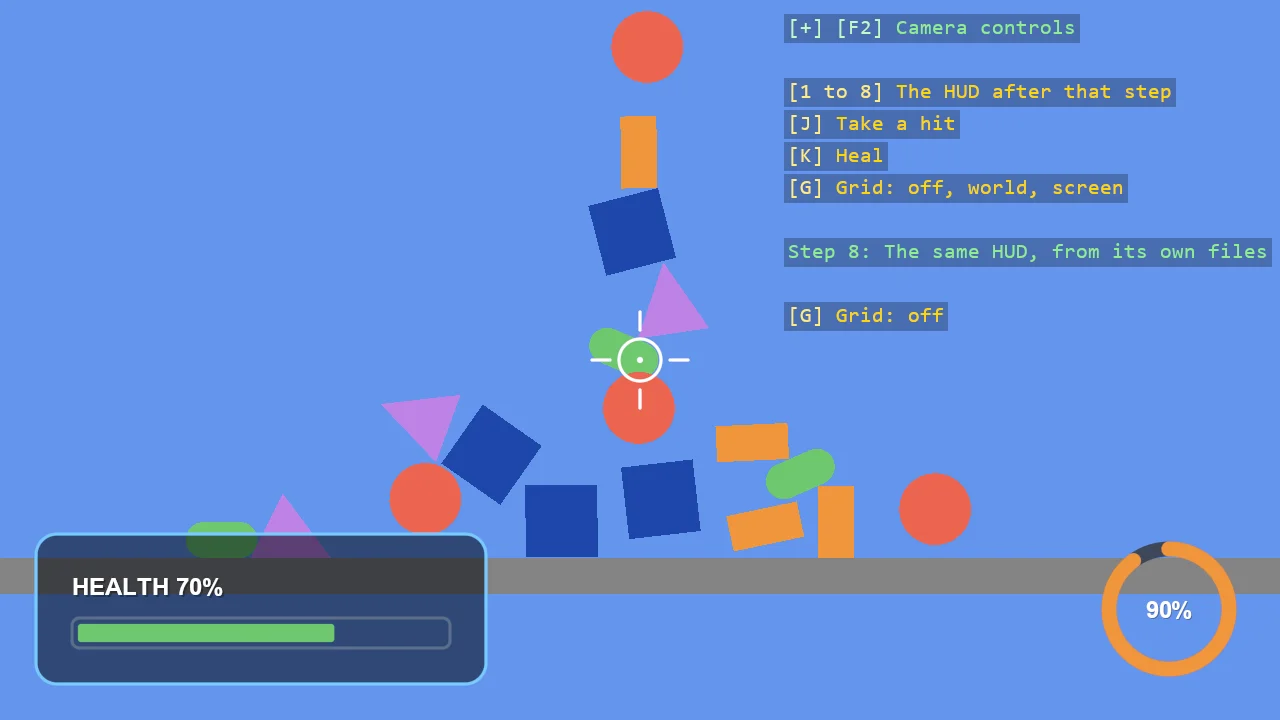
A simple HUD built in eight steps with ShapeBatch: a panel in a corner, a health bar, an energy dial, a crosshair, labels, a warning panel and a damage flash, and at the end the same HUD moved into files of its own. The number keys show the HUD as it stood after each step. It is the program of the tutorial "Build a simple HUD with ShapeBatch", which walks through it a step at a time.
The Program.cs file shows how to:
- Drawing on the screen in pixels with ShapeBatch.Screen, Anchor and ScreenSize
- Outline and fill - BorderWidth and Fill as the state each draw call takes
- Immediate mode - a bar and a dial that are redrawn from a value every frame
- Arcs and angles, rings, pixel lines
- Screen-space text with EntityTextComponent, since ShapeBatch does not draw text
- Glow and Opacity, and putting the state back afterwards
- Draw order - what is submitted first lies underneath
- Moving a HUD out of Program.cs into a class and a style
View on GitHub.
using E03_2D_HUD_Basics;
using Stride.CommunityToolkit.Bepu;
using Stride.CommunityToolkit.Engine;
using Stride.CommunityToolkit.Rendering;
using Stride.CommunityToolkit.Rendering.ProceduralModels;
using Stride.CommunityToolkit.Rendering.Text;
using Stride.CommunityToolkit.Shapes;
using Stride.Core.Mathematics;
using Stride.Engine;
using Stride.Games;
using Stride.Input;
using System.Globalization;

// A simple HUD, built in eight steps: a panel, a health bar, an energy dial, a crosshair, labels,
// a warning panel and a damage flash, and at the end the same HUD moved out into files of its own.
//
// This is the finished program of the tutorial "Build a simple HUD with ShapeBatch". The page
// builds it up a piece at a time and shows several #regions of this file. The number keys show the
// HUD as it stood after each step.
//
// Steps 1 to 7 are written here, in one file, as local functions. Step 8 draws the same HUD from
// SimpleHud.cs and HudStyle.cs.

// Pixel sizes then mean the same on a scaled display as on a 100% one
WindowsDpiManager.EnablePerMonitorV2();

const int LastStep = 8;

string[] stepNames =
[
    "A panel in a corner",
    "A health bar",
    "An energy dial",
    "A crosshair",
    "Labels",
    "A warning panel",
    "A damage flash",
    "The same HUD, from its own files",
];

#region Step1Values
// Sizes are in pixels on a 100% display
const float Margin = 24f;

var panelSize = new Vector2(300f, 100f);
var panelFill = new Color(12, 18, 32);
var panelEdge = new Color(120, 200, 255);
#endregion

#region Step2Values
const float LowHealth = 0.3f;

var barSize = new Vector2(252f, 20f);
var trackEdge = new Color(90, 110, 140);
var healthy = new Color(110, 200, 110);
var hurt = new Color(235, 100, 80);

var health = 0.7f;
#endregion

#region Step3Values
const float DialRadius = 40f;
const float DialWidth = 10f;

var dialTrack = new Color(60, 70, 90);
var energyColour = new Color(240, 150, 60);

var energy = 0.5f;
#endregion

#region Step6Values
var warningSize = new Vector2(160f, 40f);
#endregion

#region Step7Values
// How strong the damage flash is, from 1 when a hit lands down to 0
var flash = 0f;
#endregion

// What the command line can set: the step to start at, and a health and a flash to hold, which
// is how the pictures on the tutorial page were taken
var step = (int)Argument("--step", LastStep);
var holdFlash = Argument("--flash", -1f);

health = Argument("--health", health);

ShapeBatch shapeBatch = null!;             // created in Start
EntityTextComponent healthLabel = null!;
EntityTextComponent energyLabel = null!;
EntityTextComponent warningLabel = null!;
SimpleHud hud = null!;

using var game = new Game();

game.Run(new SceneSetup2D().UseBepu(), start: Start, update: Update);

void Start(Scene rootScene)
{
    game.Window.AllowUserResizing = true;
    game.Window.Title = "HUD basics - Stride Community Toolkit";

    // Something for the HUD to sit over: the scene of E01_2D_FallingShapes
    AddFallingShapes(rootScene);

    #region Step1Create
    // After the post effects, so that the HUD's colours are drawn as written
    shapeBatch = game.AddShapeBatch(afterPostEffects: true);
    #endregion

    // A grid with numbered lines, off at the start: G shows it in world units, then in pixels
    var grid = game.AddGrid();

    grid.Visible = false;

    #region Step5Create
    game.AddEntityTextRenderer();

    healthLabel = AddLabel(rootScene, TextAnchor.BottomLeft);
    energyLabel = AddLabel(rootScene, TextAnchor.MiddleCenter);
    #endregion

    #region Step6Create
    warningLabel = AddLabel(rootScene, TextAnchor.MiddleCenter);
    warningLabel.Text = "WARNING";
    warningLabel.TextColor = hurt;
    warningLabel.FontSize = 20;
    #endregion

    #region Step8Create
    hud = new SimpleHud(game, rootScene, shapeBatch, new HudStyle());
    #endregion

    DebugOverlay.GetOrCreate(game).AddSection("HUD basics", () =>
    [
        new("1 to 8", "The HUD after that step", Color.Gold),
        new("J", "Take a hit", Color.Gold),
        new("K", "Heal", Color.Gold),
        new("G", "Grid: off, world, screen", Color.Gold),
        new(""),
        new($"Step {step}: {stepNames[step - 1]}", Color.LightGreen),
    ]);
}

void Update(Scene scene, GameTime time)
{
    for (var i = 0; i < LastStep; i++)
    {
        if (game.Input.IsKeyPressed(Keys.D1 + i) || game.Input.IsKeyPressed(Keys.NumPad1 + i)) step = i + 1;
    }

    #region Step2Update
    if (game.Input.IsKeyPressed(Keys.K)) health = 1f;
    if (game.Input.IsKeyPressed(Keys.J)) health = MathF.Max(health - 0.15f, 0f);
    #endregion

    #region Step3Update
    var seconds = (float)time.Total.TotalSeconds;

    // Something that moves by itself, so the dial has a value to follow
    energy = 0.5f + 0.4f * MathF.Sin(seconds * 0.6f);
    #endregion

    #region Step7Update
    // A hit starts the flash, and it fades from full to nothing in half a second
    if (game.Input.IsKeyPressed(Keys.J)) flash = 1f;

    flash = MathF.Max(flash - (float)time.Elapsed.TotalSeconds * 2f, 0f);
    #endregion

    if (holdFlash >= 0f) flash = holdFlash;

    // Labels are entities, not draw calls: they stay until they are hidden. Hide those the
    // chosen step has not reached yet, and all of them when the class draws its own
    healthLabel.Opacity = energyLabel.Opacity = step is >= 5 and < 8 ? 1f : 0f;

    if (step is < 6 or 8) warningLabel.IsVisible = false;

    hud.Visible = step == 8;

    if (step == 8)
    {
        #region Step8Update
        hud.Health = health;
        hud.Energy = energy;
        hud.Flash = flash;
        hud.Draw(seconds);
        #endregion

        return;
    }

    // From here on, positions are window pixels: (0, 0) is the top left corner and Y points down
    shapeBatch.Screen = true;

    // Shapes are drawn in the order they are submitted, so what comes first lies underneath
    if (step >= 7) DrawDamageFlash();
    if (step >= 1) DrawPanel();
    if (step >= 2) DrawHealthBar();
    if (step >= 3) DrawEnergyDial();
    if (step >= 4) DrawCrosshair();
    if (step >= 5) UpdateLabels();
    if (step >= 6) DrawWarning(seconds);

    shapeBatch.Screen = false;
}

#region Step1
void DrawPanel()
{
    shapeBatch.BorderWidth = 2f;
    shapeBatch.Fill.Set(panelFill, 0.8f);
    shapeBatch.DrawRectangle(PanelCentre(), panelSize, panelEdge, cornerRadius: 14f);
}

Vector2 PanelCentre()
{
    // Move the rectangle half its width to the right
    var panelX = panelSize.X * 0.5f;

    // Move it half its height up, because the corner it starts from is at the bottom
    var panelY = -panelSize.Y * 0.5f;

    // Start from the bottom left corner, and keep a margin from the window's edges
    return shapeBatch.Anchor(ScreenAnchor.BottomLeft) + new Vector2(panelX, panelY) + new Vector2(Margin, -Margin);
}
#endregion

#region Step2Outline
/// <summary>The state for an outline with nothing inside it.</summary>
void Outline(float width = 2f)
{
    shapeBatch.BorderWidth = width;
    shapeBatch.Fill.Set(null, 0f);
}
#endregion

#region Step2Solid
/// <summary>The state for a shape with no outline, filled with the colour of its draw call.</summary>
void Solid()
{
    shapeBatch.BorderWidth = 0f;
    shapeBatch.Fill.Set(null, 1f);
}
#endregion

#region Step2
void DrawHealthBar()
{
    // The left end of the bar, in the lower half of the panel
    var left = PanelCentre() + new Vector2(-barSize.X * 0.5f, 16f);

    // The track
    Outline();
    shapeBatch.DrawRectangle(left + new Vector2(barSize.X * 0.5f, 0f), barSize, trackEdge, cornerRadius: 5f);

    // The bar: as wide as the health says, a little inside the track, red when the health is low
    var colour = health > LowHealth ? healthy : hurt;
    var size = new Vector2((barSize.X - 8f) * health, barSize.Y - 8f);

    Solid();
    shapeBatch.DrawRectangle(left + new Vector2(4f + size.X * 0.5f, 0f), size, colour, cornerRadius: 2f);
}
#endregion

#region Step3
/// <summary>The middle of the dial: a margin in from the bottom right corner of the window.</summary>
Vector2 DialCentre()
    => shapeBatch.Anchor(ScreenAnchor.BottomRight) + new Vector2(-Margin - DialRadius - DialWidth, -Margin - DialRadius - DialWidth);

void DrawEnergyDial()
{
    // An arc is a band with a width, filled like any other shape. Each piece sets the state it
    // needs and does not rely on what the piece before it left behind
    Solid();

    // The whole circle, dim
    shapeBatch.DrawArc(DialCentre(), DialRadius, 0f, MathF.Tau, dialTrack, DialWidth);

    // The part that is full. An angle of zero points right and a positive angle turns clockwise,
    // so this starts at the top and runs round to the right
    shapeBatch.DrawArc(DialCentre(), DialRadius, -MathF.PI * 0.5f, MathF.Tau * energy, energyColour, DialWidth);
}
#endregion

#region Step4
void DrawCrosshair()
{
    var centre = shapeBatch.ScreenSize * 0.5f;

    Outline();
    shapeBatch.DrawRing(centre, 14f, Color.White);

    // Four ticks around it, each from 20 to 32 pixels out: right, left, down and up
    shapeBatch.DrawPixelLine(centre + new Vector2(20f, 0f), centre + new Vector2(32f, 0f), 2f, Color.White);
    shapeBatch.DrawPixelLine(centre + new Vector2(-20f, 0f), centre + new Vector2(-32f, 0f), 2f, Color.White);
    shapeBatch.DrawPixelLine(centre + new Vector2(0f, 20f), centre + new Vector2(0f, 32f), 2f, Color.White);
    shapeBatch.DrawPixelLine(centre + new Vector2(0f, -20f), centre + new Vector2(0f, -32f), 2f, Color.White);

    Solid();
    shapeBatch.DrawPixelDisc(new Vector3(centre, 0f), 2f, Color.White);
}
#endregion

#region Step5
/// <summary>A piece of text on the screen. It is made once and then only moved and rewritten.</summary>
EntityTextComponent AddLabel(Scene scene, TextAnchor anchor)
{
    var label = new EntityTextComponent
    {
        Text = "",
        FontSize = 16,
        Anchor = anchor,
        PositionMode = TextPositionMode.Screen,
        EnableShadow = true,
    };

    scene.Entities.Add(new Entity("HUD label") { label });

    return label;
}

void UpdateLabels()
{
    // The positions are worked out every frame, like the shapes', so they follow a resized window
    healthLabel.Text = string.Create(CultureInfo.InvariantCulture, $"HEALTH {health * 100f:0}%");
    healthLabel.ScreenPosition = PanelCentre() + new Vector2(-barSize.X * 0.5f, -6f);

    energyLabel.Text = string.Create(CultureInfo.InvariantCulture, $"{energy * 100f:0}%");
    energyLabel.ScreenPosition = DialCentre();
}
#endregion

#region Step6
void DrawWarning(float seconds)
{
    // The label stays on the screen until it is hidden, so it is hidden unless the health is low
    warningLabel.IsVisible = health <= LowHealth;

    if (health > LowHealth) return;

    // At the top of the window, in the middle
    var centre = new Vector2(shapeBatch.ScreenSize.X * 0.5f, Margin + warningSize.Y * 0.5f);

    // Rises and falls twice a second
    var pulse = 0.4f + 0.6f * MathF.Abs(MathF.Sin(seconds * MathF.Tau));

    // A panel like the first one, with a red edge, a soft halo and the pulse as its opacity
    shapeBatch.BorderWidth = 2f;
    shapeBatch.Fill.Set(panelFill, 0.8f);
    shapeBatch.Glow.Set(18f);
    shapeBatch.Glow.Strength = 0.5f;
    shapeBatch.Opacity = pulse;

    shapeBatch.DrawRectangle(centre, warningSize, hurt, cornerRadius: 10f);

    // The state stays as it is set. Put back what the other shapes expect
    shapeBatch.Glow.Clear();
    shapeBatch.Opacity = 1f;

    // The word pulses with the panel
    warningLabel.ScreenPosition = centre;
    warningLabel.Opacity = pulse;
}
#endregion

#region Step7
void DrawDamageFlash()
{
    if (flash <= 0f) return;

    // The whole window, in red, mostly transparent
    Solid();
    shapeBatch.Opacity = flash * 0.35f;

    shapeBatch.DrawRectangle(shapeBatch.ScreenSize * 0.5f, shapeBatch.ScreenSize, hurt);

    shapeBatch.Opacity = 1f;
}
#endregion

/// <summary>Thirty shapes of five kinds dropped in a column, as in E01_2D_FallingShapes.</summary>
void AddFallingShapes(Scene scene)
{
    (Primitive2D Type, Color Colour)[] kinds =
    [
        (Primitive2D.Square(), new Color(30, 70, 170)),
        (Primitive2D.Rectangle(), new Color(240, 150, 60)),
        (Primitive2D.Circle(), new Color(235, 100, 80)),
        (Primitive2D.Capsule(), new Color(110, 200, 110)),
        (Primitive2D.Triangle(), new Color(190, 130, 230)),
    ];

    for (var i = 0; i < 30; i++)
    {
        var (type, colour) = kinds[i % kinds.Length];
        var entity = game.CreatePrimitive(type, new() { Material = game.CreateFlatMaterial(colour) });

        entity.Transform.Position = new Vector3(0.1f * (i % 3 - 1), 8 + i * 1.5f, 0);
        entity.Scene = scene;
    }
}

/// <summary>The number after <paramref name="name"/> on the command line, or the fallback.</summary>
static float Argument(string name, float fallback)
{
    var arguments = Environment.GetCommandLineArgs();
    var index = Array.IndexOf(arguments, name);

    return index >= 0 && index + 1 < arguments.Length && float.TryParse(arguments[index + 1], CultureInfo.InvariantCulture, out var value)
        ? value
        : fallback;
}