Ship HUD
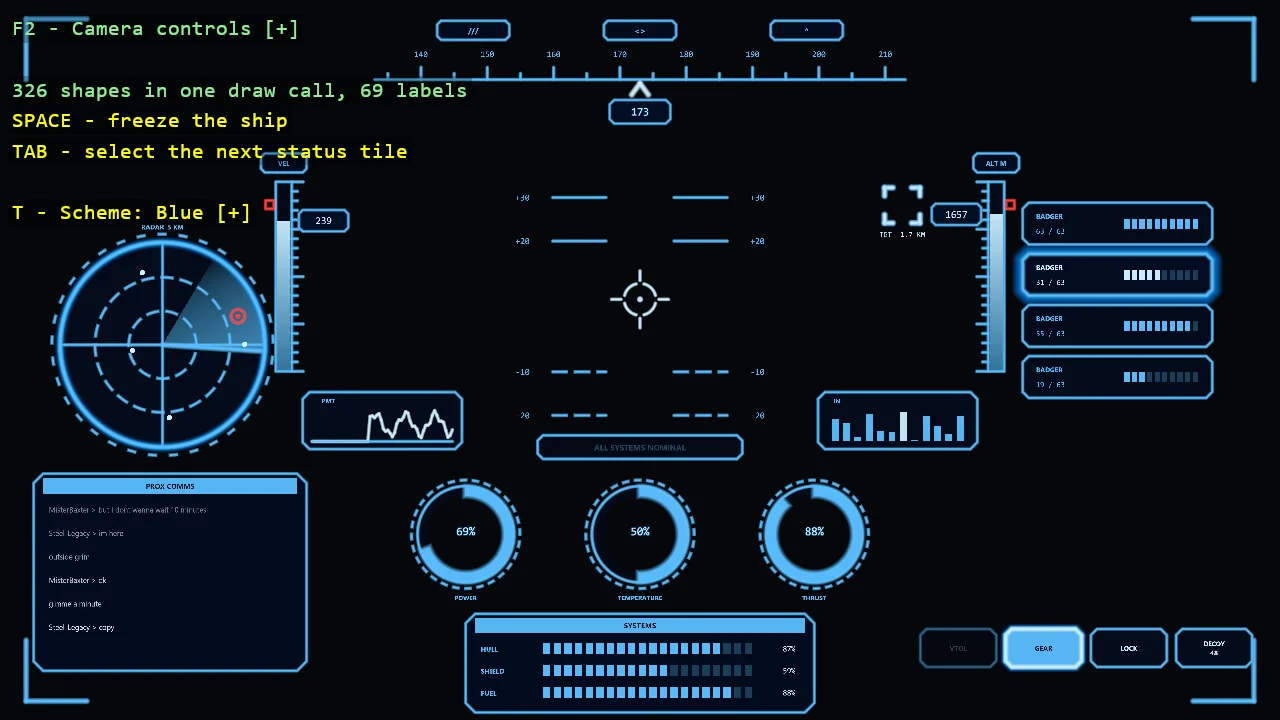
A cockpit HUD composed from the toolkit's shapes and world text, with one widget per file. A frame with cut corners holds three columns of panels: a radar, a contacts table and a comms log on the left, the heading tape, the sight with its pitch ladder, the speed and altitude tapes, two traces, a spectrum, ring gauges and the systems bars in the middle, and the target, the wing, the power triangle and the mode buttons on the right. Panels are interactive: click a contact to target it, a wing tile to select it, a mode button to switch it, a corner of the triangle to move power there. The panels' glass is a shader fill with two patterns, lines and squares. Ten colour schemes switch live, nine in one colour and one that colours by function. Every shape is in one draw call and the ship flies itself.
The Program.cs file shows how to:
- Splitting a HUD into one widget per file, each drawing inside the rectangle it is given
- A layout of rows and columns with one padding, so a widget fits any column
- An immediate-mode canvas - labels created on first use and hidden when not drawn
- Hover and click through ShapeBatch picking - tag a shape, ask the batch what is under the pointer
- Invisible tagged discs as hit areas for small things
- A shader class as the batch's fill source, sampled only by the shapes drawn as textured
- One shader with two patterns, chosen by a value composed in from C#
- A theme that answers roles, so one scheme can colour by function
- Values that ease towards their target for hover, selection and a fade-in on a scheme change
- A trace sampled as a function of time, so it scrolls every frame
- Additive glows for the things that emit light
View on GitHub.
using E03_2D_HUD;
using Stride.CommunityToolkit.Engine;
using Stride.CommunityToolkit.Rendering;
using Stride.CommunityToolkit.Rendering.Overlay;
using Stride.CommunityToolkit.Rendering.Text;
using Stride.CommunityToolkit.Shapes;
using Stride.Core.Mathematics;
using Stride.Engine;
using Stride.Games;
using Stride.Input;
using Stride.Rendering.Materials.ComputeColors;
using System.Globalization;

// A ship's cockpit HUD. Every shape goes through one ShapeBatch and out in one draw call, and
// every piece of text is a WorldTextComponent. The ship flies itself, so every widget moves.
//
// Where things are:
//   Hud.cs          the layout: a frame and three columns of widgets
//   HudCanvas.cs    what a widget draws with: shapes, labels, theme, clock, pointer
//   HudTheme.cs     the ten colour schemes
//   HudPanel.cs     the frame the panels share
//   FrameLights.cs  the small lights between the frame and the panels
//   ShipState.cs    the simulated ship
//   *Widget.cs      one widget each
//
// T opens the colour schemes and 1 to 9 and 0 pick one. Click a contact, a wing tile, a mode button
// or a corner of the power triangle. TAB selects the next wing tile, G changes the panels' glass
// and SPACE freezes the ship.
//
// "--scheme 0" starts in a scheme by its key and "--glass squares" in a glass pattern.
// "--pointer 0.5,0.5" holds the pointer there, from 0,0 top left to 1,1 bottom right, and clicks
// once: what a screenshot needs to show a hover.

const float ViewHeight = 19f;

var ship = new ShipState();
var hud = new Hud(ship);
var glassSettings = new ComputeFloat4();
var paused = false;
var time = 0f;
var shapeCount = 0;
var themeIndex = SchemeFromArguments(args);
var glassPattern = GlassFromArguments(args);
var heldPointer = PointerFromArguments(args);
var heldPointerClicked = false;

HudCanvas? canvas = null;
KeyMenu? themeMenu = null;

using var game = new Game();

game.Run(new SceneSetup2D
{
    ClearColor = new Color(5, 7, 12),
    Camera = CameraSetup.Orthographic(orthographicSize: ViewHeight).WithController(),
    Ground = null,
    WindowTitle = "Ship HUD",
    Resizable = true,
    DpiAware = true,
}, start: Start, update: Update);

void Start(Scene scene)
{
    // One batch for everything. Its fill source is the panels' glass, a shader class of the
    // example's own, which only the shapes drawn as textured sample.
    var glass = new ComputeShaderClassColor { MixinReference = "HudGlass", CompositionNodes = { ["Settings"] = glassSettings } };
    var shapes = game.AddShapeBatch(fill: glass);

    canvas = new HudCanvas(game, scene, shapes, HudTheme.All[themeIndex]);

    themeMenu = new KeyMenu
    {
        Title = "Scheme",
        ToggleKey = Keys.T,
        TitleColor = Color.Yellow,
        SelectedIndex = themeIndex,
        Items = [.. HudTheme.All.Index().Select(pair => new KeyMenuItem(SchemeKey(pair.Index), pair.Item.Name, () => canvas.Apply(pair.Item)))],
    };

    var overlay = TextOverlay.GetOrCreate(game);

    overlay.Position = Anchor.TopLeft;
    overlay.SectionGap = 0;
    overlay.AddSection("HUD", BuildOverlayLines);
}

void Update(Scene scene, GameTime gameTime)
{
    if (canvas is null) return;

    var elapsed = (float)gameTime.Elapsed.TotalSeconds;

    themeMenu?.Update(game.Input);

    if (game.Input.IsKeyPressed(Keys.Space)) paused = !paused;
    if (game.Input.IsKeyPressed(Keys.Tab)) ship.SelectedWing = (ship.SelectedWing + 1) % ship.Wing.Length;
    if (game.Input.IsKeyPressed(Keys.G)) glassPattern = glassPattern == GlassPattern.Lines ? GlassPattern.Squares : GlassPattern.Lines;

    if (!paused)
    {
        time += elapsed;
        ship.Advance(time);
    }

    // Power eases to the clicked focus on real time, so it moves while the ship is frozen too
    ship.Power.Advance(elapsed);

    // What the glass shader reads: x is the clock, y the pattern
    glassSettings.Value = new Vector4(time, (float)glassPattern, 0f, 0f);
    canvas.Glass = glassPattern;

    var pointer = heldPointer ?? game.Input.MousePosition;
    var clicked = heldPointer is null ? game.Input.IsMouseButtonPressed(MouseButton.Left) : !heldPointerClicked && canvas.Shapes.CanPick;

    heldPointerClicked |= clicked;

    canvas.Begin(time, elapsed, pointer, clicked);
    hud.Draw(canvas);
    canvas.End();

    // Read before the frame renders: the batch empties itself once it has drawn
    shapeCount = canvas.Shapes.Count;
}

IReadOnlyList<TextElement> BuildOverlayLines() =>
[
    .. themeMenu?.GetLines() ?? [],
    new(""),
    new("Click", "Contact, wing tile, mode, power corner", Color.Yellow),
    new("Tab", "Select the next wing tile", Color.Yellow),
    new("G", $"Glass: {glassPattern}", Color.Yellow),
    new("Space", paused ? "Resume" : "Freeze the ship", Color.Yellow),
    new(""),
    new($"{shapeCount} shapes in one draw call, {canvas?.LabelCount ?? 0} labels", Color.LightGreen),
];

// Schemes are listed in the order of their keys: 1 to 9, then 0
static Keys SchemeKey(int index) => index < 9 ? Keys.D1 + index : Keys.D0;

static int SchemeFromArguments(string[] args)
{
    var at = Array.IndexOf(args, "--scheme");

    if (at < 0 || at + 1 >= args.Length || !int.TryParse(args[at + 1], out var key) || key is < 0 or > 9) return 0;

    return key == 0 ? 9 : key - 1;
}

static GlassPattern GlassFromArguments(string[] args)
{
    var at = Array.IndexOf(args, "--glass");

    return at >= 0 && at + 1 < args.Length && Enum.TryParse<GlassPattern>(args[at + 1], ignoreCase: true, out var pattern) ? pattern : GlassPattern.Lines;
}

static Vector2? PointerFromArguments(string[] args)
{
    var at = Array.IndexOf(args, "--pointer");

    if (at < 0 || at + 1 >= args.Length) return null;

    var parts = args[at + 1].Split(',');

    if (parts.Length != 2) return null;

    var invariant = CultureInfo.InvariantCulture;

    return float.TryParse(parts[0], invariant, out var x) && float.TryParse(parts[1], invariant, out var y) ? new Vector2(x, y) : null;
}