Image Processing (TextureCanvas)
Every combination of anchor and stretch that TextureCanvas can apply, drawn as a grid of thumbnails so the options can be compared rather than read about. Each cell blits a region of a source texture into a destination rectangle with one setting changed, and renders the result into a UI card. The canvases are disposed as they go - each one owns a GPU render target, and a grid of them left open would be an easy leak.
The Program.cs file shows how to:
- Drawing into an offscreen target with CreateTextureCanvas
- Blitting a source rectangle into a destination rectangle
- How Anchor and Stretch interact when the aspect ratios differ
- Choosing a SamplingPattern for the resample
- Turning a canvas into a Texture for display
- Disposing each canvas so its render target is released
- Laying results out in a UniformGrid of UI cards
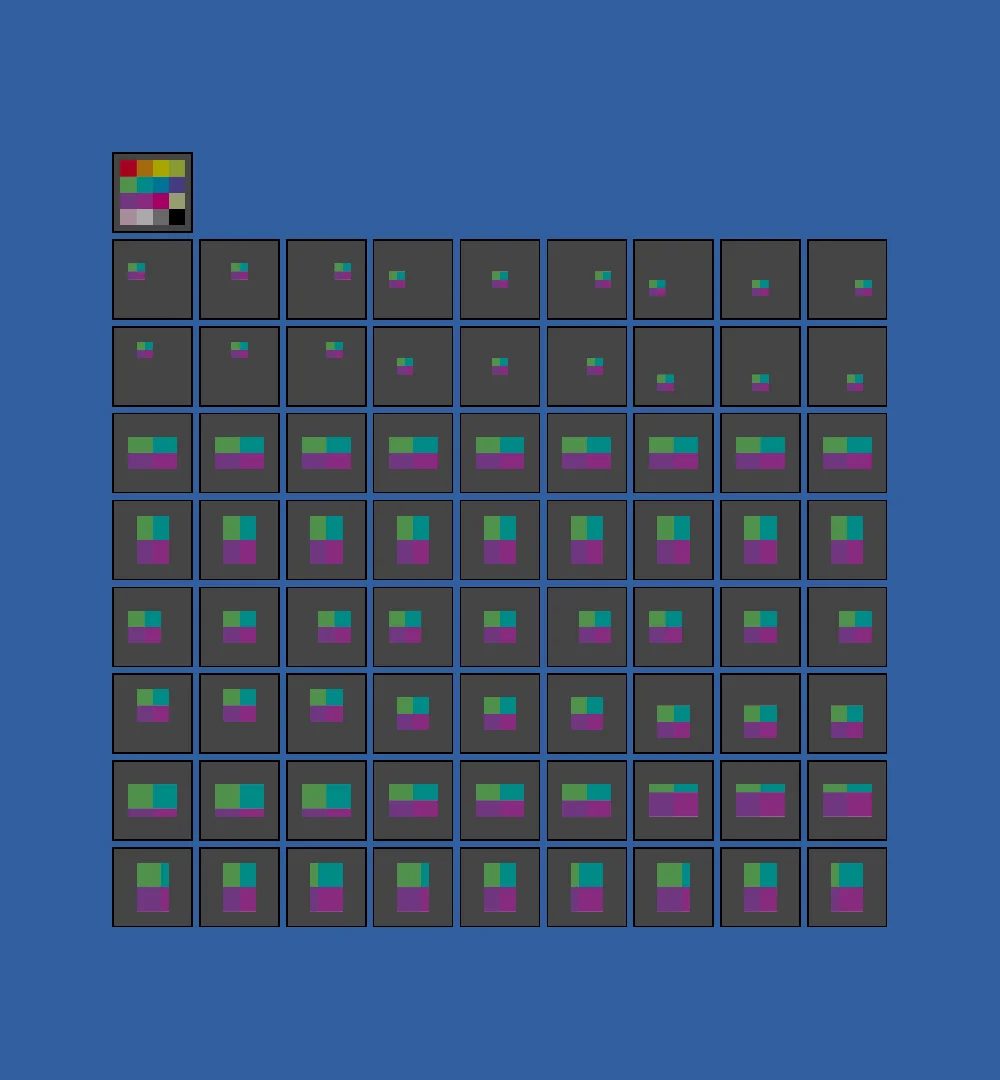
View on GitHub.
using Stride.CommunityToolkit.Engine;
using Stride.CommunityToolkit.Rendering;
using Stride.Core.Mathematics;
using Stride.Engine;
using Stride.Graphics;
using Stride.Rendering.Images;
using Stride.Rendering.Sprites;
using Stride.UI;
using Stride.UI.Controls;
using Stride.UI.Panels;

using var game = new Game();

// A tall window for the 9 by 9 grid, which is 1000 pixels square. Set before the device exists:
// game.Window.SetSize in Start would show the default size first, and back-buffer sizes from
// game.UseGameSettings alone can shrink the 1280 by 720 window but never grow it.
game.SetWindowSize(1000, 1080);

game.Run(new SceneSetup3D { Camera = CameraSetup.Perspective(), Ground = null }, start: Start);

void Start(Scene rootScene)
{
    // sRGB and premultiplied, as the content pipeline would import it. Texture.Load with its defaults
    // reads it as linear, and every mid-tone comes out pale
    var texture = new TextureLoader(game.GraphicsDevice).Color("input.png");

    var grid = new UniformGrid
    {
        Width = 1000,
        Height = 1000,
        Columns = 9,
        Rows = 9,
        Margin = new Thickness(8, 8, 8, 8)
    };

    grid.Children.Add(CreateCard(texture));

    // Every anchor across the columns; every stretch twice down the rows, into a wide area with the
    // expanded sampling pattern and into a tall one with the default
    for (var a = 0; a < 9; a++)
    {
        for (var s = 0; s < 4; s++)
        {
            AddCard(a, s * 2 + 1, new Rectangle(128, 256, 768, 512), (Stretch)s, (Anchor)a, SamplingPattern.Expanded);
            AddCard(a, s * 2 + 2, new Rectangle(256, 128, 512, 768), (Stretch)s, (Anchor)a, SamplingPattern.Linear);
        }
    }

    var entity = new Entity { new UIComponent { Page = new UIPage { RootElement = grid } } };

    entity.Scene = rootScene;

    void AddCard(int column, int row, Rectangle destination, Stretch stretch, Anchor anchor, SamplingPattern sampling)
    {
        using var canvas = game.CreateTextureCanvas(new Size2(1024, 1024));

        canvas.DrawTexture(texture, new Rectangle(0, 128, 256, 256), destination, null, stretch, anchor, sampling);

        var card = CreateCard(canvas.ToTexture());

        card.SetGridColumn(column);
        card.SetGridRow(row);
        grid.Children.Add(card);
    }
}

static Border CreateCard(Texture texture) => new()
{
    BorderColor = new Color(25, 25, 25),
    BackgroundColor = new Color(120, 120, 120),
    BorderThickness = new Thickness(2, 2, 2, 2),
    Padding = new Thickness(8, 8, 8, 8),
    Margin = new Thickness(4, 4, 4, 4),
    Content = new StackPanel
    {
        Orientation = Orientation.Vertical,
        Children = { new ImageElement { Source = new SpriteFromTexture { Texture = texture } } },
    },
};