ImGui.NET Text Rendering
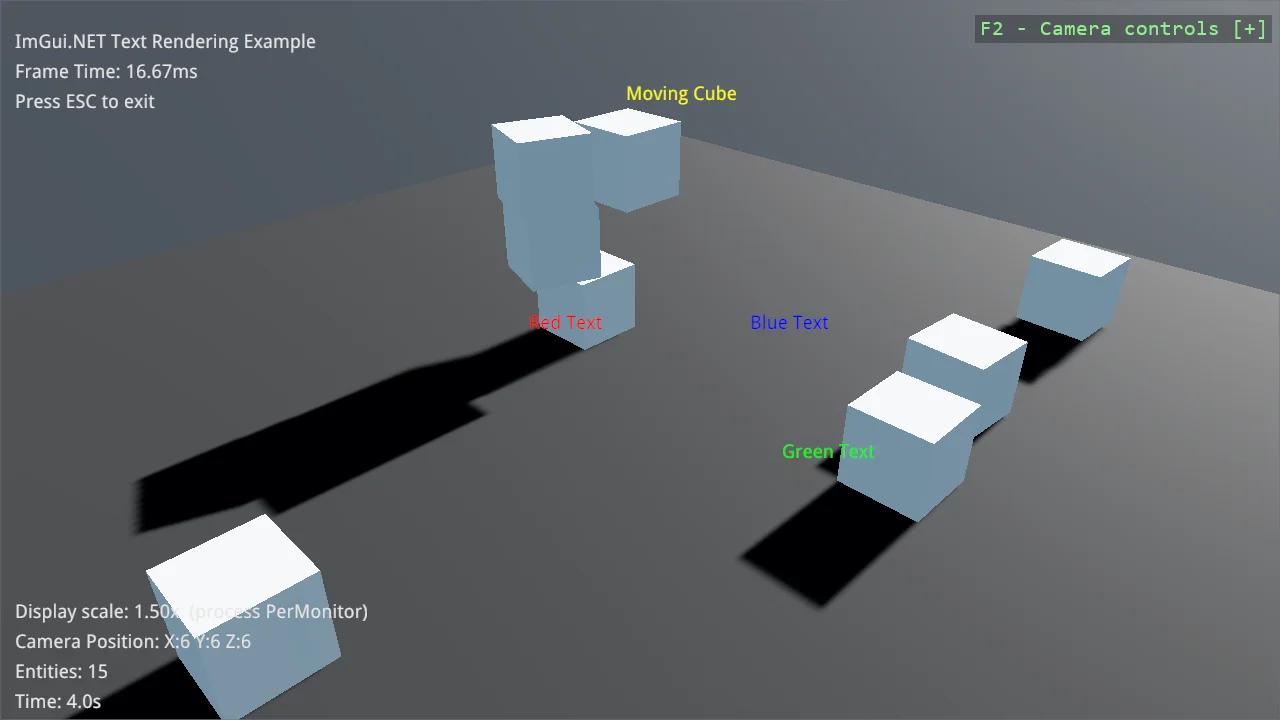
Render debug text with ImGui.NET, both in screen space and anchored to positions in the 3D scene. A kinematic Bepu body follows a circular path and knocks over stacks of dynamic boxes, showing why SetTargetPose moves a physics body while writing Transform.Position does not. The ImGui font atlas is rebuilt for the monitor's DPI so the overlay stays crisp on high-DPI displays.
The Program.cs file shows how to:
- Drawing screen-space text with DrawText
- Anchoring text to a world-space position
- Driving a kinematic BodyComponent with SetTargetPose
- Why writing Transform.Position does not move a physics body
- Rebuilding the ImGui font atlas for the window DPI
- Using helpers: AddImGuiNet
- Using helpers: SetupBase3DScene
- Using helpers: AddProfiler
Note
This example references Stride.CommunityToolkit.ImGuiNet, which is not on NuGet yet. Run it from a clone of the
repository, where the package is a project reference; a copy of the project on its own will not build.
View on GitHub.
using Stride.BepuPhysics;
using Stride.BepuPhysics.Definitions.Colliders;
using Stride.CommunityToolkit.Bepu;
using Stride.CommunityToolkit.Engine;
using Stride.CommunityToolkit.ImGuiNet;
using Stride.CommunityToolkit.Rendering;
using Stride.CommunityToolkit.Rendering.ProceduralModels;
using Stride.CommunityToolkit.Skyboxes;
using Stride.CommunityToolkit.Windows;
using Stride.Core.Mathematics;
using Stride.Engine;
using Stride.Games;

// Per-monitor DPI awareness has to be enabled before the window exists, otherwise Windows
// hands us a stretched, blurry window on high-DPI displays.
WindowsDpiManager.EnablePerMonitorV2();
WindowsDpiManager.LogDpiInfo("Before Game: ");

// Path the cube travels along
const float OrbitRadius = 3f;
const float OrbitHeight = 2f;
const float OrbitBobHeight = 0.5f;

// Stacks of boxes standing on that path
const int ObstacleStackCount = 3;
const int BoxesPerStack = 3;
const float BoxSize = 1f;

// Overlay layout, in pixels from the window edge on a 100% display; scaled at draw time
const int TextMargin = 10;
const int TextLineHeight = 20;

const int TargetFps = 60;

using var game = new Game();

ImGuiNetSystem? imGuiSystem = null;
Entity? orbitingCube = null;
BodyComponent? orbitingCubeBody = null;
float elapsedSeconds = 0f;

// Fixed points in the scene, drawn to show that DrawText projects world positions to the screen
WorldLabel[] worldLabels =
[
    new(new Vector3(-2, 1, 0), "Red Text", 255, 0, 0),
    new(new Vector3(2, 1, 0), "Green Text", 0, 255, 0),
    new(new Vector3(0, 1, -2), "Blue Text", 0, 0, 255)
];

game.Run(start: Start, update: Update);

void Start(Scene rootScene)
{
    ConfigureWindow();

    // Camera, directional light and a ground plane
    game.SetupBase3DScene();
    game.AddSkybox();
    game.AddProfiler();

    imGuiSystem = game.AddImGuiNet();

    orbitingCube = CreateOrbitingCube(rootScene);
    orbitingCubeBody = orbitingCube.Get<BodyComponent>();

    CreateObstacleStacks(rootScene);

    game.SetMaxFPS(TargetFps);
}

void Update(Scene rootScene, GameTime gameTime)
{
    if (imGuiSystem is null || orbitingCube is null) return;

    elapsedSeconds += (float)gameTime.Elapsed.TotalSeconds;

    MoveOrbitingCube();

    DrawTopLeftPanel(imGuiSystem, gameTime);
    DrawWorldLabels(imGuiSystem, orbitingCube);
    DrawBottomLeftPanel(imGuiSystem, rootScene);
}

void ConfigureWindow()
{
    game.Window.AllowUserResizing = true;
    game.Window.Title = "ImGui.NET Text Rendering";
}

/// <summary>
/// Creates the cube the world-space label is attached to. It is kinematic, so it follows a
/// scripted path without being affected by gravity or collisions, yet still pushes away the
/// dynamic boxes it runs into.
/// </summary>
Entity CreateOrbitingCube(Scene rootScene)
{
    var cube = game.Create3DPrimitive(PrimitiveModelType.Cube, new Bepu3DPhysicsOptions
    {
        Component = new BodyComponent
        {
            Kinematic = true,
            Collider = new CompoundCollider()
        }
    });

    cube.Transform.Position = new Vector3(0, OrbitHeight, 0);
    cube.Scene = rootScene;

    return cube;
}

/// <summary>
/// Builds towers of dynamic boxes spaced evenly around the cube's path, so there is something
/// visible for it to knock over.
/// </summary>
void CreateObstacleStacks(Scene rootScene)
{
    for (var stack = 0; stack < ObstacleStackCount; stack++)
    {
        var angle = MathF.Tau * stack / ObstacleStackCount;
        var x = MathF.Sin(angle) * OrbitRadius;
        var z = MathF.Cos(angle) * OrbitRadius;

        for (var level = 0; level < BoxesPerStack; level++)
        {
            var box = game.Create3DPrimitive(PrimitiveModelType.Cube);
            box.Transform.Position = new Vector3(x, BoxSize * (0.5f + level), z);
            box.Scene = rootScene;
        }
    }
}

/// <summary>
/// Moves the cube along its circular path. <see cref="BodyComponent.SetTargetPose(Vector3)"/>
/// turns the target into a velocity for the next physics tick, so Bepu sweeps the body there and
/// it collides on the way. Assigning <c>Transform.Position</c> instead would move only the mesh:
/// the transform sync runs physics to transform, never the other way round.
/// </summary>
void MoveOrbitingCube()
{
    var target = new Vector3(
        MathF.Sin(elapsedSeconds) * OrbitRadius,
        OrbitHeight + MathF.Sin(elapsedSeconds * 2f) * OrbitBobHeight,
        MathF.Cos(elapsedSeconds) * OrbitRadius);

    orbitingCubeBody?.SetTargetPose(target);
}

/// <summary>
/// Draws the status lines in screen space, growing downwards from the top-left corner.
/// </summary>
void DrawTopLeftPanel(ImGuiNetSystem imGui, GameTime gameTime)
{
    string[] lines =
    [
        "ImGui.NET Text Rendering Example",
        $"Frame Time: {gameTime.Elapsed.TotalMilliseconds:F2}ms",
        "Press ESC to exit"
    ];

    // The font atlas is already scaled by the system; the layout has to follow it too
    var scale = DisplayScale.GetOrCreate(game).Value;

    for (var i = 0; i < lines.Length; i++)
    {
        imGui.DrawText((int)(TextMargin * scale), (int)(TextLineHeight * scale * (i + 1)), lines[i]);
    }
}

/// <summary>
/// Draws text anchored to positions in the 3D scene rather than to the screen.
/// </summary>
void DrawWorldLabels(ImGuiNetSystem imGui, Entity cube)
{
    // Physics owns the transform of a kinematic body, so reading it here tracks the cube exactly
    imGui.DrawText(cube.Transform.Position + Vector3.UnitY, "Moving Cube", 255, 255, 0);

    foreach (var label in worldLabels)
    {
        imGui.DrawText(label.Position, label.Text, label.Red, label.Green, label.Blue);
    }
}

/// <summary>
/// Draws the diagnostics block anchored to the bottom-left corner, so it stays put when the
/// window is resized.
/// </summary>
void DrawBottomLeftPanel(ImGuiNetSystem imGui, Scene rootScene)
{
    // The font atlas follows this by itself - ImGuiNetSystem rebuilds it when the value changes,
    // which is what happens when the window is dragged to a differently scaled monitor
    var displayScale = DisplayScale.GetOrCreate(game).Value;
    var awareness = WindowsDpiManager.GetProcessDpiAwareness();
    var cameraPosition = rootScene.GetCamera()?.Entity.Transform.Position;

    string[] lines =
    [
        $"Display scale: {displayScale:F2}x  (process {awareness?.ToString() ?? "unknown"})",
        $"Camera Position: {cameraPosition?.ToString() ?? "n/a"}",
        $"Entities: {rootScene.Entities.Count}",
        $"Time: {elapsedSeconds:F1}s"
    ];

    var windowHeight = game.Window.ClientBounds.Height;

    for (var i = 0; i < lines.Length; i++)
    {
        imGui.DrawText((int)(TextMargin * displayScale), windowHeight - (int)(TextLineHeight * displayScale * (lines.Length - i)), lines[i]);
    }
}

/// <summary>
/// A coloured text label anchored to a fixed point in world space.
/// </summary>
readonly record struct WorldLabel(Vector3 Position, string Text, byte Red, byte Green, byte Blue);