Jitter2 Physics - Constraining to 2D
Demonstrates constraining a Jitter2 3D physics simulation to 2D-style behaviour. Jitter2 has no dedicated 2D mode, so each falling cube gets a PointOnPlane constraint locking translation along Z and a HingeAngle constraint locking rotation to the Z axis, confining it to the X/Y plane while it keeps running on the same 3D solver. Builds on E06_Jitter2 with the same falling-cubes setup, spread across a grid so they cascade and pile up sideways.
The Program.cs file shows how to:
- Constraining a 3D physics engine to 2D motion
- Creating and initializing Jitter2 constraints (PointOnPlane, HingeAngle)
- Locking translation and rotation axes with world.CreateConstraint
- Synchronizing physics bodies with visual entities
- Fixed-timestep physics update loop, decoupled from the render frame rate
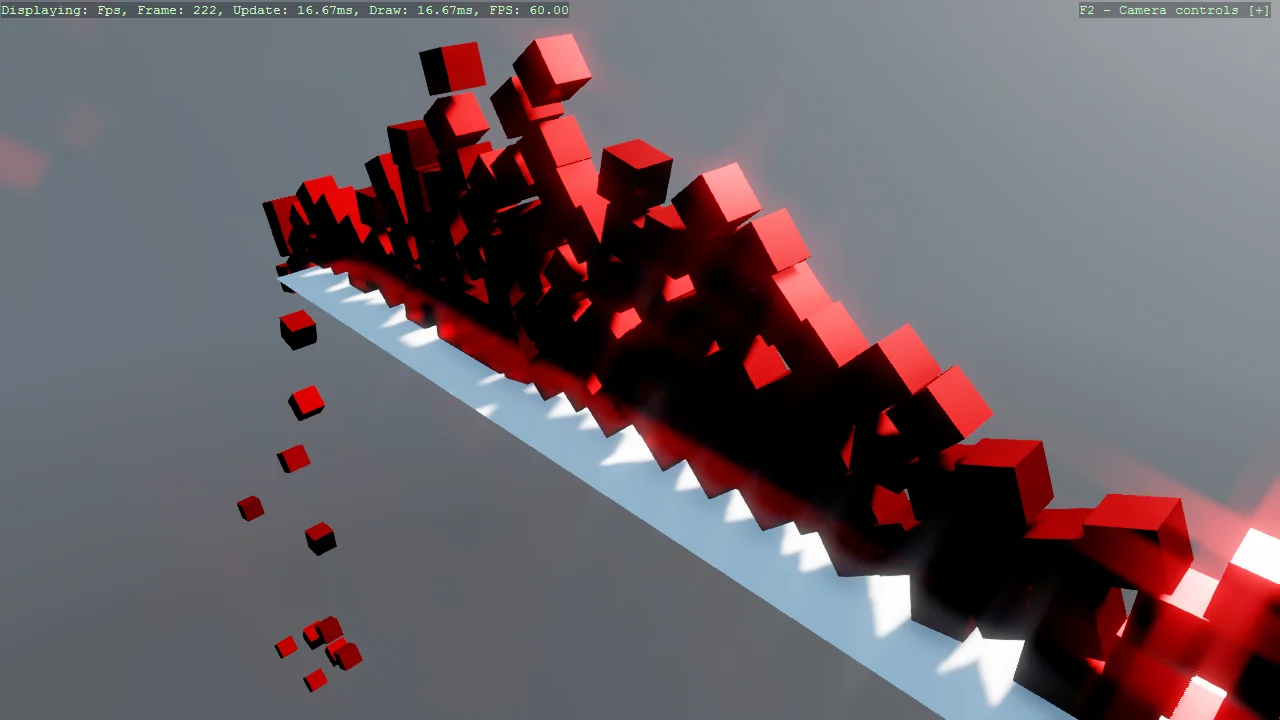
View on GitHub.
using Jitter2;
using Jitter2.Collision.Shapes;
using Jitter2.Dynamics;
using Jitter2.Dynamics.Constraints;
using Jitter2.LinearMath;
using Stride.CommunityToolkit.Engine;
using Stride.CommunityToolkit.Rendering.ProceduralModels;
using Stride.CommunityToolkit.Skyboxes;
using Stride.Core.Mathematics;
using Stride.Engine;
using Stride.Games;

const float CubeSize = 0.5f;
const float HorizontalSpacing = 0.6f;
const float VerticalSpacing = 0.6f;
const int Columns = 10;

// Physics runs at a fixed rate, decoupled from the render frame rate (see Update)
const float FixedTimeStep = 1f / 100f;
const int MaxStepsPerFrame = 5;

var groundSize = new Vector3(15f, 1f, 2f);

// Initialize Jitter2 physics world with 4 substeps for better accuracy
var world = new World()
{
    SubstepCount = 4,
};

// Each cube's visual entity and physics body, kept together so they can never drift out of sync
var cubes = new List<CubeInstance>();

// Accumulates real elapsed time between fixed physics steps (see Update)
var accumulatedTime = 0f;

using var game = new Game();

game.Run(start: Start, update: Update);

void Start(Scene rootScene)
{
    game.Window.Title = "Jitter 2 Physics Constraints Example - Stride Community Toolkit";

    game.SetupBase3D();
    game.AddSkybox();
    game.Add3DCameraController();
    game.AddProfiler();

    CreateGround(rootScene);
    CreateCubes(rootScene, count: 150);
}

void Update(Scene scene, GameTime time)
{
    // Accumulate real elapsed time and step the simulation in fixed increments, so it advances at
    // the correct speed even when the render frame rate drifts away from FixedTimeStep. Capping the
    // number of steps per frame avoids a "spiral of death" if a frame hitches badly.
    accumulatedTime += (float)time.Elapsed.TotalSeconds;

    var steps = 0;

    while (accumulatedTime >= FixedTimeStep && steps < MaxStepsPerFrame)
    {
        world.Step(FixedTimeStep, true);

        accumulatedTime -= FixedTimeStep;
        steps++;
    }

    // If the frame rate stays below the physics rate for a sustained period rather than a single
    // hitch, the loop above can never fully drain accumulatedTime and the backlog would otherwise
    // keep growing forever. Clamping it bounds that backlog to one frame's worth of catch-up,
    // trading permanently-delayed simulation time for a value that can't grow without bound (which
    // would eventually lose precision as a float in a long-running session).
    accumulatedTime = MathF.Min(accumulatedTime, FixedTimeStep * MaxStepsPerFrame);

    // Update visual entities to match their physics body positions
    SyncPhysicsToEntities();
}

void CreateGround(Scene rootScene)
{
    // Create visual ground plane
    var groundEntity = game.Create3DPrimitive(PrimitiveModelType.Plane, new()
    {
        Size = groundSize,
    });
    groundEntity.Scene = rootScene;

    // Create physics body for the ground (static, won't move)
    var groundBody = world.CreateRigidBody();
    groundBody.MotionType = MotionType.Static;
    groundBody.AddShape(new BoxShape(groundSize.X, groundSize.Y, groundSize.Z));
    groundBody.Position = new JVector(0, -0.5f, 0);
}

void CreateCubes(Scene rootScene, int count)
{
    for (int i = 0; i < count; i++)
    {
        // Spread cubes across a grid of columns instead of a single vertical stack, so they
        // cascade and pile up sideways - a much better way to see the 2D constraint at work.
        var column = i % Columns;
        var row = i / Columns;
        var cubePosition = new Vector3((column - Columns / 2f) * HorizontalSpacing, 10 + row * VerticalSpacing, 0);

        // Create visual cube entity
        var cubeEntity = game.Create3DPrimitive(PrimitiveModelType.Cube, new()
        {
            Material = game.CreateMaterial(Color.Red),
            Size = new Vector3(CubeSize),
        });

        cubeEntity.Transform.Position = cubePosition;
        cubeEntity.Scene = rootScene;

        // Create physics body for the cube (dynamic, affected by forces)
        var cubeBody = world.CreateRigidBody();
        cubeBody.AddShape(new BoxShape(CubeSize));
        cubeBody.SetMassInertia(1f);
        cubeBody.Position = new JVector(cubePosition.X, cubePosition.Y, cubePosition.Z);

        ConstrainToPlane(cubeBody);

        cubes.Add(new CubeInstance(cubeEntity, cubeBody));
    }
}

/// <summary>
/// Restricts a dynamic body to the X/Y plane (Z = 0), giving Jitter2's 3D solver 2D-style behaviour.
/// </summary>
/// <remarks>
/// Jitter2 has no dedicated 2D mode. Locking one translation axis and the two out-of-plane rotation
/// axes confines a body to a plane while it keeps running on the same 3D solver - the same trick the
/// toolkit already uses for Bepu in <c>Body2DComponent</c>. See the maintainer's write-up at
/// https://github.com/notgiven688/jitterphysics2/discussions/232 for the general recipe, including a
/// cheaper alternative that edits the inverse inertia tensor directly instead of adding constraints.
/// </remarks>
void ConstrainToPlane(RigidBody body)
{
    // Pins the body's own origin to the world's Z=0 plane, removing translation along Z
    var positionConstraint = world.CreateConstraint<PointOnPlane>(world.NullBody, body);
    positionConstraint.Initialize(JVector.UnitZ, JVector.Zero, body.Position);

    // A hinge around Z removes the other two angular degrees of freedom, so the body can only
    // spin around the axis facing the camera instead of tumbling out of the plane
    var rotationConstraint = world.CreateConstraint<HingeAngle>(world.NullBody, body);
    rotationConstraint.Initialize(JVector.UnitZ, AngularLimit.Full);
}

void SyncPhysicsToEntities()
{
    // Copy physics body transforms to visual entities each frame
    foreach (var cube in cubes)
    {
        var position = cube.Body.Position;
        var orientation = cube.Body.Orientation;

        cube.Entity.Transform.Position = new Vector3(position.X, position.Y, position.Z);
        cube.Entity.Transform.Rotation = new Quaternion(orientation.X, orientation.Y, orientation.Z, orientation.W);
    }
}

/// <summary>
/// Pairs a cube's visual entity with its physics body, so the two can never drift out of sync.
/// </summary>
sealed record CubeInstance(Entity Entity, RigidBody Body);