Layer Selection
Selecting things through collision layers. A click is a raycast whose mask says which layers it may hit, and the keys let it pick units alone, units and crates, or anything at all; a dragged marquee tests every candidate on the chosen layers through the camera's IsInScreenRectangle. Rings mark the selection, Shift adds to it and a click on nothing clears it.
The Program.cs file shows how to:
- A raycast's CollisionMask as the filter for what a click can select
- Marquee selection with IsInScreenRectangle over the candidates on the chosen layers
- A click and a drag told apart by the distance the mouse moved
- A screen-space rectangle drawn through a ShapeBatch after the post effects
- Using helpers: SceneSetup3D, UseBepu, UseSkybox, CreatePrimitive, CreateMaterial, GetSimulation, ScreenToWorldRay, IsInScreenRectangle, ShapeBatch, TextOverlay
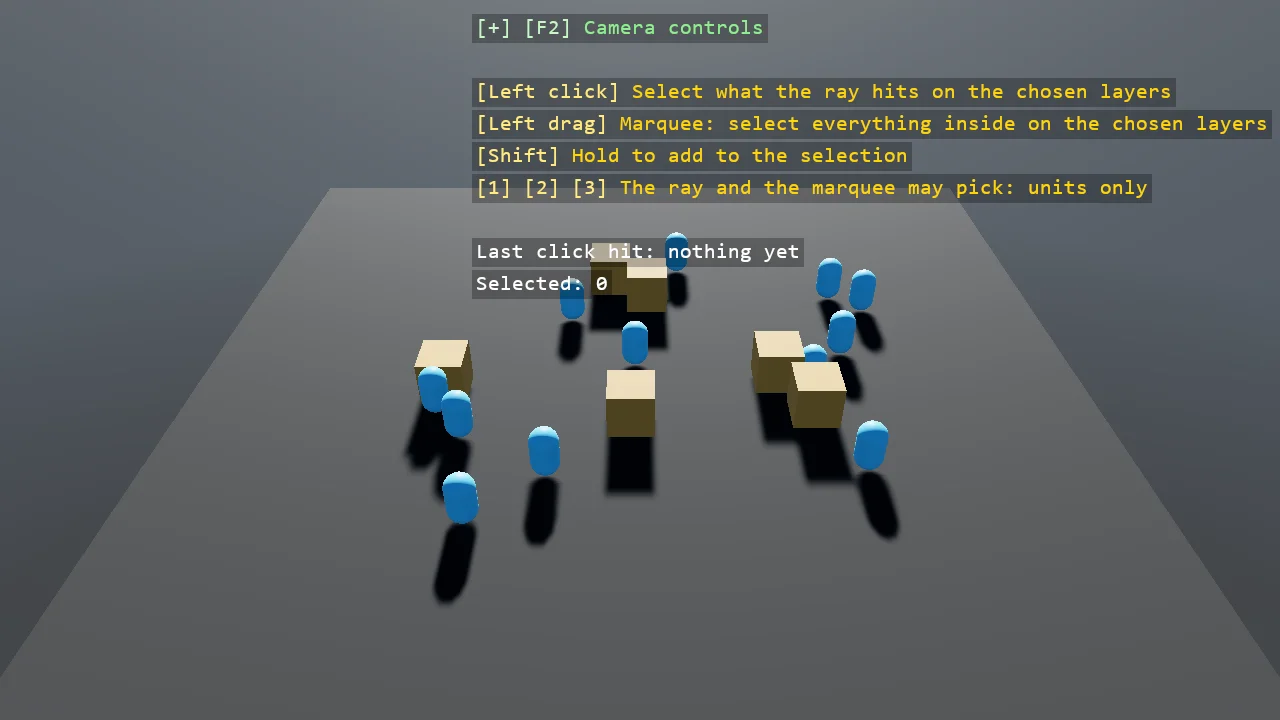
View on GitHub.
using Stride.BepuPhysics;
using Stride.CommunityToolkit.Bepu;
using Stride.CommunityToolkit.Engine;
using Stride.CommunityToolkit.Rendering.Overlay;
using Stride.CommunityToolkit.Rendering.ProceduralModels;
using Stride.CommunityToolkit.Rendering.Text;
using Stride.CommunityToolkit.Shapes;
using Stride.CommunityToolkit.Skyboxes;
using Stride.Core.Mathematics;
using Stride.Engine;
using Stride.Games;
using Stride.Input;
using Stride.Rendering;

// Selecting things through layers. A click is a raycast, and a raycast takes a mask: the layers it may
// hit. Units stand on one layer and crates on another, and the keys choose whether a click can pick
// units alone, units and crates, or anything at all, the ground included. The same mask decides what a
// marquee picks up: drag a rectangle and every candidate on a chosen layer whose position projects
// inside it is selected, through the camera's IsInScreenRectangle.
//
// A ring under each selected thing; Shift adds to the selection, a click on nothing clears it.
// E05_3D_CollisionLayer is the example for the layers and the matrix themselves.

const CollisionLayer UnitLayer = CollisionLayer.Layer1;
const CollisionLayer CrateLayer = CollisionLayer.Layer2;
const float DragThreshold = 0.004f;

(string Name, CollisionMask Mask)[] maskChoices =
[
    ("units only", CollisionMask.Layer1),
    ("units and crates", CollisionMask.Layer1 | CollisionMask.Layer2),
    ("everything, the ground too", CollisionMask.Everything),
];

var maskChoice = 0;
var candidates = new List<(Entity Entity, CollisionMask Layer, float Radius)>();
var selected = new HashSet<Entity>();
var selectedList = new List<Entity>();
var lastHit = "nothing yet";
Vector2? dragStart = null;

BepuSimulation simulation = null!;
CameraComponent camera = null!;
ShapeBatch rings = null!;
ShapeBatch screen = null!;

using var game = new Game();

var sceneSetup = new SceneSetup3D
{
    Camera = CameraSetup.Perspective(position: new Vector3(0f, 12f, 16f), rotation: new Vector3(0f, -36f, 0f)).WithController(),
    WindowTitle = "Layer selection - Stride Community Toolkit",
    Resizable = true,
    DpiAware = true,
}.UseBepu().UseSkybox();

game.Run(sceneSetup, start: Start, update: Update);

void Start(Scene scene)
{
    camera = game.GetCameraEntity().Get<CameraComponent>();
    simulation = game.GetCameraEntity().GetSimulation();
    rings = game.AddShapeBatch(depthTest: true);
    screen = game.AddShapeBatch(afterPostEffects: true);

    var unitMaterial = game.CreateMaterial(new Color(90, 190, 255), metalness: 0f, glossiness: 0.5f);
    var crateMaterial = game.CreateMaterial(new Color(190, 140, 80), metalness: 0f, glossiness: 0.3f);
    var random = new Random(8);

    for (var i = 0; i < 12; i++)
    {
        Add(scene, $"Unit {i + 1}", Primitive3D.Capsule(0.3f, 0.5f), unitMaterial, UnitLayer, CollisionMask.Layer1, 0.5f,
            new Vector3(random.NextSingle() * 12f - 6f, 0.55f, random.NextSingle() * 10f - 5f));
    }

    for (var i = 0; i < 6; i++)
    {
        Add(scene, $"Crate {i + 1}", Primitive3D.Cube(1f), crateMaterial, CrateLayer, CollisionMask.Layer2, 0.75f,
            new Vector3(random.NextSingle() * 12f - 6f, 0.5f, random.NextSingle() * 10f - 5f));
    }

    TextOverlay.GetOrCreate(game).AddSection("Layer selection", BuildOverlayLines);
}

void Update(Scene scene, GameTime time)
{
    var input = game.Input;

    for (var i = 0; i < maskChoices.Length; i++)
    {
        if (input.IsKeyPressed(Keys.D1 + i) || input.IsKeyPressed(Keys.NumPad1 + i)) maskChoice = i;
    }

    // Press: remember where. Release: a click where it started, or a marquee from there to here
    if (input.IsMouseButtonPressed(MouseButton.Left)) dragStart = input.MousePosition;

    if (input.IsMouseButtonReleased(MouseButton.Left) && dragStart is { } start)
    {
        var additive = input.IsKeyDown(Keys.LeftShift) || input.IsKeyDown(Keys.RightShift);

        if (Vector2.Distance(start, input.MousePosition) < DragThreshold) Click(input.MousePosition, additive);
        else Marquee(start, input.MousePosition, additive);

        dragStart = null;
    }

    DrawSelection();

    if (dragStart is { } from && input.IsMouseButtonDown(MouseButton.Left)) DrawMarquee(from, input.MousePosition);
}

/// <summary>A static body on a layer, remembered as a candidate for the marquee with the layer's mask bit.</summary>
void Add(Scene scene, string name, Primitive3D shape, Material material, CollisionLayer layer, CollisionMask bit, float radius, Vector3 position)
{
    var entity = game.CreatePrimitive(shape, new BepuPhysicsOptions
    {
        EntityName = name,
        Body = BodyMode.Static,
        Material = material,
        ShareModel = true,
        Position = position,
    });

    entity.Get<StaticComponent>().CollisionLayer = layer;
    entity.Scene = scene;
    candidates.Add((entity, bit, radius));
}

/// <summary>A click is one raycast with the chosen mask: it stops at the first thing on an allowed layer and ignores the rest.</summary>
void Click(Vector2 screenPosition, bool additive)
{
    var ray = camera.ScreenToWorldRay(screenPosition);
    var mask = maskChoices[maskChoice].Mask;

    if (!additive) ClearSelection();

    if (simulation.RayCast(ray.Position, ray.Direction, 100f, out var hit, mask) && hit.Collidable?.Entity is { } entity)
    {
        lastHit = entity.Name;

        // The ground is on an allowed layer when the mask says everything, so a click on it is a hit that selects nothing
        if (IsCandidate(entity)) Select(entity);
    }
    else
    {
        lastHit = "nothing on the chosen layers";
    }
}

/// <summary>A marquee tests every candidate on an allowed layer: its position projected to the screen, inside the rectangle or not.</summary>
void Marquee(Vector2 cornerA, Vector2 cornerB, bool additive)
{
    var mask = maskChoices[maskChoice].Mask;
    var count = 0;

    if (!additive) ClearSelection();

    foreach (var (entity, bit, _) in candidates)
    {
        if ((mask & bit) == 0) continue;

        if (camera.IsInScreenRectangle(entity.Transform.Position, cornerA, cornerB))
        {
            Select(entity);
            count++;
        }
    }

    lastHit = $"{count} in the rectangle";
}

bool IsCandidate(Entity entity)
{
    foreach (var (candidate, _, _) in candidates)
    {
        if (candidate == entity) return true;
    }

    return false;
}

void Select(Entity entity)
{
    if (selected.Add(entity)) selectedList.Add(entity);
}

void ClearSelection()
{
    selected.Clear();
    selectedList.Clear();
}

void DrawSelection()
{
    rings.StrokeWidth = 2f;

    foreach (var (entity, _, radius) in candidates)
    {
        if (!selected.Contains(entity)) continue;

        rings.DrawRing(new Vector3(entity.Transform.Position.X, 0.02f, entity.Transform.Position.Z), Vector3.UnitY, radius, Color.Gold);
    }
}

// The rectangle in screen pixels, from the two normalized corners
void DrawMarquee(Vector2 from, Vector2 to)
{
    var size = screen.ScreenSize;
    var a = from * size;
    var b = to * size;
    var centre = (a + b) * 0.5f;
    var extent = new Vector2(MathF.Abs(b.X - a.X), MathF.Abs(b.Y - a.Y));

    screen.Screen = true;
    screen.BorderWidth = 1.5f;
    screen.Fill.Set(new Color(255, 215, 0), 0.12f);
    screen.DrawRectangle(new Vector3(centre, 0f), Vector3.UnitX, Vector3.UnitY, extent, Color.Gold);
    screen.Fill.Set(null, 1f);
    screen.Screen = false;
}

IReadOnlyList<TextElement> BuildOverlayLines() =>
[
    new("Left click", "Select what the ray hits on the chosen layers", Color.Gold),
    new("Left drag", "Marquee: select everything inside on the chosen layers", Color.Gold),
    new("Shift", "Hold to add to the selection", Color.Gold),
    new(["1", "2", "3"], $"The ray and the marquee may pick: {maskChoices[maskChoice].Name}", Color.Gold),
    new(""),
    new($"Last click hit: {lastHit}", Color.White),
    new($"Selected: {selectedList.Count}", Color.White),
];