3D Letters (Mesh Text)
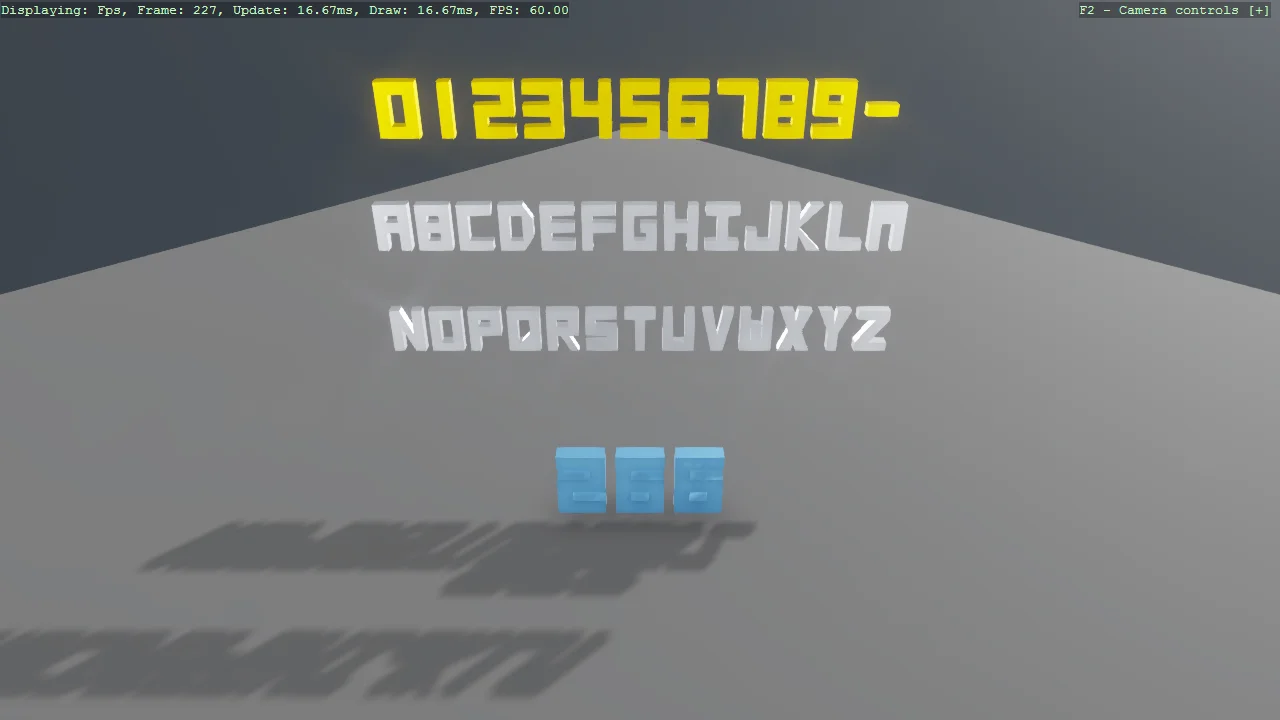
A gallery of every glyph LetterMeshFactory can build - the digits, the full A-Z alphabet and the dash - as solid extruded meshes that catch the light like any other geometry, plus a frame counter whose digits are rebuilt as a new mesh every frame. The counter demonstrates the one rule of dynamic mesh text: dispose the old GPU buffers before swapping in the new mesh, or leak a buffer pair per rebuild.
The Program.cs file shows how to:
- Solid 3D lettering from code: LetterMeshFactory.CreateTextMeshDraw
- Which characters exist - SupportedCharacters - and why fonts are not involved
- Static lettering built once versus text that changes
- Rebuilding a mesh safely: dispose the old buffers first
- centerOrigin for strings centred on their entity
- When to use EntityTextComponent or WorldTextComponent instead
View on GitHub.
using E03_3D_MeshText;
using Stride.CommunityToolkit.Bepu;
using Stride.CommunityToolkit.Engine;
using Stride.CommunityToolkit.Rendering.Utilities;
using Stride.CommunityToolkit.Skyboxes;
using Stride.Core.Mathematics;
using Stride.Engine;
using Stride.Rendering;

// A gallery of every glyph LetterMeshFactory can build, plus a frame counter whose digits are
// rebuilt as solid geometry every frame.
//
// LetterMeshFactory makes letters that are MESHES: real extruded geometry that catches the light,
// takes a material, casts onto the scene like any other model - and could carry a physics body and
// tumble (E20_3D_CubeCollapse drops its GAME OVER that way). The price is that only the
// characters someone has authored exist; see LetterMeshFactory.SupportedCharacters.
//
// For ordinary text in a real font - labels, HUDs, signs - use E03_3D_EntityText (screen-space)
// or E03_3D_WorldText (in-scene) instead.

using var game = new Game();

game.Run(start: Start);

void Start(Scene scene)
{
    game.SetupBase3DScene();
    game.AddSkybox();
    game.AddProfiler();

    // The base scene's single directional light shines from behind this gallery, leaving the front
    // caps in the dark. Six lights down the six world axes make solid lettering read from any side.
    game.AddAllDirectionLighting(intensity: 20f, showLightGizmo: false);

    // The default camera starts at (6, 6, 6) looking at the origin, so the whole gallery is turned
    // 45 degrees to face it square-on. Fly around it - these are solids, not billboards.
    var faceCamera = Quaternion.RotationY(MathUtil.DegreesToRadians(45));

    var gold = game.CreateMaterial(Color.Gold);
    var silver = game.CreateMaterial(new Color(210, 215, 225));
    var blue = game.CreateMaterial(new Color(120, 190, 255));

    // Every authored glyph, three lines: the digits and the dash, then the full alphabet
    AddLine(scene, "0123456789-", new Vector3(0, 3.9f, 0), gold, faceCamera);
    AddLine(scene, "ABCDEFGHIJKLM", new Vector3(0, 2.7f, 0), silver, faceCamera, scale: 0.5f);
    AddLine(scene, "NOPQRSTUVWXYZ", new Vector3(0, 1.5f, 0), silver, faceCamera, scale: 0.5f);

    // The counter: a script that replaces its digit mesh whenever the number changes
    var counter = new Entity("FrameCounter")
    {
        new FrameCounterScript { Material = blue }
    };

    // A step toward the camera, so it sits in front of the gallery
    counter.Transform.Position = new Vector3(1f, 0.5f, 1f);
    counter.Transform.Rotation = faceCamera;
    counter.Transform.Scale = new Vector3(0.7f);
    counter.Scene = scene;
}

// One line of the gallery: a single mesh containing the whole string, built once and never touched
// again. Static lettering is this cheap - the cost lives only where text changes.
void AddLine(Scene scene, string text, Vector3 position, Material material, Quaternion rotation, float scale = 0.55f)
{
    var entity = new Entity($"Letters {text}")
    {
        new ModelComponent
        {
            Model = new Model
            {
                new MaterialInstance { Material = material },
                new Mesh
                {
                    // centerOrigin centres the string on the entity, so every line can share X = 0
                    Draw = LetterMeshFactory.CreateTextMeshDraw(game.GraphicsDevice, text, centerOrigin: true),
                    MaterialIndex = 0
                }
            }
        }
    };

    entity.Transform.Position = position;
    entity.Transform.Rotation = rotation;
    entity.Transform.Scale = new Vector3(scale);
    entity.Scene = scene;
}