Material Gallery
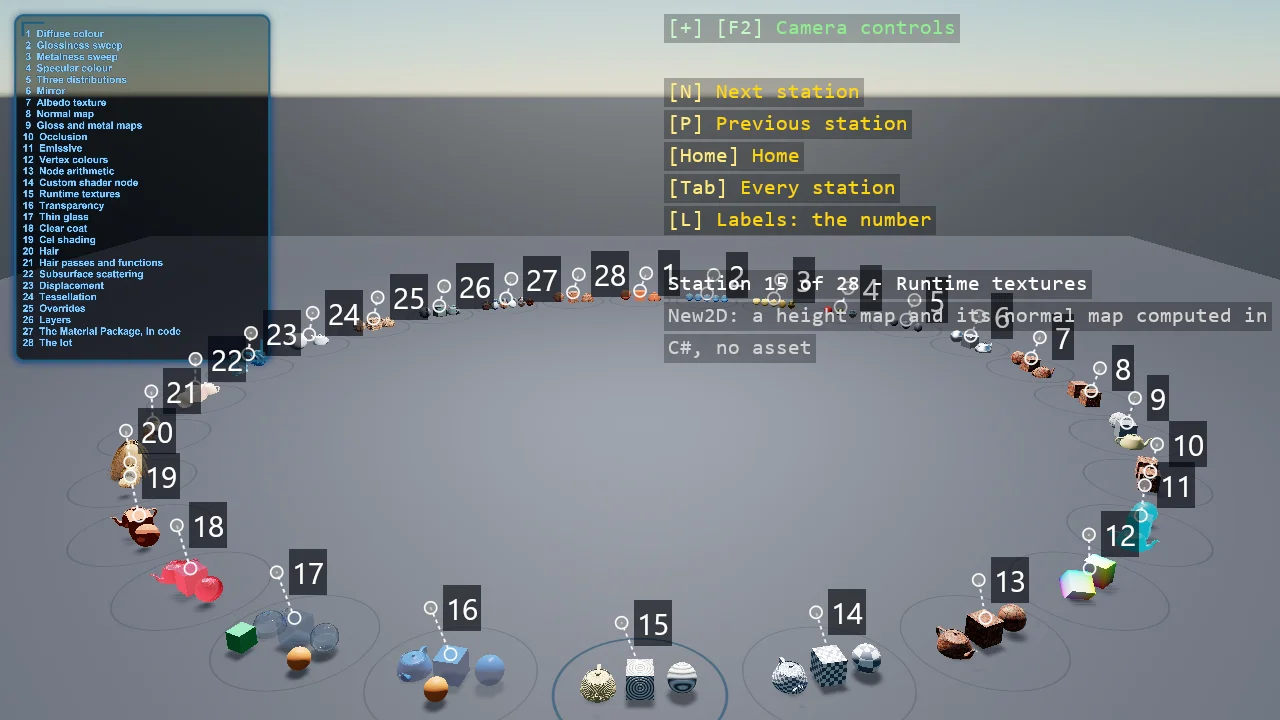
The engine's material system on a ring of stations, all from code: the four numbers of a PBR material first, then the maps, the inputs a map can be built from, and the surfaces and shading models that change what light does - transparency, glass, clear coat, cel shading, hair, subsurface scattering, displacement and tessellation, layers - ending with Game Studio's Material Package transcribed into C#. Every station puts its materials on the same three shapes, and most have variations on a key.
The Program.cs file shows how to:
- Building a Material from a MaterialDescriptor in code - diffuse, glossiness, metalness, specular models
- The metalness and the specular workflows, and what each number does
- Textures as material inputs - colour maps as sRGB, data maps as linear
- Normal, glossiness, metalness, occlusion and emissive maps
- Compute nodes - vertex streams, arithmetic, a custom shader class, textures made at runtime
- Transparency, thin glass, clear coat, cel shading, hair and subsurface scattering
- The editor's view modes in code - one material stream drawn as colour on every mesh
- Displacement, tessellation and material layers
- Game Studio's Material Package, transcribed from its .sdmat files
View on GitHub.
using E02_3D_Material_Gallery;
using Example.Common;
using Example.Common.Galleries;
using Stride.CommunityToolkit.Engine;
using Stride.CommunityToolkit.Rendering;
using Stride.CommunityToolkit.Rendering.Compositing;
using Stride.CommunityToolkit.Scripts.Utilities;
using Stride.CommunityToolkit.Skyboxes;
using Stride.CommunityToolkit.Windows;
using Stride.Core.Mathematics;
using Stride.Engine;
using Stride.Games;
using Stride.Graphics;
using Stride.Input;
using Stride.Rendering.Colors;
using Stride.Rendering.Lights;

// A gallery of the engine's material system, built entirely from code. Every material in Stride is
// a MaterialDescriptor - a bag of features composed into one shader - and every station here is one
// static method in Stations.*.cs that builds a few descriptors and puts them on the same three
// shapes, so the eye compares stations by shapes it knows. The ring, the ground, the labels, the
// index board and the camera flights come from the shared gallery frame in Example.Common. Most
// stations have variations of their own - press V - so "what does this feature do" is a keypress.
//
// The textures are Game Studio's Material Package, the pack the new-game dialog offers, under the
// engine's MIT licence; the pack's own materials are transcribed from their .sdmat files late in
// the ring, so what the editor hands you is here in C#.
//
// Keys: N and P fly to the next and previous station, Home flies home to the index board, Tab
// shows one station at a time, L widens the labels, V cycles the current station's variation, M opens
// the list of material stream views - diffuse, glossiness, normals - and a digit draws every mesh with
// that stream as its colour, the way the editor's view modes do: the fastest way to see what a map is
// really feeding the material.
// "--station 5" starts at a station; "--station 5 --variation 2" at its third variation; "--stream Glossiness"
// starts with that view on - handy for screenshots.
// "--engine-fix" enables the hair and subsurface stations, which need an engine fix - see Stations.EngineHasOverrideFix.

var startStation = args.Length >= 2 && args[0] == "--station" && int.TryParse(args[1], out var number) ? number : 0;
var startVariation = args.Length >= 4 && args[2] == "--variation" && int.TryParse(args[3], out var variation) ? variation : 0;
var streamAt = Array.IndexOf(args, "--stream");
var startStream = streamAt >= 0 && streamAt + 1 < args.Length && Enum.TryParse<MaterialStream>(args[streamAt + 1], ignoreCase: true, out var parsed) ? parsed : (MaterialStream?)null;
Stations.EngineHasOverrideFix = args.Contains("--engine-fix");

Gallery<MaterialStation>? gallery = null;
MaterialTextures? textures = null;
DebugTextDropdown? viewMenu = null;

WindowsDpiManager.EnablePerMonitorV2();

using var game = new Game();

// Tessellation runs on hull and domain shaders, which need feature level 11; a code-only game runs
// at level 10 unless it asks. UseGameSettings is how it asks.
game.UseGameSettings(settings => settings.GetOrCreateConfiguration<RenderingSettings>().DefaultGraphicsProfile = GraphicsProfile.Level_11_0);

game.Run(start: Start, update: Update);

void Start(Scene rootScene)
{
    game.Window.AllowUserResizing = true;
    game.Window.Title = "Material Gallery - Stride Community Toolkit";

    game.AddGraphicsCompositor().AddCleanUIStage();
    game.Add3DCamera();
    game.Add3DCameraController();
    var sun = game.AddDirectionalLight();
    game.AddSkybox();
    game.AddProfiler();

    // The editor's view modes for a code-only game: M opens the list, a digit picks the stream every
    // mesh draws, 0 is lit shading again. The digits count only while the list is open
    var view = game.AddMaterialStreamView();

    view.Stream = startStream;
    viewMenu = new DebugTextDropdown
    {
        Title = "View",
        ToggleKey = Keys.M,
        TitleColor = Color.Gold,
        SelectedIndex = startStream is { } chosen ? (int)chosen : MaterialStreamView.All.Count,
        Items =
        [
            .. MaterialStreamView.All.Select(stream => new DebugTextDropdownItem((Keys)(Keys.D1 + (int)stream), MaterialStreamView.DisplayName(stream), () => view.Stream = stream)),
            new(Keys.D0, "Lit", () => view.Stream = null),
        ],
    };

    // The text renderers, appended after the camera renderer, so labels land on top of everything
    game.AddWorldTextRenderer();
    game.AddEntityTextRenderer();

    textures = new MaterialTextures(game.GraphicsDevice);

    // The frame comes from Example.Common; what a material station needs on top of it is the textures
    var loaded = textures;

    gallery = new Gallery<MaterialStation>(game, rootScene, Stations.All, configure: station =>
    {
        station.Textures = loaded;
        if (station.Number == startStation) station.Variation = startVariation;
    });
    gallery.UpdateLabels();
    LightTheRing(rootScene, gallery.Radius, sun);

    if (startStation > 0) gallery.GoTo(startStation - 1, instant: true);
    else gallery.GoHome(instant: true);

    DebugOverlay.GetOrCreate(game).AddSection("Gallery", BuildOverlayLines);
}

void Update(Scene scene, GameTime gameTime)
{
    if (gallery is null) return;

    HandleInput(gallery);
    gallery.Update(gameTime);
}

void HandleInput(Gallery<MaterialStation> gallery)
{
    if (game.Input.IsKeyPressed(Keys.N)) gallery.Step(+1);
    if (game.Input.IsKeyPressed(Keys.P)) gallery.Step(-1);
    if (game.Input.IsKeyPressed(Keys.Home)) gallery.GoHome();
    if (game.Input.IsKeyPressed(Keys.Tab)) gallery.Solo = !gallery.Solo;
    if (viewMenu?.Update(game.Input) == true) return;

    if (game.Input.IsKeyPressed(Keys.L))
    {
        gallery.LabelDetail = (gallery.LabelDetail + 1) % 3;
        gallery.UpdateLabels();
    }

    if (gallery.CurrentStation is not { } station) return;

    // A variation is the same setup method with a different branch taken: bump and rebuild
    if (game.Input.IsKeyPressed(Keys.V) && station.VariationNames.Count > 1)
    {
        station.Variation++;
        Gallery<MaterialStation>.Guarded(station, () => Stations.All[gallery.Current].Setup?.Invoke(station));
    }
}

// One sun lights a ring badly. The exhibits face the centre, so the station the sun points at is
// front-lit and the one opposite gets nothing but sky. The ring is symmetric about its centre, so a
// point light there is the same key light for every station, from the side the camera stands on,
// and high enough to come in at forty-five degrees rather than as a flat headlight - the higher it
// sits, the less the floor under it outshines the exhibits, since a point light falls off with the
// square of the distance. The sun stays for its shadows, steepened so its share is nearly the same
// all the way round.
void LightTheRing(Scene scene, float radius, Entity sun)
{
    sun.Transform.Rotation = Quaternion.RotationX(MathUtil.DegreesToRadians(-65f)) * Quaternion.RotationY(MathUtil.DegreesToRadians(-180f));

    // The subsurface-scattering station reads the shadow map's thickness for its translucency term. The
    // blur that would spread light under the surface is a forward-renderer post effect; on 4.4 its shader
    // needs an engine fix and, once it compiles, every material draw trips a constant-buffer size
    // mismatch and the frame is wrong (an engine matter, reported upstream), so it stays off
    ((LightDirectional)sun.Get<LightComponent>().Type).Shadow.ComputeTransmittance = true;

    var key = new Entity("Key light")
    {
        new LightComponent
        {
            // By the exhibits, at the ring's radius times root two, this is about 12: a little over half the sun
            Intensity = 30f * radius * radius,
            Type = new LightPoint { Radius = radius * 2.5f, Color = new ColorRgbProvider(Color.White) },
        }
    };

    key.Transform.Position = new Vector3(0f, radius, 0f);
    key.Scene = scene;
}

IReadOnlyList<TextElement> BuildOverlayLines()
{
    if (gallery is null) return [];

    List<TextElement> lines =
    [
        new("N", "Next station", Color.Gold),
        new("P", "Previous station", Color.Gold),
        new("Home", "Home", Color.Gold),
        new("Tab", gallery.Solo ? "One station at a time" : "Every station", Color.Gold),
        new("L", gallery.LabelDetail switch { 0 => "Labels: the number", 1 => "Labels: the number and the feature", _ => "Labels: everything" }, Color.Gold),
        .. viewMenu?.GetLines() ?? [],
        new(""),
    ];

    if (gallery.CurrentStation is not { } station)
    {
        lines.Add(gallery.Stations.Count == 0
            ? new("No stations in the registry", Color.OrangeRed)
            : new($"Home - {gallery.Stations.Count} stations; N, P or a pad to visit", Color.White));

        return lines;
    }

    lines.Add(new($"Station {station.Number} of {gallery.Stations.Count} - {station.Exhibit.Title}", Color.White));
    lines.AddRange(OverlayText.Wrap($"{station.Exhibit.Method}: {station.Exhibit.Summary}", Color.LightGray));

    if (station.VariationNames.Count > 1)
    {
        lines.Add(new("V", $"Variation {station.Variation + 1} of {station.VariationNames.Count}: {station.VariationNames[station.Variation]}", Color.Cyan));
    }

    if (station.Error is { } error)
    {
        lines.AddRange(OverlayText.Wrap($"Station failed: {error}", Color.OrangeRed));
    }

    return lines;
}