Material Preview
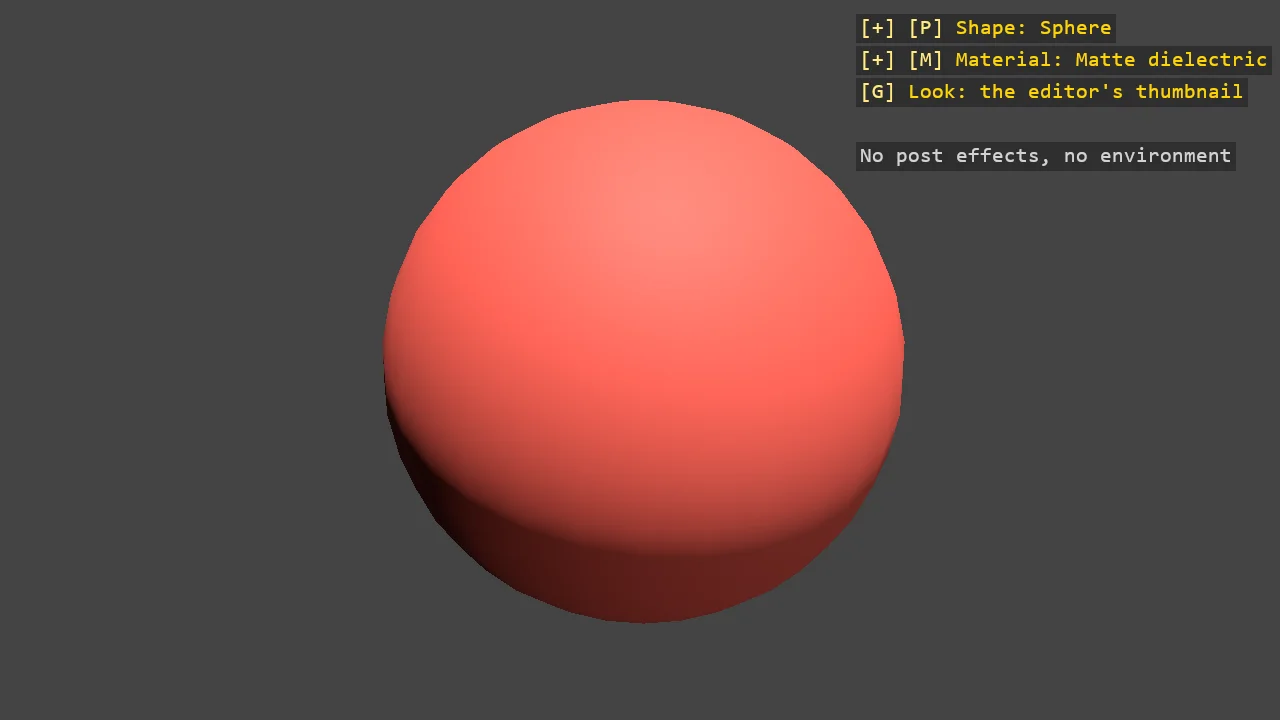
Game Studio's material thumbnail rebuilt in code, with the editor's own numbers: the forward renderer with no post effects on a grey background, a camera pitched and turned the same way, the three thumbnail lights, and the model scaled to its unit bounding sphere. Pick a shape and a material, then press G to see the same material the way a game shows it, with post effects and a skybox - and why a metal that looks dull in the editor shines in the game.
The Program.cs file shows how to:
- The editor's thumbnail rig - compositor, camera, lights and framing - as code
- A compositor without post effects, and swapping compositors at runtime
- Why a metal needs an environment, and why the thumbnail barely has one
- Scaling any model to its unit bounding sphere so every shape frames the same
- Keyboard dropdowns for shape and material with DebugTextDropdown
View on GitHub.
using Stride.CommunityToolkit.Engine;
using Stride.CommunityToolkit.Rendering;
using Stride.CommunityToolkit.Rendering.ProceduralModels;
using Stride.CommunityToolkit.Scripts.Utilities;
using Stride.CommunityToolkit.Skyboxes;
using Stride.CommunityToolkit.Windows;
using Stride.Core.Mathematics;
using Stride.Engine;
using Stride.Games;
using Stride.Input;
using Stride.Rendering;
using Stride.Rendering.Compositing;
using Stride.Rendering.Lights;
using Stride.Rendering.Materials;
using Stride.Rendering.Materials.ComputeColors;

// Game Studio's material thumbnail, rebuilt in code: the same compositor, camera, lights and framing
// the editor uses when it draws a material asset's preview, so a material made in code can be looked at
// the way the editor would show it - and the two can be told apart when they disagree.
//
// The numbers are the editor's own (ThumbnailFromEntityCommand and MaterialThumbnailCompiler): the forward
// renderer with no post effects, cleared to a grey of 0x434343 with no skybox; a camera pitched down thirty
// degrees and turned forty-five, far enough back that the front of a unit sphere fits; an ambient light
// of 0.02, a front light of 0.07 and a top light of 0.8 tilted eighty degrees, the two directional ones
// multiplied by five in an HDR project, which is the editor's default; and the model scaled to its unit
// bounding sphere and turned half round, so the middle of the texture faces the camera.
//
// G switches to how a game would show the same material: post effects and a skybox. The difference is
// the lesson. The thumbnail has almost no environment, and a metal is almost all reflection of its
// environment, so in the thumbnail a metal is mostly its highlight; in the game it shines.
//
// Keys: P opens the shape list, M the material list, a digit picks; G switches the thumbnail and the game.
// "--material 3 --shape Teapot --game" starts there - handy for screenshots.

const float HdrFactor = 5f;

Entity? subject = null;
Entity? skybox = null;
CameraComponent? camera = null;
GraphicsCompositor? thumbnail = null;
GraphicsCompositor? inGame = null;
DebugTextDropdown? shapeMenu = null;
DebugTextDropdown? materialMenu = null;
TextureLoader? textures = null;
var shape = PrimitiveModelType.Sphere;
var material = 0;
var gameLook = false;

for (var i = 0; i < args.Length; i++)
{
    if (args[i] == "--game") gameLook = true;
    else if (i + 1 < args.Length && args[i] == "--material" && int.TryParse(args[i + 1], out var number)) material = number - 1;
    else if (i + 1 < args.Length && args[i] == "--shape" && Enum.TryParse<PrimitiveModelType>(args[i + 1], ignoreCase: true, out var type)) shape = type;
}

// The editor's preview primitives, less its plane
PrimitiveModelType[] shapes =
[
    PrimitiveModelType.Sphere,
    PrimitiveModelType.Cube,
    PrimitiveModelType.Cylinder,
    PrimitiveModelType.Torus,
    PrimitiveModelType.Teapot,
    PrimitiveModelType.Cone,
    PrimitiveModelType.Capsule,
];

(string Name, Func<Material> Make)[] materials = [];
Material?[] built = [];

WindowsDpiManager.EnablePerMonitorV2();

using var game = new Game();

game.Run(start: Start, update: Update);

void Start(Scene scene)
{
    game.Window.AllowUserResizing = true;
    game.Window.Title = "Material Preview - Stride Community Toolkit";

    // The editor's thumbnail compositor: the forward renderer, no post effects, the editor's grey. The
    // game's has post effects - tone mapping, bloom - and is swapped in on G
    thumbnail = GraphicsCompositorHelper.CreateDefault(enablePostEffects: false, clearColor: Color.FromBgra(0xFF434343));
    inGame = GraphicsCompositorHelper.CreateDefault(enablePostEffects: true, clearColor: Color.FromBgra(0xFF434343));
    game.SceneSystem.GraphicsCompositor = thumbnail;

    camera = AddThumbnailCamera(scene);
    AddThumbnailLights(scene);

    // The game look's environment, off in the thumbnail
    skybox = game.AddSkybox();
    skybox.Scene = null;

    textures = new TextureLoader(game.GraphicsDevice, Path.Combine(AppContext.BaseDirectory, "Resources", "materials"));
    materials = MakeMaterials();
    built = new Material?[materials.Length];
    material = Math.Clamp(material, 0, materials.Length - 1);

    shapeMenu = new DebugTextDropdown
    {
        Title = "Shape",
        ToggleKey = Keys.P,
        TitleColor = Color.Gold,
        SelectedIndex = Array.IndexOf(shapes, shape),
        Items = [.. shapes.Select((type, i) => new DebugTextDropdownItem((Keys)(Keys.D1 + i), type.ToString(), () => { shape = type; Rebuild(scene); }))],
    };

    materialMenu = new DebugTextDropdown
    {
        Title = "Material",
        ToggleKey = Keys.M,
        TitleColor = Color.Gold,
        SelectedIndex = material,
        Items = [.. materials.Select((entry, i) => new DebugTextDropdownItem((Keys)(Keys.D1 + i), entry.Name, () => { material = i; Rebuild(scene); }))],
    };

    Rebuild(scene);
    SetGameLook(scene, gameLook);

    DebugOverlay.GetOrCreate(game).AddSection("Preview", OverlayLines);
}

void Update(Scene scene, GameTime time)
{
    // One list open at a time, so their digit keys can overlap
    if (shapeMenu?.Update(game.Input) == true) { if (materialMenu is not null) materialMenu.IsOpen = false; return; }
    if (materialMenu?.Update(game.Input) == true) { if (shapeMenu is not null) shapeMenu.IsOpen = false; return; }

    if (game.Input.IsKeyPressed(Keys.G)) SetGameLook(scene, !gameLook);
}

// The editor's thumbnail camera: back along Z far enough that the front of a unit sphere fills the view,
// then pitched down thirty degrees and turned forty-five about the subject
CameraComponent AddThumbnailCamera(Scene scene)
{
    var component = new CameraComponent { Slot = new SceneCameraSlotId(thumbnail!.Cameras[0].Id) };
    var aspect = game.Window.ClientBounds.Width / (float)Math.Max(1, game.Window.ClientBounds.Height);

    // The editor's own formula, the horizontal term with its aspect ratio folded into the angle as it is there
    var toFront = new Vector2(
        1f / MathF.Tan(MathUtil.DegreesToRadians(component.VerticalFieldOfView / 2f * aspect)),
        1f / MathF.Tan(MathUtil.DegreesToRadians(component.VerticalFieldOfView / 2f)));
    var distance = 1f + Math.Max(toFront.X, toFront.Y);
    var rotation = Quaternion.RotationX(-MathUtil.Pi / 6f) * Quaternion.RotationY(-MathUtil.Pi / 4f);
    var position = new Vector3(0f, 0f, distance);

    rotation.Rotate(ref position);

    component.NearClipPlane = distance / 50f;
    component.FarClipPlane = distance * 50f;

    var entity = new Entity("Thumbnail camera") { component };

    entity.Transform.Position = position;
    entity.Transform.Rotation = rotation;
    entity.Scene = scene;

    return component;
}

// The editor's three lights: a faint ambient, a weak front light along the camera's default direction and
// a strong one from almost straight above, the directional ones five times brighter in HDR
void AddThumbnailLights(Scene scene)
{
    new Entity("Thumbnail ambient") { new LightComponent { Type = new LightAmbient(), Intensity = 0.02f } }.Scene = scene;
    new Entity("Thumbnail front") { new LightComponent { Type = new LightDirectional(), Intensity = 0.07f * HdrFactor } }.Scene = scene;

    var top = new Entity("Thumbnail top") { new LightComponent { Type = new LightDirectional(), Intensity = 0.8f * HdrFactor } };

    top.Transform.Rotation = Quaternion.RotationX(MathUtil.DegreesToRadians(-80f));
    top.Scene = scene;
}

// The subject: the chosen shape in the chosen material, scaled to its unit bounding sphere and turned
// half round, so every shape fills the thumbnail the same and the texture's middle faces the camera
void Rebuild(Scene scene)
{
    if (subject is not null) subject.Scene = null;

    built[material] ??= materials[material].Make();

    subject = game.Create3DPrimitive(shape, new Primitive3DEntityOptions { Material = built[material] });

    var sphere = subject.Get<ModelComponent>()!.Model.BoundingSphere;
    var scale = sphere.Radius > MathUtil.ZeroTolerance ? 1f / sphere.Radius : 1f;

    var rotation = Quaternion.RotationY(MathUtil.Pi);

    // The centre moves with the turn: the editor sets the offset before turning, which only a model centred
    // on its origin - its sphere - gets away with
    var centre = scale * sphere.Center;

    rotation.Rotate(ref centre);

    subject.Transform.Scale = new Vector3(scale);
    subject.Transform.Rotation = rotation;
    subject.Transform.Position = -centre;
    subject.Scene = scene;
}

// The thumbnail and the game differ in two things only: the post effects and the environment. The camera
// moves to the other compositor's slot, since each compositor has slots of its own
void SetGameLook(Scene scene, bool on)
{
    gameLook = on;

    var compositor = on ? inGame! : thumbnail!;

    game.SceneSystem.GraphicsCompositor = compositor;
    camera!.Slot = new SceneCameraSlotId(compositor.Cameras[0].Id);
    skybox!.Scene = on ? scene : null;
}

// Materials made in code, compiled with the game's content manager so the engine's lookup-table
// environment term resolves - the one the thumbnail barely shows, having so little environment
(string Name, Func<Material> Make)[] MakeMaterials() =>
[
    ("Matte dielectric", () => game.CreateMaterial(new Color(170, 60, 50), metalness: 0f, glossiness: 0.3f)),
    ("Glossy dielectric", () => game.CreateMaterial(new Color(40, 90, 170), metalness: 0f, glossiness: 0.9f)),
    ("Polished gold", () => game.CreateMaterial(new Color(255, 195, 80), metalness: 1f, glossiness: 0.85f)),
    ("Brushed steel", () => game.CreateMaterial(new Color(200, 200, 205), metalness: 1f, glossiness: 0.45f)),
    ("Brick, mapped", () => game.CreateMaterial(Brick())),
    ("Emissive", () => game.CreateEmissiveMaterial(new Color(80, 220, 255), intensity: 3f)),
];

MaterialDescriptor Brick()
{
    var descriptor = MaterialDescriptors.Textured(textures!.Color("brick/brick_dif.png"), glossiness: 0.3f);

    descriptor.Attributes.MicroSurface = new MaterialGlossinessMapFeature(new ComputeTextureScalar(textures.Data("brick/brick_gls.png"), TextureCoordinate.Texcoord0, Vector2.One, Vector2.Zero));
    descriptor.Attributes.Surface = new MaterialNormalMapFeature(new ComputeTextureColor(textures.NormalMap("brick/brick_nml.png"))) { ScaleAndBias = true, IsXYNormal = true };

    return descriptor;
}

IReadOnlyList<TextElement> OverlayLines()
{
    List<TextElement> lines = [];

    if (shapeMenu is not null) lines.AddRange(shapeMenu.GetLines());
    if (materialMenu is not null) lines.AddRange(materialMenu.GetLines());

    lines.Add(new("G", gameLook ? "Look: a game - post effects, skybox" : "Look: the editor's thumbnail", Color.Gold));
    lines.Add(new(""));
    lines.Add(new(gameLook ? "Tone mapped, lit by the sky too" : "No post effects, no environment", Color.LightGray));

    return lines;
}