Mesh line
This example demonstrates how to create a simple 3D scene with a custom mesh line connecting two objects. The code shows:
- Setting up a basic 3D scene
- Creating two sphere entities positioned in 3D space
- Building a custom mesh line by:
- Defining vertices for start and end points
- Creating vertex and index buffers
- Configuring a mesh draw with line list primitive type
- Applying an emissive color material for visibility
The line is attached as a child to one of the spheres, creating a visual connection between the two objects. This approach illustrates how to create basic geometric primitives and custom line visualizations in a Stride 3D environment using low-level graphics APIs.
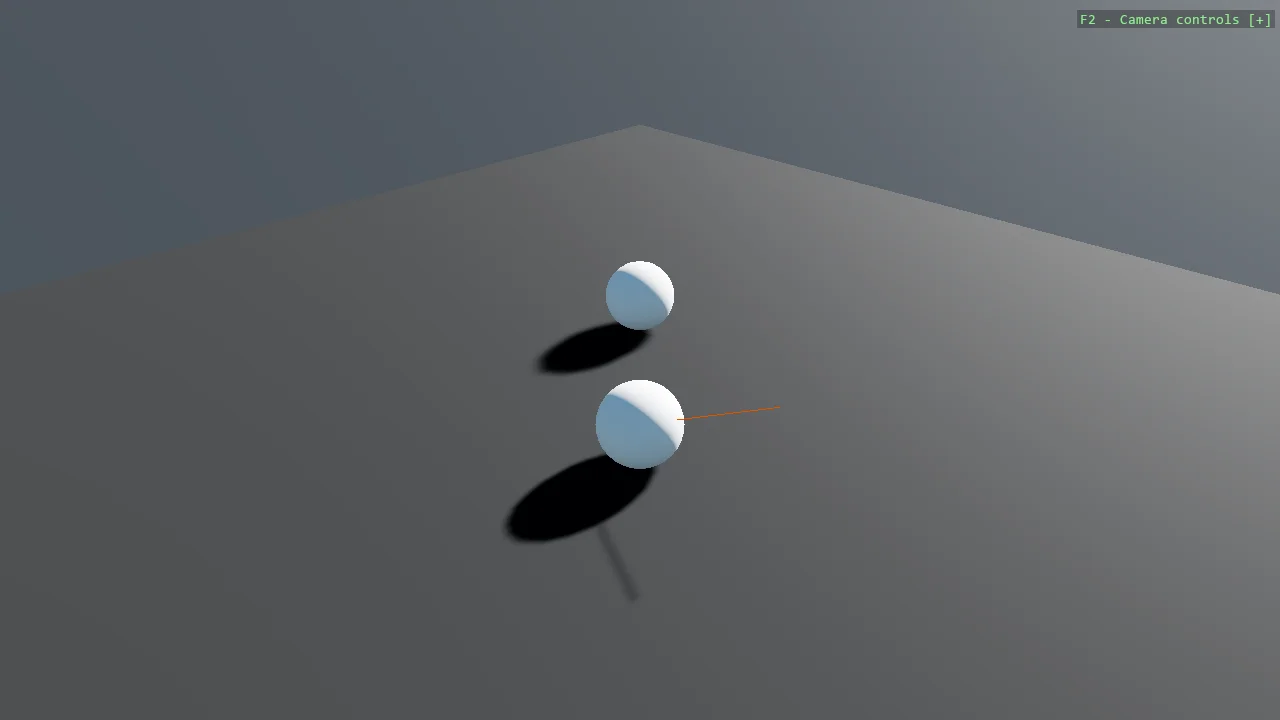
View on GitHub.
using Stride.CommunityToolkit.Bepu;
using Stride.CommunityToolkit.Engine;
using Stride.CommunityToolkit.Rendering.Gizmos;
using Stride.CommunityToolkit.Rendering.ProceduralModels;
using Stride.CommunityToolkit.Skyboxes;
using Stride.Core.Mathematics;
using Stride.Engine;
using Stride.Graphics;
using Stride.Rendering;
using Buffer = Stride.Graphics.Buffer;

using var game = new Game();

game.Run(start: Start);

void Start(Scene rootScene)
{
    game.SetupBase3DScene();
    game.AddSkybox();

    var lineEntity = CreateLineEntity(game);

    var entity1 = CreateSphereEntity(game);
    entity1.Transform.Position = new Vector3(0, 8, 0);
    entity1.AddChild(lineEntity);

    var entity2 = CreateSphereEntity(game);
    entity2.Transform.Position = new Vector3(-0.01f, 9, -0.01f);

    entity1.Scene = rootScene;
    entity2.Scene = rootScene;
}

static Entity CreateSphereEntity(Game game)
    => game.Create3DPrimitive(PrimitiveModelType.Sphere);

static Entity CreateLineEntity(Game game)
{
    // Create vertex buffer with start and end points
    var vertices = new Vector3[] { new(0, 0, 0), new(1, 1, -1) };
    var vertexBuffer = Buffer.New(game.GraphicsDevice, vertices, BufferFlags.VertexBuffer, GraphicsResourceUsage.Default);

    // Create index buffer
    var indices = new short[] { 0, 1 };
    var indexBuffer = Buffer.New(game.GraphicsDevice, indices, BufferFlags.IndexBuffer, GraphicsResourceUsage.Default);

    // Emissive, so the line shows whatever the lighting; an intensity above 1 also carries it past the
    // bloom threshold and gives it a glow. A lit material such as game.CreateMaterial would draw this mesh
    // black: lighting needs normals, and the vertex layout below has positions only.
    var material = GizmoEmissiveColorMaterial.Create(game.GraphicsDevice, Color.OrangeRed, 4);

    var meshDraw = new MeshDraw
    {
        PrimitiveType = PrimitiveType.LineList,
        VertexBuffers = [new VertexBufferBinding(vertexBuffer, new VertexDeclaration(VertexElement.Position<Vector3>()), vertices.Length)],
        IndexBuffer = new IndexBufferBinding(indexBuffer, is32Bit: false, indices.Length),
        DrawCount = indices.Length
    };

    var mesh = new Mesh { Draw = meshDraw };
    var model = new Model { mesh, material };

    return new Entity { new ModelComponent(model) };