Mesh Outline Render Feature
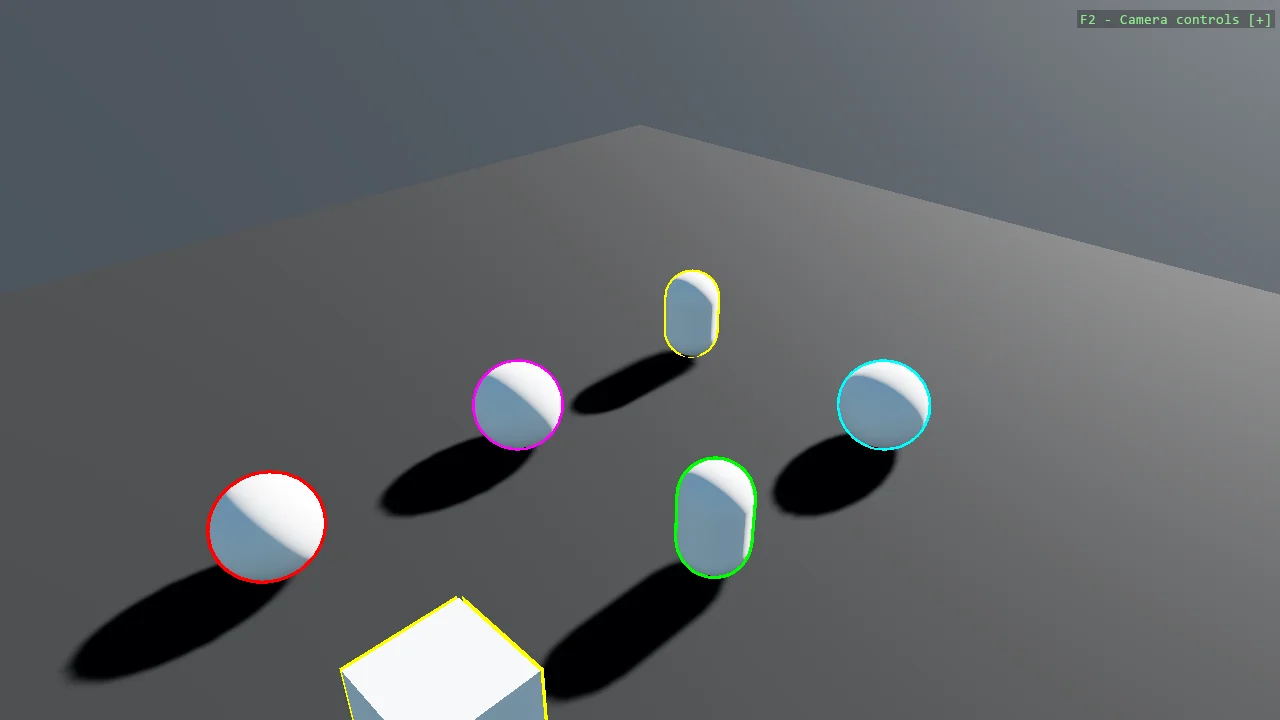
Draw coloured outlines around 3D primitives with a custom RootRenderFeature. Each mesh is drawn a second time, inflated along its normals with front faces culled, so only a shell remains visible behind the original mesh. Adding a MeshOutlineComponent to an entity is all it takes to outline it, and a high intensity pushes the outline into HDR range so bloom makes it glow.
The Program.cs file shows how to:
- Writing a custom RootRenderFeature
- Registering a render feature with AddRootRenderFeature
- Driving rendering from a custom EntityComponent
- Building a MutablePipelineState and applying a DynamicEffectInstance
- Inflating a mesh along its normals in a shader
- Skipping render stages that bind no render target
- Using helpers: SceneSetup3D, UseSkybox
View on GitHub.
using E09_3D_MeshOutline;
using Stride.CommunityToolkit.Bepu;
using Stride.CommunityToolkit.Engine;
using Stride.CommunityToolkit.Rendering.ProceduralModels;
using Stride.CommunityToolkit.Skyboxes;
using Stride.Core.Mathematics;
using Stride.Engine;

// Shows how a custom RootRenderFeature can draw outlines around 3D primitives.
// The original code is from https://github.com/herocrab/StrideMeshOutlineRenderFeature

// How far the outline sticks out, as a fraction of the model's size
const float OutlineThickness = 0.03f;

// Outlines are drawn into the HDR buffer, so values well above 1 make them glow through bloom
const float OutlineIntensity = 100f;

using var game = new Game();

game.Run(new SceneSetup3D().UseBepu().UseSkybox(), start: Start);

void Start(Scene rootScene)
{
    // From here on, any entity carrying a MeshOutlineComponent gets an outline
    game.AddRootRenderFeature(new MeshOutlineRenderFeature { Thickness = OutlineThickness });

    CreateOutlinedPrimitive(rootScene, Primitive3D.Sphere(), Color.Cyan, new Vector3(2f, 0.5f, -2f));
    CreateOutlinedPrimitive(rootScene, Primitive3D.Capsule(), Color.Yellow, new Vector3(-1f, 0.5f, -2f));
    CreateOutlinedPrimitive(rootScene, Primitive3D.Sphere(), Color.Red, new Vector3(-1f, 0.5f, 4f));
    CreateOutlinedPrimitive(rootScene, Primitive3D.Capsule(), Color.Green, new Vector3(2f, 0.5f, 1f));
    CreateOutlinedPrimitive(rootScene, Primitive3D.Sphere(), Color.Magenta, new Vector3(-1f, 0.5f, 1f));
    // Cube has hard per-face normals (duplicated vertices at each edge), so inflating along the
    // normal pushes adjacent faces apart instead of outward as one shell - expect visible gaps/
    // seams at the cube's edges and corners, unlike the smooth outline on curved primitives like
    // Sphere/Capsule.
    CreateOutlinedPrimitive(rootScene, Primitive3D.Cube(), Color.Orange, new Vector3(2f, 0.5f, 4f));
}

/// <summary>
/// Creates a 3D primitive, gives it an outline, and adds it to the scene.
/// </summary>
/// <param name="rootScene">The scene to which the entity will be added.</param>
/// <param name="modelType">The shape to create, such as <c>Primitive3D.Sphere()</c>.</param>
/// <param name="color">The color of the outline effect.</param>
/// <param name="position">The position of the entity in the scene.</param>
void CreateOutlinedPrimitive(Scene rootScene, Primitive3D modelType, Color4 color, Vector3 position)
{
    var entity = game.CreatePrimitive(modelType);

    entity.Transform.Position = position;

    // The presence of this component is what makes the render feature draw an outline
    entity.Add(new MeshOutlineComponent
    {
        Color = color,
        Intensity = OutlineIntensity
    });

    entity.Scene = rootScene;
}