Multiple Physics Simulations
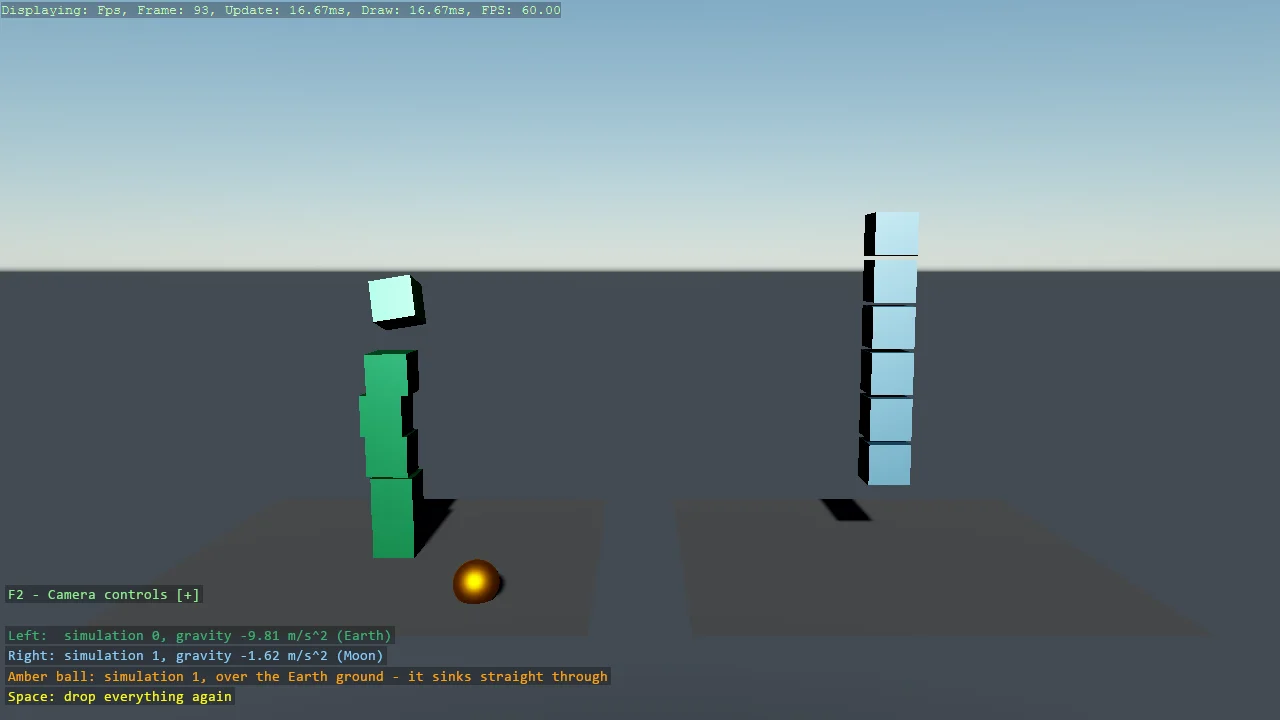
Two Bepu simulations in one game, side by side: the left lane falls under Earth gravity, the right under Moon gravity, and an amber ball that belongs to the Moon world sinks straight through the Earth ground because the two worlds never touch. The simulation list comes from UseGameSettings, the code-only stand-in for the GameSettings asset, and each body picks its world with a SimulationSelector.
The Program.cs file shows how to:
- Configuring physics before the game starts with UseGameSettings and BepuConfiguration
- Giving each simulation its own gravity
- Choosing a simulation per body and per static with IndexBasedSimulationSelector
- Why bodies in different simulations pass through each other
- Respawning entities with Space
- Showing instructions as a DebugOverlay section beside the camera help
- Using helpers: SetupBase3D, Add3DGround, Create3DPrimitive, SetCameraPosition, SetCameraRotation
View on GitHub.
using Stride.BepuPhysics;
using Stride.BepuPhysics.Definitions;
using Stride.CommunityToolkit.Bepu;
using Stride.CommunityToolkit.Engine;
using Stride.CommunityToolkit.Rendering.ProceduralModels;
using Stride.CommunityToolkit.Scripts.Utilities;
using Stride.CommunityToolkit.Skyboxes;
using Stride.Core.Mathematics;
using Stride.Engine;
using Stride.Input;

// Two physics simulations in one game, each with its own gravity, running side by side.
//
// A Bepu game normally has exactly one simulation, created for you with default settings. The
// engine reads the list of simulations from GameSettings - which a code-only game does not have -
// so UseGameSettings is how that list is written in code: it must run before the game starts,
// because the physics system reads it while the engine initialises.
//
// Every collidable then chooses a simulation through its SimulationSelector. The default picks
// the first one, so nothing changes for a game that never asks; here the right-hand lane asks for
// simulation 1. Bodies in different simulations never touch: the amber ball belongs to the Moon
// simulation but hangs over the Earth ground, so it sinks slowly straight through it - that ground
// only exists in simulation 0.

const int Earth = 0;
const int Moon = 1;

var earthGravity = new Vector3(0, -9.81f, 0);
var moonGravity = new Vector3(0, -1.62f, 0);

// The camera looks along +Z from the lit side of the scene, so +X is screen-left: the Earth lane
// sits at -laneOffset to appear on the left.
var laneOffset = new Vector3(-6, 0, 0);
var dropHeight = 7f;

var spawned = new List<Entity>();

using var game = new Game();

game.UseGameSettings(settings =>
{
    var bepu = settings.GetOrCreateConfiguration<BepuConfiguration>();

    // Index 0 is the default simulation; index 1 is the one the Moon lane selects below.
    bepu.BepuSimulations.Add(new BepuSimulation { PoseGravity = earthGravity });
    bepu.BepuSimulations.Add(new BepuSimulation { PoseGravity = moonGravity });
});

game.Run(start: Start, update: Update);

void Start(Scene scene)
{
    // Not SetupBase3DScene: its ground would land in simulation 0 only, and each lane needs its own.
    game.SetupBase3D();
    game.Add3DCameraController();
    game.AddSkybox();
    game.AddProfiler();

    game.SetCameraPosition(new Vector3(0, 7, -21));
    game.SetCameraRotation(new Vector3(180, -6, 0));

    AddGround("Earth Ground", -laneOffset, Earth);
    AddGround("Moon Ground", laneOffset, Moon);

    AddInstructions();
    Spawn(scene);
}

void AddInstructions()
{
    // One shared on-screen block with the camera help: the overlay draws itself, so nothing here
    // runs per frame
    var overlay = DebugOverlay.GetOrCreate(game);

    overlay.AddSection("Simulations", () =>
    [
        new("Space", "Drop everything again", Color.Yellow),
        new(""),
        new($"Left: simulation 0, gravity {earthGravity.Y} m/s² (Earth)", Color.MediumSeaGreen),
        new($"Right: simulation 1, gravity {moonGravity.Y} m/s² (Moon)", Color.LightSkyBlue),
        new("Amber ball: simulation 1 over the Earth ground,", Color.Orange),
        new("so it sinks straight through", Color.Orange),
    ]);
}

void Update(Scene scene, Stride.Games.GameTime time)
{
    if (game.Input.IsKeyPressed(Keys.Space))
    {
        foreach (var entity in spawned)
            entity.Scene = null;

        spawned.Clear();

        Spawn(scene);
    }
}

void AddGround(string name, Vector3 position, int simulation)
{
    var ground = game.Add3DGround(new()
    {
        EntityName = name,
        Position = position,
        Size = new Vector3(10, 1, 10),
    });

    // Changing the selector on an attached collidable moves it to the other simulation.
    ground.Get<StaticComponent>()!.SimulationSelector = new IndexBasedSimulationSelector { Index = simulation };
}

void Spawn(Scene scene)
{
    // The same column of cubes on each side; only the simulation - and so the gravity - differs.
    for (var i = 0; i < 6; i++)
    {
        var height = dropHeight + i * 1.1f;

        SpawnCube($"Earth Cube {i}", Color.MediumSeaGreen, -laneOffset + new Vector3(0, height, 0), Earth, scene);
        SpawnCube($"Moon Cube {i}", Color.LightSkyBlue, laneOffset + new Vector3(0, height, 0), Moon, scene);
    }

    // Simulation 1 (Moon gravity, so it takes its time), positioned over the Earth ground: nothing
    // in simulation 1 is there to stop it, so it passes straight through.
    var ghost = game.Create3DPrimitive(PrimitiveModelType.Sphere, new()
    {
        EntityName = "Ghost Ball",
        Material = game.CreateMaterial(Color.Orange),
    });

    ghost.Transform.Position = -laneOffset + new Vector3(-2.5f, dropHeight - 2, -3);
    ghost.Get<BodyComponent>()!.SimulationSelector = new IndexBasedSimulationSelector { Index = Moon };
    ghost.Scene = scene;

    spawned.Add(ghost);
}

void SpawnCube(string name, Color color, Vector3 position, int simulation, Scene scene)
{
    var cube = game.Create3DPrimitive(PrimitiveModelType.Cube, new()
    {
        EntityName = name,
        Material = game.CreateMaterial(color),
    });

    cube.Transform.Position = position;

    // Set before the entity joins the scene, so the body attaches to the right simulation from the start.
    cube.Get<BodyComponent>()!.SimulationSelector = new IndexBasedSimulationSelector { Index = simulation };

    cube.Scene = scene;

    spawned.Add(cube);
}