Myra UI - Control Panel
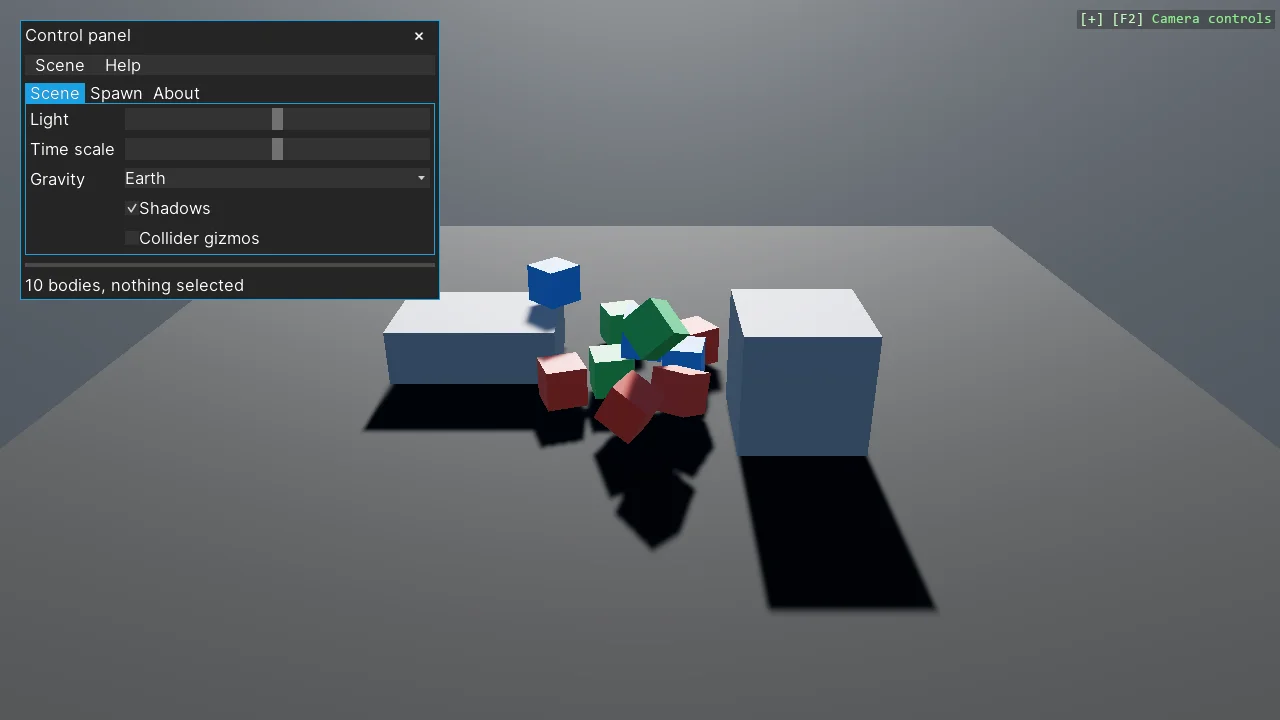
Myra's widget set at work in one draggable window that drives a Stride scene: a menu bar, tabs, a grid of sliders for the light and the physics clock, a combo for gravity, check buttons for shadows and collider gizmos, a spin button and buttons that spawn bodies, a list view that selects and lights one, a dialog that asks before clearing, tooltips and a status line. The UI reaches the scene through plain C# on the same objects; the renderer that hosts Myra is the one from the draggable window example.
The Program.cs file shows how to:
- Hosting Myra through a scene renderer that builds the widgets once the device exists
- Window, HorizontalMenu, TabControl, Grid with proportions, VerticalStackPanel and HorizontalStackPanel
- HorizontalSlider, CheckButton, ComboView, SpinButton, Button, ListView, Dialog, tooltips, a progress bar
- Widget handlers set flags or values; the scene reacts in Update, on the game thread
- Driving a LightComponent, the simulation's TimeScale and PoseGravity, and the collider gizmos from UI
- Using helpers: SceneSetup3D, CreatePrimitive, AddSceneRenderer, AddPhysicsDebug, CreateMaterial, AddGrabber
View on GitHub.
using E04_Myra_ControlPanel;
using Myra.Graphics2D.UI;
using Stride.BepuPhysics;
using Stride.CommunityToolkit.Bepu;
using Stride.CommunityToolkit.Engine;
using Stride.CommunityToolkit.Rendering.Compositing;
using Stride.CommunityToolkit.Rendering.ProceduralModels;
using Stride.CommunityToolkit.Skyboxes;
using Stride.Core.Mathematics;
using Stride.Engine;
using Stride.Games;
using Stride.Rendering;
using Stride.Rendering.Lights;

// A Myra control panel that drives a Stride scene. Myra is an external UI library hosted through a
// scene renderer of its own (MyraSceneRenderer); this example puts most of its widget set to work in
// one draggable window: a menu bar, tabs, a grid of sliders, check buttons and a combo on the Scene
// tab, a spin button, buttons and a list view on the Spawn tab, a dialog that asks before clearing,
// tooltips, and a status line. Every control changes something you can see: the light, the shadows,
// the physics clock, gravity, the collider gizmos, and the bodies that get spawned and selected.
//
// Not a Myra tutorial: the widgets are used plainly, as their docs show them. The example teaches
// how a foreign UI reaches into a Stride scene, which is through ordinary C# on the same objects.

const int SpawnLimit = 60;

(string Name, Vector3 Value)[] gravities =
[
    ("Earth", new Vector3(0f, -9.81f, 0f)),
    ("Moon", new Vector3(0f, -1.62f, 0f)),
    ("None", Vector3.Zero),
    ("Upside down", new Vector3(0f, 9.81f, 0f)),
];

var spawned = new List<Entity>();
var random = new Random(4);
var pendingSpawn = 0;
var pendingClear = false;
var pendingReset = false;
var spawnShape = 0;
var spawnCount = 10f;

Scene? rootScene = null;
LightComponent? sun = null;
BepuSimulation? simulation = null;
Entity? physicsDebug = null;
Entity? selected = null;
Material? selectedMaterial = null;
Material[] materials = [];
Label? status = null;
ListView? bodyList = null;
Window? panel = null;
var panelPlaced = false;
HorizontalProgressBar? frameBar = null;

using var game = new Game();

var sceneSetup = new SceneSetup3D
{
    Camera = CameraSetup.Perspective(position: new Vector3(0f, 7f, 14f), rotation: new Vector3(0f, -25f, 0f)).WithController(),
    Profiler = true,
    WindowTitle = "Myra control panel - Stride Community Toolkit",
    Resizable = true,
}.UseBepu().UseSkybox();

game.Run(sceneSetup, start: Start, update: Update);

void Start(Scene scene)
{
    game.AddGrabber();

    rootScene = scene;

    sun = scene.Entities.Select(e => e.Get<LightComponent>()).First(l => l is not null);
    physicsDebug = game.AddPhysicsDebug();

    selectedMaterial = game.CreateMaterial(Color.White, metalness: 0f, glossiness: 0.7f);
    materials =
    [
        game.CreateMaterial(new Color(220, 90, 80), metalness: 0f, glossiness: 0.4f),
        game.CreateMaterial(new Color(90, 180, 110), metalness: 0f, glossiness: 0.4f),
        game.CreateMaterial(new Color(80, 150, 230), metalness: 0f, glossiness: 0.4f),
    ];

    BuildScenery(scene);

    // Ten bodies to begin with, so the list and the status have something to show
    pendingSpawn = 10;

    // The widgets are built once Myra has the device: the renderer calls BuildPanel from its initialisation
    game.AddSceneRenderer(new MyraSceneRenderer { Build = BuildPanel });
}

void Update(Scene scene, GameTime time)
{
    // A window centres itself when it is added; it is moved to the corner once it has been placed
    if (!panelPlaced && panel is { IsPlaced: true })
    {
        panel.Left = 20;
        panel.Top = 20;
        panelPlaced = true;
    }

    // The bodies hand over their simulation once one is attached
    simulation ??= spawned.Count > 0 ? spawned[0].Get<BodyComponent>().Simulation : null;

    // The widgets ask; the scene answers here, on the game thread, outside any widget callback
    if (pendingReset) Reset();
    if (pendingClear) Clear();
    if (pendingSpawn > 0) Spawn(pendingSpawn);

    pendingReset = pendingClear = false;
    pendingSpawn = 0;

    if (status is not null)
    {
        var where = selected is null ? "nothing selected" : $"{selected.Name} at {selected.Transform.Position:0.0}";

        status.Text = $"{spawned.Count} bodies, {where}";
    }

    if (frameBar is not null) frameBar.Value = MathF.Min((float)time.Elapsed.TotalMilliseconds, frameBar.Maximum);
}

/// <summary>One window with a menu, three tabs and a status line. Every handler only flags or sets; the scene reacts in Update.</summary>
void BuildPanel(Desktop desktop)
{
    var tabs = new TabControl { HorizontalAlignment = HorizontalAlignment.Stretch };

    tabs.Items.Add(new TabItem { Text = "Scene", Content = BuildSceneTab() });
    tabs.Items.Add(new TabItem { Text = "Spawn", Content = BuildSpawnTab(desktop) });
    tabs.Items.Add(new TabItem { Text = "About", Content = BuildAboutTab() });

    status = new Label { Text = "Ready" };

    var stack = new VerticalStackPanel { Spacing = 8 };

    stack.Widgets.Add(BuildMenu(desktop));
    stack.Widgets.Add(tabs);
    stack.Widgets.Add(new HorizontalSeparator());
    stack.Widgets.Add(status);

    var window = new Window
    {
        Title = "Control panel",
        Left = 20,
        Top = 20,
        Width = 420,
        Content = stack,
    };

    desktop.Widgets.Add(window);

    panel = window;
}

/// <summary>A menu bar: a menu is items, an item is a label with a Selected event, and items nest.</summary>
HorizontalMenu BuildMenu(Desktop desktop)
{
    var scene = new MenuItem { Text = "Scene" };
    var spawnTen = new MenuItem { Text = "Spawn ten" };
    var clear = new MenuItem { Text = "Clear..." };
    var reset = new MenuItem { Text = "Reset" };

    spawnTen.Selected += (_, _) => pendingSpawn += 10;
    clear.Selected += (_, _) => ConfirmClear(desktop);
    reset.Selected += (_, _) => pendingReset = true;

    scene.Items.Add(spawnTen);
    scene.Items.Add(clear);
    scene.Items.Add(new MenuSeparator());
    scene.Items.Add(reset);

    var help = new MenuItem { Text = "Help" };
    var about = new MenuItem { Text = "About" };

    about.Selected += (_, _) => Dialog.CreateMessageBox("About", "Myra widgets driving a Stride scene.\nEvery control changes something in the world behind this window.").ShowModal(desktop);

    help.Items.Add(about);

    var menu = new HorizontalMenu();

    menu.Items.Add(scene);
    menu.Items.Add(help);

    return menu;
}

/// <summary>Sliders, check buttons and a combo in a two-column grid: a label on the left, the control filling the right.</summary>
Grid BuildSceneTab()
{
    var grid = new Grid { ColumnSpacing = 10, RowSpacing = 8, HorizontalAlignment = HorizontalAlignment.Stretch };

    grid.ColumnsProportions.Add(new Proportion(ProportionType.Auto));
    grid.ColumnsProportions.Add(new Proportion(ProportionType.Fill));

    var row = 0;

    // The setup's sun is bright, so the slider starts where the light is rather than at 1
    var light = new HorizontalSlider { Minimum = 0f, Maximum = 40f, Value = sun?.Intensity ?? 20f, Tooltip = "The directional light's intensity" };
    light.ValueChanged += (_, _) => { if (sun is not null) sun.Intensity = light.Value; };
    AddRow(grid, row++, "Light", light);

    var timeScale = new HorizontalSlider { Minimum = 0f, Maximum = 2f, Value = 1f, Tooltip = "The physics clock against the game clock" };
    timeScale.ValueChanged += (_, _) => { if (simulation is not null) simulation.TimeScale = timeScale.Value; };
    AddRow(grid, row++, "Time scale", timeScale);

    var gravity = new ComboView { Tooltip = "Takes effect on every body on the next step" };

    foreach (var (name, _) in gravities)
    {
        gravity.Widgets.Add(new Label { Text = name });
    }

    gravity.SelectedIndex = 0;
    gravity.SelectedIndexChanged += (_, _) => { if (simulation is not null && gravity.SelectedIndex is { } i) simulation.PoseGravity = gravities[i].Value; };
    AddRow(grid, row++, "Gravity", gravity);

    var shadows = new CheckButton { Content = new Label { Text = "Shadows" }, IsChecked = true };
    shadows.IsCheckedChanged += (_, _) => { if (sun?.Type is LightDirectional directional) directional.Shadow.Enabled = shadows.IsChecked; };
    AddRow(grid, row++, "", shadows);

    var gizmos = new CheckButton { Content = new Label { Text = "Collider gizmos" }, Tooltip = "The same view as the P key" };
    gizmos.IsCheckedChanged += (_, _) => { var script = physicsDebug?.Get<CollidableGizmoScript>(); if (script is not null) script.Visible = gizmos.IsChecked; };
    AddRow(grid, row++, "", gizmos);

    return grid;
}

/// <summary>A spin button and a combo say what to spawn, buttons do it, and a list view shows what there is; selecting an item lights that body.</summary>
VerticalStackPanel BuildSpawnTab(Desktop desktop)
{
    var stack = new VerticalStackPanel { Spacing = 8 };

    var options = new HorizontalStackPanel { Spacing = 8 };
    var count = new SpinButton { Minimum = 1, Maximum = 50, Value = spawnCount, Integer = true, Width = 80, Tooltip = "How many at once" };
    var shape = new ComboView { Width = 120 };

    foreach (var name in (ReadOnlySpan<string>)["Cube", "Sphere", "Capsule"])
    {
        shape.Widgets.Add(new Label { Text = name });
    }

    shape.SelectedIndex = 0;
    shape.SelectedIndexChanged += (_, _) => spawnShape = shape.SelectedIndex ?? 0;
    count.ValueChanged += (_, _) => spawnCount = count.Value ?? 1f;

    var spawn = new Button { Content = new Label { Text = "Spawn" } };
    var clear = new Button { Content = new Label { Text = "Clear..." } };

    spawn.Click += (_, _) => pendingSpawn += (int)spawnCount;
    clear.Click += (_, _) => ConfirmClear(desktop);

    options.Widgets.Add(count);
    options.Widgets.Add(shape);
    options.Widgets.Add(spawn);
    options.Widgets.Add(clear);

    bodyList = new ListView { Height = 160 };
    bodyList.SelectedIndexChanged += (_, _) => Select(bodyList.SelectedItem?.Tag as Entity);

    stack.Widgets.Add(options);
    stack.Widgets.Add(new Label { Text = "Spawned bodies, click one to light it:" });
    stack.Widgets.Add(bodyList);

    return stack;
}

/// <summary>Wrapped text and a progress bar that reads the frame time, so the About tab moves too.</summary>
VerticalStackPanel BuildAboutTab()
{
    var stack = new VerticalStackPanel { Spacing = 8 };

    stack.Widgets.Add(new Label
    {
        Text = "Myra is a UI library for MonoGame, FNA and Stride. Here it is hosted in a scene renderer of its own and drives the scene through plain C#: the sliders set the light and the physics clock, the combo sets gravity, the buttons spawn bodies, and the list selects one.",
        Wrap = true,
    });

    stack.Widgets.Add(new Label { Text = "Frame time, 0 to 33 ms:" });

    frameBar = new HorizontalProgressBar { Minimum = 0f, Maximum = 33f, Height = 16 };

    stack.Widgets.Add(frameBar);

    return stack;
}

/// <summary>A dialog with OK and Cancel; only OK sets the flag.</summary>
void ConfirmClear(Desktop desktop)
{
    var dialog = Dialog.CreateMessageBox("Clear", $"Remove all {spawned.Count} spawned bodies?");

    dialog.ButtonOk.Click += (_, _) => pendingClear = true;
    dialog.ShowModal(desktop);
}

void AddRow(Grid grid, int row, string caption, Widget control)
{
    var label = new Label { Text = caption, VerticalAlignment = VerticalAlignment.Center };

    Grid.SetRow(label, row);
    Grid.SetColumn(label, 0);
    Grid.SetRow(control, row);
    Grid.SetColumn(control, 1);

    control.HorizontalAlignment = HorizontalAlignment.Stretch;

    grid.Widgets.Add(label);
    grid.Widgets.Add(control);
}

/// <summary>A few static blocks to land on, so the spawned bodies have something besides the ground.</summary>
void BuildScenery(Scene scene)
{
    foreach (var (position, size) in new[] { (new Vector3(-3f, 0.5f, -1f), new Vector3(3f, 1f, 2f)), (new Vector3(2.5f, 1f, 1.5f), new Vector3(2f, 2f, 2f)) })
    {
        var block = game.CreatePrimitive(Primitive3D.Box(size), new BepuPhysicsOptions
        {
            Material = game.CreateMaterial(new Color(150, 150, 160), metalness: 0f, glossiness: 0.3f),
            Body = BodyMode.Static,
        });

        block.Transform.Position = position;
        block.Scene = scene;
    }
}

void Spawn(int count)
{
    for (var i = 0; i < count && spawned.Count < SpawnLimit; i++)
    {
        var (shape, name) = spawnShape switch
        {
            1 => (Primitive3D.Sphere(0.4f), "Sphere"),
            2 => (Primitive3D.Capsule(0.3f, 0.5f), "Capsule"),
            _ => (Primitive3D.Cube(0.7f), "Cube"),
        };

        var entity = game.CreatePrimitive(shape, new BepuPhysicsOptions
        {
            Material = materials[spawned.Count % materials.Length],
        });

        entity.Name = $"{name} {spawned.Count + 1}";
        entity.Transform.Position = new Vector3(random.NextSingle() * 4f - 2f, 6f + i * 0.9f, random.NextSingle() * 4f - 2f);
        entity.Transform.Rotation = Quaternion.RotationY(random.NextSingle() * MathUtil.TwoPi);
        entity.Scene = rootScene;

        spawned.Add(entity);
        bodyList?.Widgets.Add(new Label { Text = entity.Name, Tag = entity });
    }
}

void Clear()
{
    Select(null);

    foreach (var entity in spawned) entity.Scene = null;

    spawned.Clear();
    bodyList?.Widgets.Clear();
}

void Reset()
{
    Clear();

    if (simulation is not null)
    {
        simulation.TimeScale = 1f;
        simulation.PoseGravity = gravities[0].Value;
    }

    Spawn(10);
}

/// <summary>The selected body wears the white material; the one before gets its own back.</summary>
void Select(Entity? entity)
{
    selected?.Get<ModelComponent>().Materials.Remove(0);
    selected = entity;

    if (selected is not null) selected.Get<ModelComponent>().Materials[0] = selectedMaterial!;
}