Game - Pong
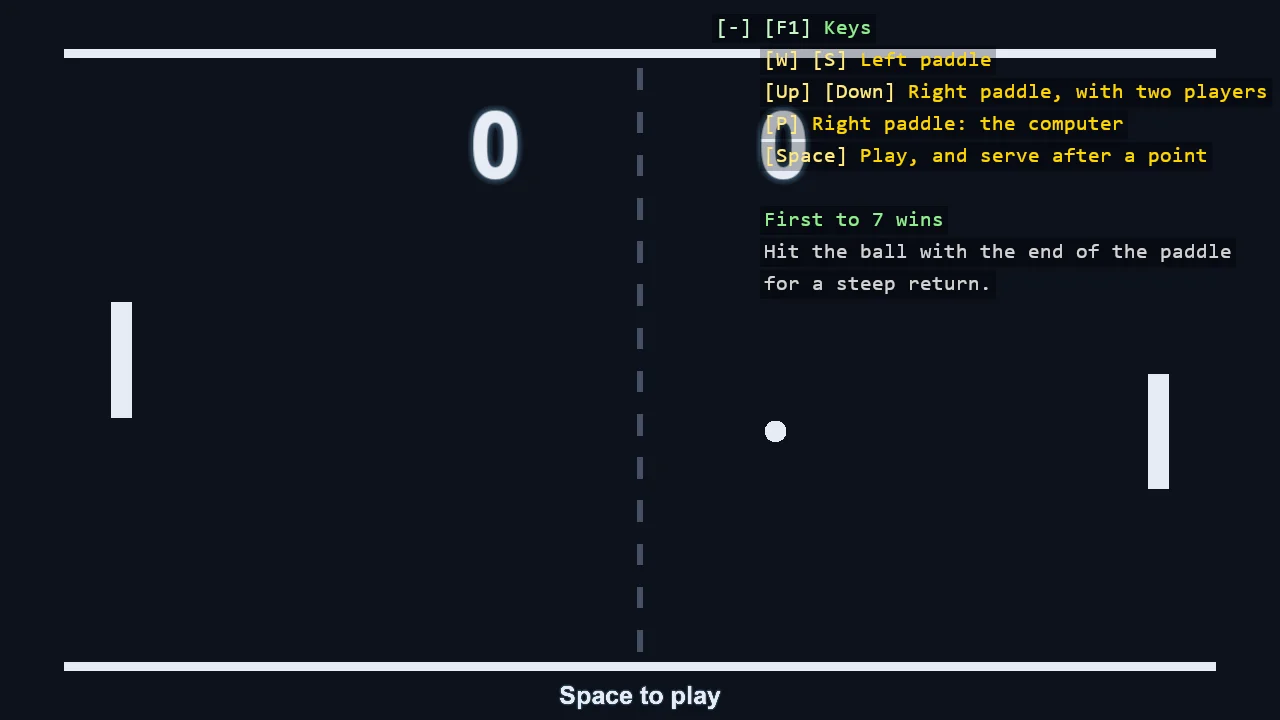
Pong, the first game: two paddles, a ball and a score to seven, with no assets and no physics engine. The game is three small scripts that do not call each other. The paddles and the ball are SyncScripts; the referee is an AsyncScript, so a whole match reads top to bottom as one method. The ball announces a point through an EventKey and the referee awaits it. Until Space is pressed the computer plays both sides.
The Program.cs file shows how to:
- SyncScript for what moves every frame, AsyncScript for a flow that waits
- EventKey and EventReceiver - broadcast, TryReceive and ReceiveAsync
- A bounce without a physics engine - reflecting a velocity, and testing the crossing of a line so a fast ball cannot skip through a paddle
- A computer player that can be beaten
- Score and messages as WorldTextComponent
View on GitHub.
using E20_2D_Pong;
using Stride.CommunityToolkit.Engine;
using Stride.CommunityToolkit.Rendering.ProceduralModels;
using Stride.CommunityToolkit.Rendering.Overlay;
using Stride.CommunityToolkit.Rendering.Text;
using Stride.Core.Mathematics;
using Stride.Engine;
using Stride.Games;
using Stride.Input;
using Stride.Rendering;

// Pong, the first game: two paddles, a ball, a score to seven. Everything is made in code - no
// assets, no physics engine - and the game is three small scripts that do not call each other:
//
//   Paddle   a SyncScript: moves with two keys, or by itself when the computer plays it.
//   Ball     a SyncScript: flies, bounces, and broadcasts an event when it leaves the court.
//   Referee  an AsyncScript: serves, waits for that event, counts, and names the winner.
//
// The ball and the referee talk through two EventKeys in Court.cs. That is what keeps them apart:
// the ball announces a point without knowing who counts it.
//
// This file only builds the scene. Start with Ball.cs for the game's rules, then Referee.cs for
// how a match is written as one method.

var court = new Color(14, 18, 28);
var chalk = new Color(230, 236, 245);
var glow = new Color(120, 190, 255, 140);

Referee referee = null!;
TextOverlaySection keys = null!;
var foldedKeys = false;

using var game = new Game();

// No camera controller: the court does not move, and the arrow keys belong to the right paddle
game.Run(new SceneSetup2D
{
    ClearColor = court,
    Camera = CameraSetup.Orthographic(orthographicSize: 10f),
    Ground = null,
    WindowTitle = "Pong - Stride Community Toolkit",
    Resizable = true,
    DpiAware = true,
}, start: Start, update: Update);

void Start(Scene scene)
{
    var material = game.CreateFlatMaterial(chalk);
    var faint = game.CreateFlatMaterial(new Color(70, 80, 100));

    // The court: a line along the top and the bottom, and a dashed net. Visuals only - the ball
    // bounces off Court.HalfHeight, a number, not off these entities
    Rectangle("Top line", new Vector2(Court.HalfWidth * 2f, 0.12f), new Vector3(0f, Court.HalfHeight + 0.06f, 0f), material);
    Rectangle("Bottom line", new Vector2(Court.HalfWidth * 2f, 0.12f), new Vector3(0f, -Court.HalfHeight - 0.06f, 0f), material);

    for (var y = -Court.HalfHeight + 0.3f; y < Court.HalfHeight; y += 0.6f)
    {
        // A little behind the rest, so the ball passes in front of the net
        Rectangle("Net", new Vector2(0.08f, 0.3f), new Vector3(0f, y, -0.1f), faint);
    }

    var leftPaddle = Rectangle("Left paddle", Court.PaddleSize, new Vector3(-Court.PaddleX, 0f, 0f), material);
    var rightPaddle = Rectangle("Right paddle", Court.PaddleSize, new Vector3(Court.PaddleX, 0f, 0f), material);

    var ballEntity = game.CreatePrimitive(Primitive2D.Circle(Court.BallSize * 0.5f), new PrimitiveEntityOptions { EntityName = "Ball", Material = material });

    ballEntity.Scene = scene;

    // The scripts. Each gets what it needs through its properties and nothing else
    var ball = new Ball { LeftPaddle = leftPaddle, RightPaddle = rightPaddle };
    var left = new Paddle { Up = Keys.W, Down = Keys.S, Ball = ball };
    var right = new Paddle { Up = Keys.Up, Down = Keys.Down, Ball = ball };

    ballEntity.Add(ball);
    leftPaddle.Add(left);
    rightPaddle.Add(right);

    referee = new Referee
    {
        LeftPaddle = left,
        RightPaddle = right,
        LeftScore = Text("Left score", "0", new Vector3(-2f, 3f, 0f), 1.5f),
        RightScore = Text("Right score", "0", new Vector3(2f, 3f, 0f), 1.5f),
        // Under the court, in the strip the camera leaves below the bottom line
        Message = Text("Message", "", new Vector3(0f, -Court.HalfHeight - 0.45f, 0f), 0.4f),
    };

    scene.Entities.Add(new Entity("Referee") { referee });

    // The keys are shown over the demo and fold away to one line when a match starts, so they do
    // not cover the score. F1 brings them back
    keys = TextOverlay.GetOrCreate(game).AddSection("Pong", () =>
    [
        new(["W", "S"], "Left paddle", Color.Gold),
        new(["Up", "Down"], "Right paddle, with two players", Color.Gold),
        new("P", referee.TwoPlayers ? "Right paddle: a second player" : "Right paddle: the computer", Color.Gold),
        new("Space", "Play, and serve after a point", Color.Gold),
        new(""),
        new($"First to {Court.WinningScore} wins", Color.LightGreen),
        new("Hit the ball with the end of the paddle", Color.LightGray),
        new("for a steep return.", Color.LightGray),
    ]);

    keys.Title = "Keys";
    keys.ToggleKey = Keys.F1;

    Entity Rectangle(string name, Vector2 size, Vector3 position, Material fill)
    {
        var entity = game.CreatePrimitive(Primitive2D.Rectangle(size.X, size.Y), new PrimitiveEntityOptions { EntityName = name, Material = fill, Position = position });

        entity.Scene = scene;

        return entity;
    }

    WorldTextComponent Text(string name, string text, Vector3 position, float height)
    {
        var component = new WorldTextComponent
        {
            Text = text,
            FontSize = 64,
            Height = height,
            TextColor = chalk,
            GlowColor = glow,
            GlowSize = 4f,
            Billboard = false,
        };

        scene.Entities.Add(new Entity(name, position) { component });

        return component;
    }
}

void Update(Scene scene, GameTime time)
{
    if (game.Input.IsKeyPressed(Keys.P)) referee.TwoPlayers = !referee.TwoPlayers;

    // Once, when the first match starts
    if (referee.InMatch && !foldedKeys)
    {
        keys.Collapsed = true;
        foldedKeys = true;
    }
}