Post Effects
Every post effect Stride ships, one key each: bloom, ambient occlusion, screen-space reflections, depth of field, light streaks, lens flare, fog, outline, FXAA, and the vignette, film-grain and dither colour transforms. The default compositor has all of them switched off, so the example is the answer to "how do I turn bloom on" - a first set is enabled through ConfigurePostEffects, the rest toggle at runtime - and to the less obvious rule that colour transforms must be added, not enabled. The scene is built for the effects: over-bright lamps, a glossy floor, a receding corridor and a cluster of cubes.
The Program.cs file shows how to:
- Enabling post effects with ConfigurePostEffects, and toggling them at runtime with GetPostEffects
- Which effects exist on the compositor and start disabled
- Adding Vignetting, FilmGrain and Dither to the colour-transform group, where they cost nothing extra
- Building an emissive material above intensity 1 so bloom has something to bloom
- Showing live effect state as a DebugOverlay section
- Using helpers: SetupBase3D, Add3DGround, Create3DPrimitive, CreateMaterial
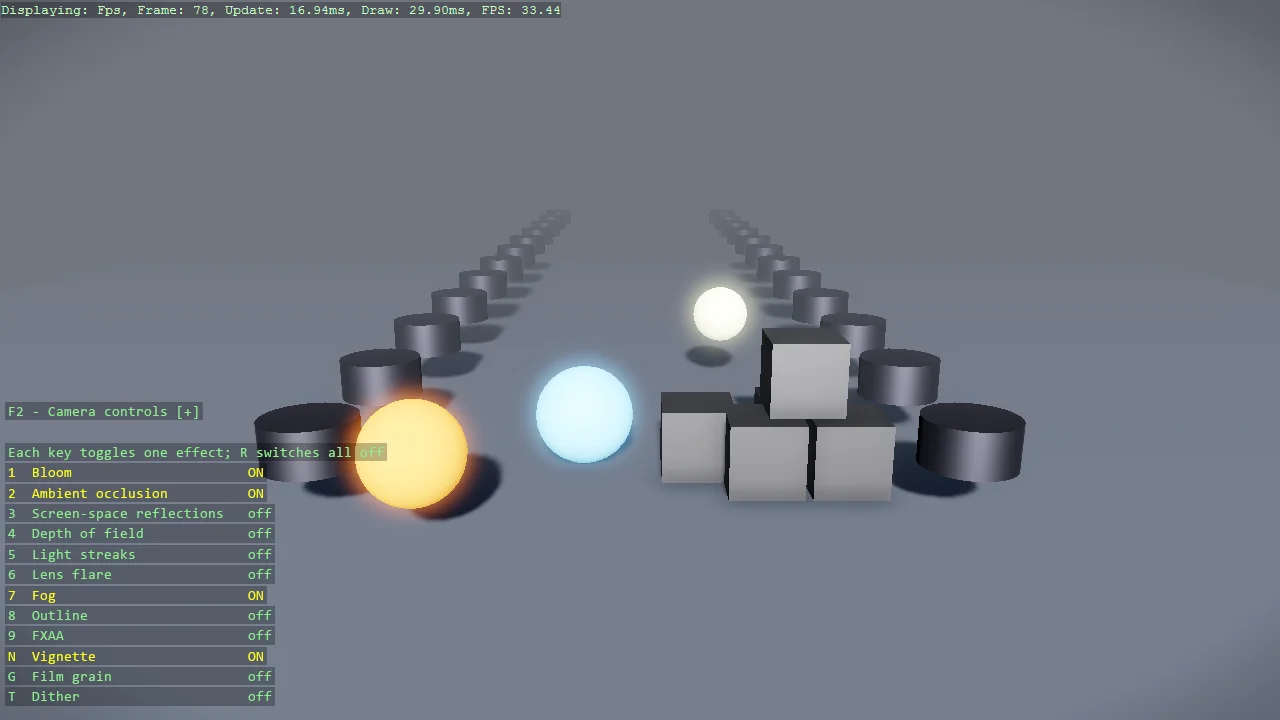
View on GitHub.
using Stride.BepuPhysics;
using Stride.BepuPhysics.Definitions.Colliders;
using Stride.CommunityToolkit.Bepu;
using Stride.CommunityToolkit.Engine;
using Stride.CommunityToolkit.Rendering.ProceduralModels;
using Stride.CommunityToolkit.Scripts.Utilities;
using Stride.CommunityToolkit.Skyboxes;
using Stride.Core.Mathematics;
using Stride.Engine;
using Stride.Input;
using Stride.Rendering;
using Stride.Rendering.Images;
using Stride.Rendering.Images.Dither;
using Stride.Rendering.Materials;
using Stride.Rendering.Materials.ComputeColors;

// Every post effect Stride ships, one key each, on a scene built to show them.
//
// The default compositor has all of them switched off and only tone mapping in its colour
// transforms. Bloom, ambient occlusion, depth of field and the rest are objects that already exist
// on the compositor and just need Enabled = true - which is what ConfigurePostEffects below does for
// a first set, and each key does for one effect at a time. The three colour transforms - vignette,
// film grain, dither - are different: they are not there at all until added to the colour-transform
// group, which fuses them into the tone-mapping pass, so they cost nothing extra once added.
//
// The scene is built for the effects, not the other way round: three over-bright lamps for bloom,
// light streaks and lens flare; a glossy floor for screen-space reflections; a corridor of pillars
// receding into the distance for depth of field and fog; a tight cluster of cubes for ambient
// occlusion to darken the creases of.

const float LampIntensity = 6f;   // emissive above 1 is what bloom and streaks feed on

var effects = new Dictionary<Keys, (string Name, Func<bool> IsOn, Action Toggle)>();

Vignetting? vignette = null;
FilmGrain? filmGrain = null;
Dither? dither = null;

using var game = new Game();

game.Run(start: Start, update: Update);

void Start(Scene scene)
{
    game.SetupBase3D();
    game.Add3DCameraController();
    game.AddSkybox();
    game.AddProfiler();

    // On the lit side of the default directional light, looking along +Z; from the other side every
    // face turned to the camera is in shadow and the whole scene reads black.
    game.SetCameraPosition(new Vector3(0, 4.5f, -14));
    game.SetCameraRotation(new Vector3(180, -14, 0));

    game.ConfigurePostEffects(fx =>
    {
        // A first set, switched on the way any game would do it. Every key below flips one flag.
        fx.Bloom.Enabled = true;
        fx.Bloom.Amount = 0.6f;

        fx.AmbientOcclusion.Enabled = true;

        fx.Fog.Enabled = true;
        fx.Fog.Density = 0.06f;
        fx.Fog.Color = new Color3(0.55f, 0.6f, 0.7f);

        // Tuning for effects that start off.
        fx.DepthOfField.AutoFocus = true;
        fx.LightStreak.Amount = 0.35f;
        fx.LensFlare.Amount = 0.4f;

        // The colour transforms have to be added, not enabled; only the vignette starts on.
        fx.ColorTransforms.Transforms.Add(vignette = new Vignetting { Amount = 0.35f, Radius = 0.8f });
        fx.ColorTransforms.Transforms.Add(filmGrain = new FilmGrain { Enabled = false, Amount = 0.35f, Animate = true });
        fx.ColorTransforms.Transforms.Add(dither = new Dither { Enabled = false });

        effects[Keys.D1] = ("Bloom", () => fx.Bloom.Enabled, () => fx.Bloom.Enabled ^= true);
        effects[Keys.D2] = ("Ambient occlusion", () => fx.AmbientOcclusion.Enabled, () => fx.AmbientOcclusion.Enabled ^= true);
        effects[Keys.D3] = ("Screen-space reflections", () => fx.LocalReflections.Enabled, () => fx.LocalReflections.Enabled ^= true);
        effects[Keys.D4] = ("Depth of field", () => fx.DepthOfField.Enabled, () => fx.DepthOfField.Enabled ^= true);
        effects[Keys.D5] = ("Light streaks", () => fx.LightStreak.Enabled, () => fx.LightStreak.Enabled ^= true);
        effects[Keys.D6] = ("Lens flare", () => fx.LensFlare.Enabled, () => fx.LensFlare.Enabled ^= true);
        effects[Keys.D7] = ("Fog", () => fx.Fog.Enabled, () => fx.Fog.Enabled ^= true);
        effects[Keys.D8] = ("Outline", () => fx.Outline.Enabled, () => fx.Outline.Enabled ^= true);
        effects[Keys.D9] = ("FXAA", () => fx.Antialiasing.Enabled, () => fx.Antialiasing.Enabled ^= true);
        effects[Keys.N] = ("Vignette", () => vignette.Enabled, () => vignette.Enabled ^= true);
        effects[Keys.G] = ("Film grain", () => filmGrain.Enabled, () => filmGrain.Enabled ^= true);
        effects[Keys.T] = ("Dither", () => dither.Enabled, () => dither.Enabled ^= true);
    });

    AddInstructions();
    BuildScene(scene);
}

void Update(Scene scene, Stride.Games.GameTime time)
{
    foreach (var (key, effect) in effects)
    {
        if (game.Input.IsKeyPressed(key))
            effect.Toggle();
    }

    if (game.Input.IsKeyPressed(Keys.R))
    {
        foreach (var effect in effects.Values)
        {
            if (effect.IsOn())
                effect.Toggle();
        }
    }
}

void AddInstructions()
{
    var overlay = DebugOverlay.GetOrCreate(game);

    // The lines are rebuilt whenever the overlay draws, so each shows the live state.
    overlay.AddSection("Post effects", () =>
    {
        var lines = new List<TextElement>();

        foreach (var (key, effect) in effects)
        {
            var on = effect.IsOn();
            lines.Add(new(KeyLabel(key), $"{effect.Name} {(on ? "on" : "off")}", on ? Color.Yellow : null));
        }

        lines.Add(new("R", "All off"));
        lines.Add(new(""));
        lines.Add(new("Each key toggles one effect", Color.LightGray));

        return lines;
    });
}

static string KeyLabel(Keys key) => key switch
{
    >= Keys.D0 and <= Keys.D9 => ((char)('0' + (key - Keys.D0))).ToString(),
    _ => key.ToString(),
};

void BuildScene(Scene scene)
{
    // A glossy floor: what screen-space reflections have to work with. Glossy, not mirror-like -
    // at specular 1 the floor turns metallic and simply shows the dark underside of the skybox.
    game.Add3DGround(new()
    {
        Size = new Vector3(40, 1, 40),
        Material = game.CreateMaterial(new Color(95, 100, 110), metalness: 0.5f, glossiness: 0.85f),
    });

    // A corridor of pillars receding into the distance: depth of field blurs the far ones, fog swallows them.
    for (var i = 0; i < 12; i++)
    {
        var z = -4 + i * 3f;
        var shade = (byte)(170 - i * 8);

        Place(PrimitiveModelType.Cylinder, new Vector3(-4, 1, z), new Vector3(0.6f, 2, 0.6f), game.CreateMaterial(new Color(shade, shade, (byte)(shade + 20))));
        Place(PrimitiveModelType.Cylinder, new Vector3(4, 1, z), new Vector3(0.6f, 2, 0.6f), game.CreateMaterial(new Color(shade, shade, (byte)(shade + 20))));
    }

    // Three lamps brighter than white: bloom haloes them, light streaks and lens flare stretch them.
    Place(PrimitiveModelType.Sphere, new Vector3(2.5f, 1.2f, -5), new Vector3(0.6f), Emissive(new Color(255, 140, 60)));
    Place(PrimitiveModelType.Sphere, new Vector3(0.8f, 0.7f, -2), new Vector3(0.7f), Emissive(new Color(120, 200, 255)));
    Place(PrimitiveModelType.Sphere, new Vector3(-1.5f, 1.4f, 2), new Vector3(0.5f), Emissive(new Color(255, 255, 200)));

    // A tight cluster of cubes: creases and contact corners that ambient occlusion darkens.
    // Negative X is screen-right for a camera looking along +Z.
    var cluster = new Vector3(-2.2f, 0, -3);
    foreach (var offset in new[] { new Vector3(-0.55f, 0.5f, 0), new Vector3(0.55f, 0.5f, 0), new Vector3(0, 0.5f, 0.9f), new Vector3(0, 1.5f, 0.35f), new Vector3(1.4f, 0.5f, 0.6f) })
        Place(PrimitiveModelType.Cube, cluster + offset, Vector3.One, game.CreateMaterial(new Color(200, 200, 205)));

    void Place(PrimitiveModelType type, Vector3 position, Vector3 size, Material material)
    {
        // Static, so the scene holds still: this example is about the picture, not the physics.
        var entity = game.Create3DPrimitive(type, new()
        {
            Size = size,
            Material = material,
            Component = new StaticComponent { Collider = new CompoundCollider() },
        });

        entity.Transform.Position = position;
        entity.Scene = scene;
    }
}

Material Emissive(Color color)
{
    // Diffuse for the shaded look plus an emissive term far above 1: the HDR overshoot is what the
    // bloom, streak and flare passes pick out of the frame. MaterialDescriptors.Emissive is the bag behind it.
    return game.CreateEmissiveMaterial(color, LampIntensity);
}