Raycast
Two raycasts with two jobs. Click the ground and the camera's ray finds the point, the first thing under the mouse; the sphere is kicked towards it. A second ray is cast from the sphere through that point and on, with every hit listed near to far, which is what the sphere would meet if it flew on, and the line shows that ray. Click the sphere and it stops dead.
The Program.cs file shows how to:
- Turning a screen position into a world ray from the camera, and the first thing it hits
- A second ray from a point in the world through another, as a RaySegment
- Listing every hit along a ray with RayCastPenetrating, near to far, not only the first
- Applying an impulse towards a point
- Stopping a body by zeroing its velocity
- Drawing the impulse direction as a line from the sphere to the hit point
- Using helpers: SceneSetup3D, UseSkybox, CreatePrimitive, AddGroundGizmo, AddOrientationGizmo
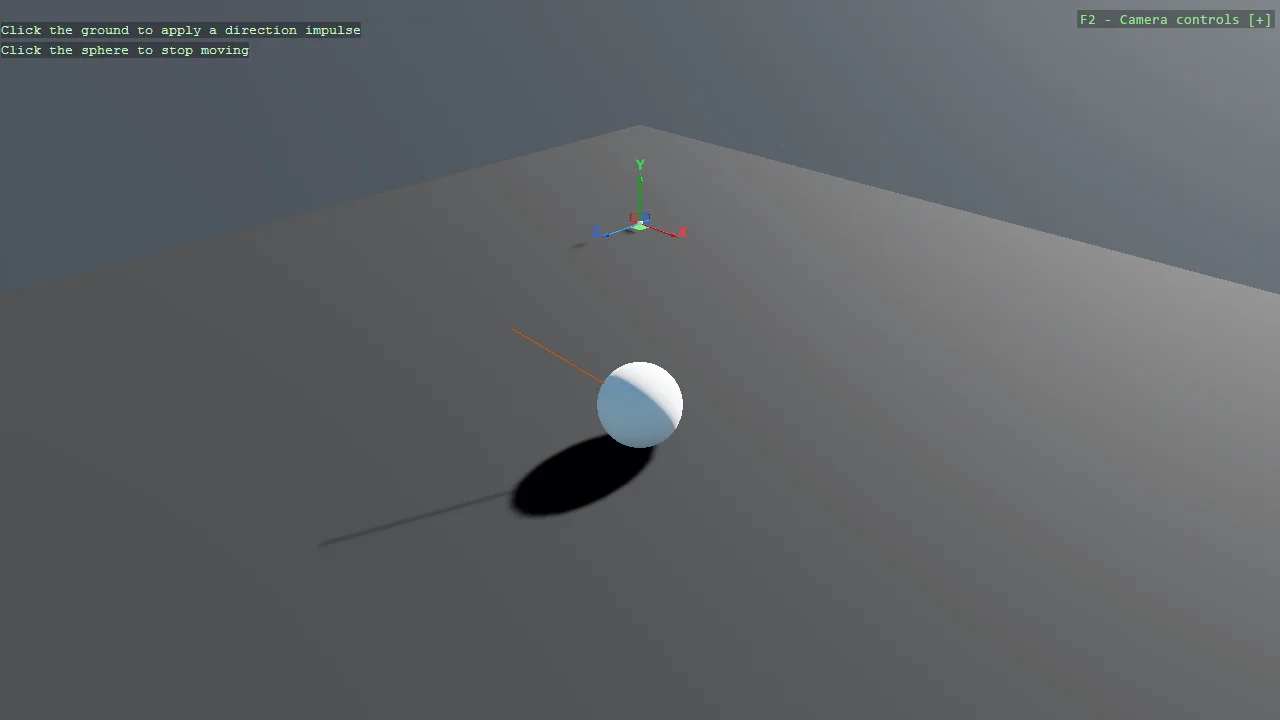
View on GitHub.
using Stride.BepuPhysics;
using Stride.BepuPhysics.Definitions.Colliders;
using Stride.CommunityToolkit.Bepu;
using Stride.CommunityToolkit.Engine;
using Stride.CommunityToolkit.Mathematics;
using Stride.CommunityToolkit.Rendering.Gizmos;
using Stride.CommunityToolkit.Rendering.ProceduralModels;
using Stride.CommunityToolkit.Rendering.Text;
using Stride.CommunityToolkit.Skyboxes;
using Stride.Core.Mathematics;
using Stride.Engine;
using Stride.Games;
using Stride.Graphics;
using Stride.Input;
using Stride.Rendering;
using Buffer = Stride.Graphics.Buffer;

// Two raycasts with two jobs. The camera's ray answers "what did I click, and where": the first thing
// under the mouse. The sphere's ray answers "what lies in that direction, all of it": cast from the
// sphere through the clicked point and on, with every hit listed near to far, which is what the sphere
// would meet if it flew on. The line is the sphere's ray. Click the sphere itself and it stops.

const float ImpulseStrength = 0.5f;
const float SphereRadius = 0.5f;
const float RayLength = 30f;

CameraComponent? mainCamera = null;
Entity? sphereEntity = null;
BodyComponent? sphereBody = null;
Buffer? vertexBuffer = null;

// The sphere's ray as a line: its two ends, in the sphere's local space
Vector3[] lineVertices = new Vector3[2];

// What the sphere's ray went through, one line per hit, for the overlay
List<string> through = [];

using var game = new Game();

game.Run(new SceneSetup3D { Profiler = true }.UseBepu().UseSkybox(), start: Start, update: Update);

void Start(Scene scene)
{
    game.AddGroundGizmo(new(-5, 0, -5), showAxisName: true);
    game.AddOrientationGizmo();
    game.AddGrabber();

    DebugOverlay.GetOrCreate(game).AddSection("Raycast", OverlayLines);

    // Panels around the sphere, so a ray from it has something to go through
    AddPanels(scene);

    sphereEntity = game.CreatePrimitive(Primitive3D.Sphere());
    sphereEntity.Transform.Position = new Vector3(0, 8, 0);
    sphereEntity.Scene = scene;

    sphereBody = sphereEntity.Get<BodyComponent>();
    mainCamera = scene.GetCamera();

    // The line is a child of the sphere, so it moves with it
    sphereEntity.AddChild(CreateLineEntity(game));
}

void Update(Scene scene, GameTime time)
{
    if (mainCamera is null) return;

    if (game.Input.IsMouseButtonPressed(MouseButton.Left))
    {
        ProcessMouseClick();
    }
}

// The camera's ray: the mouse position becomes a ray from the camera, and Bepu reports the first
// thing it hits and where
void ProcessMouseClick()
{
    if (sphereBody is null || sphereEntity is null) return;

    if (!mainCamera.Raycast(game.Input.MousePosition, 100, out var hitInfo))
    {
        Console.WriteLine("No hit");

        return;
    }

    Console.WriteLine($"Hit entity: {hitInfo.Collidable.Entity.Name}");

    // The sphere itself: stop it dead
    if (hitInfo.Collidable.Entity == sphereEntity)
    {
        sphereBody.LinearVelocity = Vector3.Zero;
        sphereBody.AngularVelocity = Vector3.Zero;

        return;
    }

    ListEverythingInThatDirection(hitInfo.Point);
    ApplyImpulseToSphere(hitInfo.Point);
}

// The sphere's ray: from its centre through the clicked point and on for RayLength. A raycast stops at
// the first hit; RayCastPenetrating goes on through everything along the ray, and the toolkit's
// overload takes a segment and sorts the hits by distance. The line is drawn along it
void ListEverythingInThatDirection(Vector3 clickedPoint)
{
    if (sphereEntity is null || sphereBody?.Simulation is not { } simulation) return;

    var start = sphereEntity.Transform.WorldMatrix.TranslationVector;
    var direction = Vector3.Normalize(clickedPoint - start);
    var segment = new RaySegment(start, start + direction * RayLength);
    var hits = simulation.RayCastPenetrating(segment);

    through.Clear();

    foreach (var hit in hits)
    {
        // The sphere's own surface is the first thing a ray from its centre meets
        if (hit.Collidable.Entity == sphereEntity) continue;

        through.Add($"{hit.Collidable.Entity.Name} at {hit.Distance:0.0} m");
    }

    UpdateLineVisualization(segment.End);
}

// Static panels standing around the sphere on the ground: click the ground beyond one and the sphere's ray goes through it
void AddPanels(Scene scene)
{
    var positions = new[] { new Vector3(4f, 1f, 0f), new Vector3(0f, 1f, -5f), new Vector3(-3.5f, 1f, 3.5f), new Vector3(7f, 1f, 1f) };

    for (var i = 0; i < positions.Length; i++)
    {
        var panel = game.CreatePrimitive(Primitive3D.Box(new Vector3(2.4f, 2f, 0.1f)), new Bepu3DPhysicsOptions
        {
            Material = game.CreateMaterial(new Color(120, 170, 220), metalness: 0f, glossiness: 0.5f),
            Component = new StaticComponent { Collider = new CompoundCollider() },
        });

        // Each panel faces the sphere's starting point, so a ray from there meets it square on
        var toCentre = -positions[i];
        panel.Name = $"Panel {i + 1}";
        panel.Transform.Position = positions[i];
        panel.Transform.Rotation = Quaternion.RotationY(MathF.Atan2(toCentre.X, toCentre.Z));
        panel.Scene = scene;
    }
}

IReadOnlyList<TextElement> OverlayLines()
{
    List<TextElement> lines =
    [
        new("Left click", "On the ground: push the sphere towards the click", Color.Gold),
        new("Left click", "On the sphere: stop it moving", Color.Gold),
    ];

    if (through.Count > 0)
    {
        lines.Add(new(""));
        lines.Add(new("The sphere's ray went through", Color.LightGray));

        foreach (var line in through) lines.Add(new(line, Color.LightSkyBlue));
    }

    return lines;
}

// The line's far end goes to the ray's end, in the sphere's local space since the line is its child
void UpdateLineVisualization(Vector3 rayEndWorld)
{
    if (sphereEntity == null || vertexBuffer == null) return;

    lineVertices[1] = Vector3.Transform(rayEndWorld, Matrix.Invert(sphereEntity.Transform.WorldMatrix)).XYZ();

    vertexBuffer.SetData(game.GraphicsContext.CommandList, lineVertices);
}

// The impulse points from the sphere's centre to the hit point, the same strength whatever the distance
void ApplyImpulseToSphere(Vector3 hitPointWorld)
{
    if (sphereEntity == null || sphereBody == null) return;

    var direction = hitPointWorld - sphereEntity.Transform.WorldMatrix.TranslationVector;

    direction.Normalize();

    // Applied at the surface rather than the centre, so the sphere spins as well as moves
    sphereBody.ApplyImpulse(direction * ImpulseStrength, direction * SphereRadius);

    // A sleeping body ignores an impulse until it is woken
    sphereBody.Awake = true;
}

// A two-vertex line list in a buffer the example owns, so the far end can be rewritten on every click. The
// line rides on the sphere, so once the sphere rolls on, the line no longer lies along the ray it drew
Entity CreateLineEntity(Game game)
{
    lineVertices[0] = Vector3.Zero;
    lineVertices[1] = new(-1, 1, 1);

    vertexBuffer = Buffer.New(game.GraphicsDevice, lineVertices, BufferFlags.VertexBuffer, GraphicsResourceUsage.Default);

    var indices = new ushort[] { 0, 1 };
    var indexBuffer = Buffer.New(game.GraphicsDevice, indices, BufferFlags.IndexBuffer, GraphicsResourceUsage.Default);

    var meshDraw = new MeshDraw
    {
        PrimitiveType = PrimitiveType.LineList,
        VertexBuffers = [new VertexBufferBinding(vertexBuffer, new VertexDeclaration(VertexElement.Position<Vector3>()), lineVertices.Length)],
        IndexBuffer = new IndexBufferBinding(indexBuffer, is32Bit: false, indices.Length),
        DrawCount = indices.Length
    };

    var mesh = new Mesh { Draw = meshDraw };

    // An emissive gizmo material: visible whatever the lighting, and bright enough that bloom gives it a glow
    var lineModelComponent = new ModelComponent { Model = new Model { mesh, GizmoEmissiveColorMaterial.Create(game.GraphicsDevice, Color.OrangeRed, 4) } };

    return new Entity { lineModelComponent };
}