Render to Texture
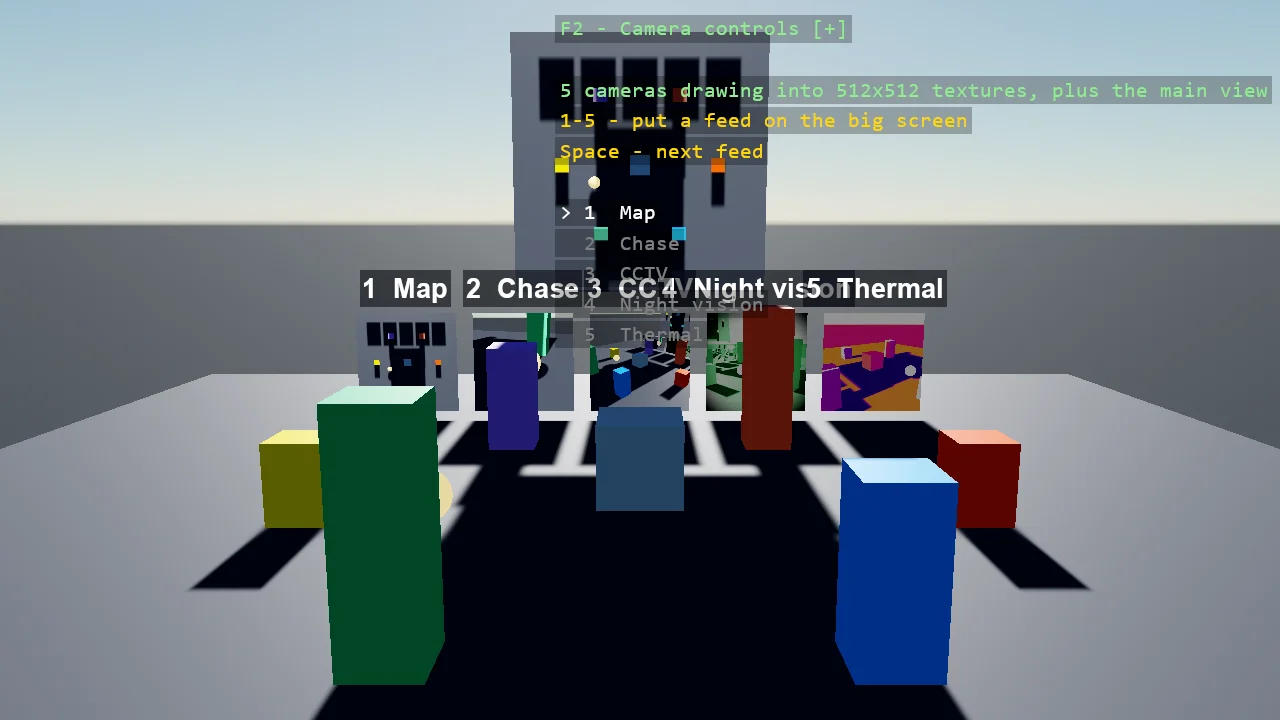
Five cameras watch one scene and each draws into a texture shown on a monitor: an overhead map, a chase camera following an orbiting ball, a fixed CCTV corner, and two cameras with a look of their own - night vision and a thermal camera, colour transforms from the toolkit's Effects package. A big screen shows the selected feed. Each feed is one call, AddRenderTextureCamera, which returns a texture that is just a texture: here the emissive map of a monitor's material.
The Program.cs file shows how to:
- A second camera drawing into a texture with AddRenderTextureCamera, and what the call builds in the compositor
- Why the texture is HDR and where the tone map happens
- A texture on a plane through an emissive material, so a monitor is not lit again
- An orthographic map camera, a chase camera re-aimed every frame, and fixed cameras looking at a point
- Colour transforms of your own on a camera's post-effects chain - night vision and thermal
- Swapping a model's material at runtime to change what a screen shows
View on GitHub.
using Stride.CommunityToolkit.Effects.PostProcessing;
using Stride.CommunityToolkit.Engine;
using Stride.CommunityToolkit.Rendering.Compositing;
using Stride.CommunityToolkit.Rendering.ProceduralModels;
using Stride.CommunityToolkit.Rendering.Text;
using Stride.CommunityToolkit.Scripts.Utilities;
using Stride.CommunityToolkit.Skyboxes;
using Stride.CommunityToolkit.Windows;
using Stride.Core.Mathematics;
using Stride.Engine;
using Stride.Engine.Processors;
using Stride.Games;
using Stride.Graphics;
using Stride.Input;
using Stride.Rendering;
using Stride.Rendering.Materials;
using Stride.Rendering.Materials.ComputeColors;

// Five cameras watching one small scene, each drawing into a texture, each texture on a monitor:
// an overhead map, a chase camera following the orbiting ball, a fixed CCTV corner, and two
// cameras with a look of their own - night vision and a thermal camera - which are colour
// transforms in the toolkit's Effects package, added to a feed the way the engine's own
// vignette or film grain would be. A big screen shows whichever feed is selected.
//
// A feed is one call: game.AddRenderTextureCamera(entity, width, height, postEffects). It gives
// back the texture, and the texture is just a texture - here the emissive map of a monitor's
// material. Behind the call: a camera slot of its own, a camera renderer wrapping a
// render-texture renderer wrapping a second forward renderer over the compositor's existing
// stages. The texture is HDR because the scene is lit in HDR and a feed has no tone map; the
// main view tone-maps the monitors along with everything else it draws.
//
// Keys: 1 to 5 put a feed on the big screen, Space steps through them.

const int FeedSize = 512;

Feed[] feeds = [];
Material[] monitorMaterials = [];
ModelComponent? bigScreen = null;
Entity? ball = null;
Entity? chaseCamera = null;
var selected = 0;

WindowsDpiManager.EnablePerMonitorV2();

using var game = new Game();

game.Run(start: Start, update: Update);

void Start(Scene scene)
{
    game.Window.AllowUserResizing = true;
    game.Window.Title = "Render to Texture - Stride Community Toolkit";

    game.SetupBase3D();
    game.Add3DCameraController();
    game.AddSkybox();
    game.AddProfiler();
    game.AddEntityTextRenderer();

    // Looking at the monitors from the scene's side, with the scene in the foreground
    game.SetCameraPosition(new(-1, 15, 27));
    game.SetCameraRotation(new(0, -17, 0));

    BuildScene(scene);

    feeds =
    [
        new Feed("Map", Map(scene)),
        new Feed("Chase", Chase(scene)),
        new Feed("CCTV", Cctv(scene)),
        new Feed("Night vision", NightVisionFeed(scene)),
        new Feed("Thermal", ThermalFeed(scene)),
    ];

    BuildMonitors(scene);

    var overlay = DebugOverlay.GetOrCreate(game);
    overlay.SectionGap = 0;
    overlay.AddSection("Feeds", OverlayLines);
}

void Update(Scene scene, GameTime time)
{
    var seconds = (float)time.Total.TotalSeconds;

    HandleInput();
    MoveScene(seconds);
    FollowBall();
}

/// <summary>
/// Something to watch: a ground, a ring of coloured pillars, a bright ball orbiting among them and
/// a slowly turning cube in the middle. The ball is emissive, so it reads white-hot on the thermal
/// camera and blooms on the night-vision one.
/// </summary>
void BuildScene(Scene scene)
{
    var groundMaterial = game.CreateMaterial(new Color(52, 56, 64), metalness: 0.05f, glossiness: 0.3f);

    var ground = game.Create3DPrimitive(PrimitiveModelType.Cube, new Primitive3DEntityOptions
    {
        EntityName = "Ground",
        Material = groundMaterial,
        Size = new Vector3(40f, 0.5f, 40f),
        Position = new Vector3(0f, -0.25f, 0f),
    });

    ground.Scene = scene;

    ReadOnlySpan<Color> colours = [Color.OrangeRed, Color.DodgerBlue, Color.MediumSeaGreen, Color.Gold, Color.MediumPurple, Color.Tomato];

    for (var i = 0; i < colours.Length; i++)
    {
        var angle = i * MathF.Tau / colours.Length;
        var height = 2f + (i % 3) * 1.2f;

        var pillar = game.Create3DPrimitive(PrimitiveModelType.Cube, new Primitive3DEntityOptions
        {
            EntityName = $"Pillar {i}",
            Material = game.CreateMaterial(colours[i], metalness: 0.2f, glossiness: 0.5f),
            Size = new Vector3(1.4f, height, 1.4f),
            Position = new Vector3(MathF.Cos(angle) * 8f, height * 0.5f, MathF.Sin(angle) * 8f),
        });

        pillar.Scene = scene;
    }

    var cube = game.Create3DPrimitive(PrimitiveModelType.Cube, new Primitive3DEntityOptions
    {
        EntityName = "Cube",
        Material = game.CreateMaterial(Color.LightSteelBlue, metalness: 0.4f, glossiness: 0.7f),
        Size = new Vector3(2f),
        Position = new Vector3(0f, 1.5f, 0f),
    });

    cube.Scene = scene;

    ball = game.Create3DPrimitive(PrimitiveModelType.Sphere, new Primitive3DEntityOptions
    {
        EntityName = "Ball",
        Material = EmissiveMaterial(new Color(255, 200, 120), 6f),
        Size = new Vector3(0.6f),
        Position = new Vector3(5f, 1f, 0f),
    });

    ball.Scene = scene;

    Material EmissiveMaterial(Color colour, float intensity) => game.CreateEmissiveMaterial(colour, intensity);
}

void MoveScene(float seconds)
{
    if (ball is null) return;

    var angle = seconds * 0.7f;

    ball.Transform.Position = new Vector3(MathF.Cos(angle) * 5f, 1f + MathF.Sin(seconds * 2.3f) * 0.4f, MathF.Sin(angle) * 5f);
}

// ---- The feeds ------------------------------------------------------------------------------

/// <summary>Straight down over the middle, orthographic, the whole ring in view: a live map.</summary>
RenderTextureCamera Map(Scene scene)
{
    var camera = new Entity("Map camera") { new CameraComponent { Projection = CameraProjectionMode.Orthographic, OrthographicSize = 26f } };

    camera.Transform.Position = new Vector3(0f, 30f, 0f);
    camera.Transform.Rotation = Quaternion.RotationYawPitchRoll(0f, -MathF.PI * 0.5f, 0f);
    camera.Scene = scene;

    return game.AddRenderTextureCamera(camera, FeedSize, FeedSize);
}

/// <summary>Behind and above the ball, re-aimed every frame in <see cref="FollowBall"/>.</summary>
RenderTextureCamera Chase(Scene scene)
{
    chaseCamera = new Entity("Chase camera");
    chaseCamera.Scene = scene;

    return game.AddRenderTextureCamera(chaseCamera, FeedSize, FeedSize);
}

/// <summary>A fixed camera in a high corner, the way a security camera is mounted.</summary>
RenderTextureCamera Cctv(Scene scene)
{
    return game.AddRenderTextureCamera(FixedCamera(scene, "CCTV camera", new Vector3(14f, 9f, 14f), new Vector3(0f, 1f, 0f)), FeedSize, FeedSize);
}

/// <summary>The same kind of fixed camera with a night-vision transform on its post-effects chain.</summary>
RenderTextureCamera NightVisionFeed(Scene scene)
{
    return game.AddRenderTextureCamera(FixedCamera(scene, "Night vision camera", new Vector3(-14f, 4f, 11f), new Vector3(0f, 1.2f, 0f)), FeedSize, FeedSize,
        postEffects: fx => fx.ColorTransforms.Transforms.Add(new NightVision()));
}

/// <summary>A fixed camera with a thermal transform: luminance painted as temperature.</summary>
RenderTextureCamera ThermalFeed(Scene scene)
{
    return game.AddRenderTextureCamera(FixedCamera(scene, "Thermal camera", new Vector3(-12f, 6f, -9f), new Vector3(0f, 1.2f, 0f)), FeedSize, FeedSize,
        postEffects: fx => fx.ColorTransforms.Transforms.Add(new Thermal()));
}

Entity FixedCamera(Scene scene, string name, Vector3 position, Vector3 target)
{
    var camera = new Entity(name);

    camera.Transform.Position = position;
    camera.Transform.Rotation = LookAt(position, target);
    camera.Scene = scene;

    return camera;
}

void FollowBall()
{
    if (ball is null || chaseCamera is null) return;

    // Behind the ball along its orbit, a little above, looking at it
    var ballPosition = ball.Transform.Position;
    var outward = Vector3.Normalize(new Vector3(ballPosition.X, 0f, ballPosition.Z));
    var tangent = new Vector3(-outward.Z, 0f, outward.X);
    var eye = ballPosition + tangent * 4f + Vector3.UnitY * 1.5f;

    chaseCamera.Transform.Position = eye;
    chaseCamera.Transform.Rotation = LookAt(eye, ballPosition);
}

/// <summary>A camera rotation looking from one point at another. A camera looks down its -Z; yaw turns that towards -X, pitch lifts it.</summary>
static Quaternion LookAt(Vector3 eye, Vector3 target)
{
    var direction = Vector3.Normalize(target - eye);

    return Quaternion.RotationYawPitchRoll(MathF.Atan2(-direction.X, -direction.Z), MathF.Asin(direction.Y), 0f);
}

// ---- The monitors ---------------------------------------------------------------------------

/// <summary>
/// One monitor per feed in a row, and a big screen above them. A monitor is a plane with an
/// emissive material whose map is the feed's texture, so the picture is not lit again. The plane
/// primitive lies flat, so it is stood up by a quarter turn about X.
/// </summary>
void BuildMonitors(Scene scene)
{
    monitorMaterials = new Material[feeds.Length];

    for (var i = 0; i < feeds.Length; i++)
    {
        monitorMaterials[i] = MonitorMaterial(feeds[i].Camera.Texture);

        var x = (i - (feeds.Length - 1) * 0.5f) * 4.2f;

        Monitor($"Monitor {feeds[i].Name}", monitorMaterials[i], new Vector3(x, 2f, -11f), 3.6f);

        var label = new Entity($"Label {feeds[i].Name}") { Transform = { Position = new Vector3(x, 4.1f, -11f) } };

        label.Add(new EntityTextComponent
        {
            Text = $"{i + 1}  {feeds[i].Name}",
            FontSize = 18,
            TextColor = Color.White,
            Anchor = TextAnchor.BottomCenter,
            EnableBackground = true,
            BackgroundColor = new Color4(0.03f, 0.05f, 0.09f, 0.8f),
        });

        label.Scene = scene;
    }

    bigScreen = Monitor("Big screen", monitorMaterials[selected], new Vector3(0f, 9f, -11.5f), 9f).Get<ModelComponent>();

    Entity Monitor(string name, Material material, Vector3 position, float size)
    {
        var monitor = game.Create3DPrimitive(PrimitiveModelType.Plane, new Primitive3DEntityOptions
        {
            EntityName = name,
            Material = material,
            Size = new Vector3(size, 0f, size),
            Position = position,
        });

        monitor.Transform.Rotation = Quaternion.RotationX(MathF.PI * 0.5f);
        monitor.Scene = scene;

        return monitor;
    }

    // A screen: the feed as an unlit, clamped emissive texture - the toolkit's CreateScreenMaterial is that bag
    Material MonitorMaterial(Texture texture) => game.CreateScreenMaterial(texture);
}

void HandleInput()
{
    for (var i = 0; i < feeds.Length; i++)
    {
        if (game.Input.IsKeyPressed(Keys.D1 + i)) Select(i);
    }

    if (game.Input.IsKeyPressed(Keys.Space)) Select((selected + 1) % feeds.Length);
}

void Select(int index)
{
    selected = index;

    if (bigScreen is not null)
    {
        bigScreen.Materials[0] = monitorMaterials[selected];
    }
}

IReadOnlyList<TextElement> OverlayLines()
{
    List<TextElement> lines =
    [
        new("1 - 5", "Put a feed on the big screen", Color.Gold),
        new("Space", "Next feed", Color.Gold),
        new(""),
        new($"{feeds.Length} cameras drawing into {FeedSize}x{FeedSize} textures", Color.LightGreen),
        new("plus the main view", Color.LightGreen),
    ];

    for (var i = 0; i < feeds.Length; i++)
    {
        lines.Add(new($"{(i == selected ? ">" : " ")} {i + 1}  {feeds[i].Name}", i == selected ? Color.White : Color.Gray));
    }

    return lines;
}

/// <summary>A feed as the monitors know it: a name, and the camera drawing into a texture.</summary>
sealed record Feed(string Name, RenderTextureCamera Camera);