Scene Switching
Rooms as child scenes: three rooms built in code, each a scene attached to the root by adding it to Children and detached by removing it, one at a time. A room change moves the player entity into the new room's scene under a screen fade, so the swap is never seen half done; a detached room keeps its crates where they fell, and R throws the room away and builds it again, the unload-and-load case.
The Program.cs file shows how to:
- Child scenes attached and detached through Scene.Children
- An entity moved between scenes by setting its Scene
- A detached scene keeping its state, against a rebuilt one
- A scene change run between the halves of a ScreenFade transition or wipe
- Using helpers: SceneSetup3D, UseBepu, UseSkybox, CreatePrimitive, CreateMaterial, AddScreenFade, AddGrabber, TextOverlay
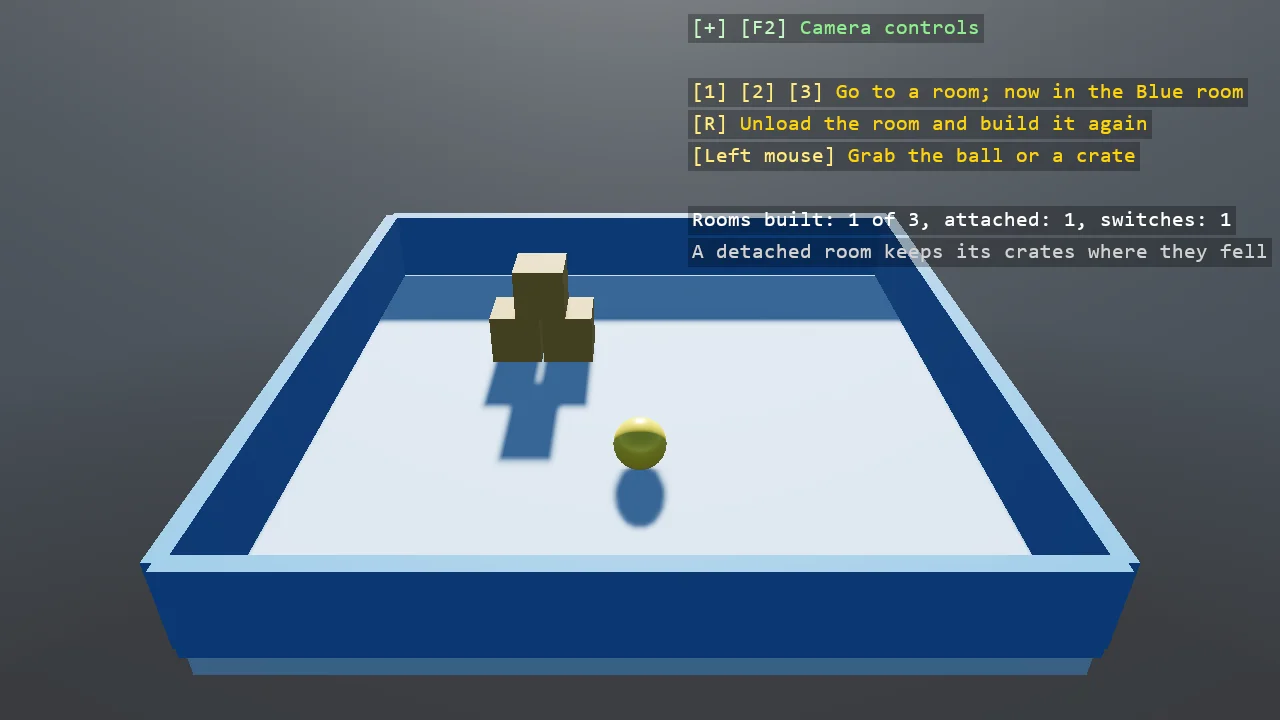
View on GitHub.
using Stride.CommunityToolkit.Bepu;
using Stride.CommunityToolkit.Engine;
using Stride.CommunityToolkit.Rendering.Overlay;
using Stride.CommunityToolkit.Rendering.ProceduralModels;
using Stride.CommunityToolkit.Rendering.Text;
using Stride.CommunityToolkit.Shapes;
using Stride.CommunityToolkit.Skyboxes;
using Stride.Core.Mathematics;
using Stride.Engine;
using Stride.Games;
using Stride.Input;
using Stride.Rendering;

// Rooms as child scenes. A scene can hold scenes, and a child scene is attached by adding it to the
// parent's Children and detached by removing it: its entities leave the world with it, bodies and all,
// and come back where they were when it is attached again. Three rooms are built in code here, each
// a child scene of its own, and only one is attached at a time; the ball is the player, and a room
// change moves it into the new room's scene and puts it on the new floor.
//
// A detached room is not unloaded: it keeps its crates where they fell, which is what a game wants
// when the player comes back. R throws the current room away and builds it again, which is the
// unload-and-load case. The change itself happens under a screen fade, between the fade out and the
// fade in, so the swap is never seen half done.

const float RoomHalf = 6f;

Color[] roomColours = [new(90, 140, 200), new(200, 120, 80), new(100, 180, 110)];
string[] roomNames = ["Blue room", "Orange room", "Green room"];

var rooms = new Scene?[3];
var current = -1;
var switches = 0;

Scene root = null!;
Entity player = null!;
ScreenFade fade = null!;

using var game = new Game();

var sceneSetup = new SceneSetup3D
{
    // The rooms bring their own floors
    Ground = null,
    Camera = CameraSetup.Perspective(position: new Vector3(0f, 9f, 14f), rotation: new Vector3(0f, -30f, 0f)).WithController(),
    WindowTitle = "Scene switching - Stride Community Toolkit",
    Resizable = true,
    DpiAware = true,
}.UseBepu().UseSkybox();

game.Run(sceneSetup, start: Start, update: Update);

void Start(Scene scene)
{
    root = scene;
    fade = game.AddScreenFade();

    // The mouse picks the ball up and throws it, so there is something to do in a room
    game.AddGrabber();

    player = game.CreatePrimitive(Primitive3D.Sphere(0.45f), new BepuPhysicsOptions
    {
        EntityName = "Player",
        Material = game.CreateMaterial(new Color(250, 220, 90), metalness: 0.2f, glossiness: 0.7f),
        Position = new Vector3(0f, 2f, 2f),
    });

    Switch(0);

    TextOverlay.GetOrCreate(game).AddSection("Scene switching", BuildOverlayLines);
}

void Update(Scene scene, GameTime time)
{
    var input = game.Input;

    if (fade.IsRunning) return;

    for (var i = 0; i < rooms.Length; i++)
    {
        if (i != current && (input.IsKeyPressed(Keys.D1 + i) || input.IsKeyPressed(Keys.NumPad1 + i)))
        {
            var target = i;

            // The swap runs while the screen is black, between the two halves of the fade
            fade.Transition(0.35f, () => Switch(target), 0.35f);
        }
    }

    if (input.IsKeyPressed(Keys.R)) fade.Wipe(0.4f, Rebuild, 0.4f);
}

/// <summary>Detaches the current room, attaches the chosen one, built on first use, and moves the player into it.</summary>
void Switch(int index)
{
    var next = rooms[index] ??= BuildRoom(index);

    if (current >= 0 && rooms[current] is { } previous) root.Children.Remove(previous);

    root.Children.Add(next);

    // The player changes scene: out of the old room's, into the new one's, placed before it joins so the body attaches there
    player.Transform.Position = new Vector3(0f, 2f, 2f);
    player.Scene = next;

    current = index;
    switches++;
}

/// <summary>The unload-and-load case: the current room is thrown away and built from nothing, crates back in their stacks.</summary>
void Rebuild()
{
    if (rooms[current] is { } room) root.Children.Remove(room);

    rooms[current] = null;

    var index = current;

    current = -1;
    Switch(index);
}

/// <summary>A room: a floor and four walls in its colour, and a stack of crates to knock over, all in a scene of its own.</summary>
Scene BuildRoom(int index)
{
    var room = new Scene { Name = roomNames[index] };
    var colour = roomColours[index];
    var wallMaterial = game.CreateMaterial(colour, metalness: 0f, glossiness: 0.3f);
    var floorMaterial = game.CreateMaterial(Color.Lerp(colour, Color.White, 0.5f), metalness: 0f, glossiness: 0.2f);
    var crateMaterial = game.CreateMaterial(new Color(190, 150, 90), metalness: 0f, glossiness: 0.3f);

    Add(room, "Floor", Primitive3D.Box(new Vector3(RoomHalf * 2f, 0.5f, RoomHalf * 2f)), floorMaterial, new Vector3(0f, -0.25f, 0f), BodyMode.Static);

    for (var side = 0; side < 4; side++)
    {
        var alongX = side < 2;
        var sign = side % 2 == 0 ? 1f : -1f;
        var size = alongX ? new Vector3(0.3f, 1.5f, RoomHalf * 2f) : new Vector3(RoomHalf * 2f, 1.5f, 0.3f);
        var position = alongX ? new Vector3(sign * RoomHalf, 0.75f, 0f) : new Vector3(0f, 0.75f, sign * RoomHalf);

        Add(room, "Wall", Primitive3D.Box(size), wallMaterial, position, BodyMode.Static);
    }

    // A different stack in each room, so a room is told apart by more than its colour
    var rows = 2 + index;

    for (var row = 0; row < rows; row++)
    {
        for (var column = 0; column <= row; column++)
        {
            var x = (column - row * 0.5f) * 1.05f - 2f;
            var y = (rows - row - 0.5f) * 1.05f;

            Add(room, "Crate", Primitive3D.Cube(1f), crateMaterial, new Vector3(x, y, -2f), BodyMode.Dynamic);
        }
    }

    return room;
}

void Add(Scene room, string name, Primitive3D shape, Material material, Vector3 position, BodyMode body)
{
    var entity = game.CreatePrimitive(shape, new BepuPhysicsOptions
    {
        EntityName = name,
        Body = body,
        Material = material,
        ShareModel = true,
        Position = position,
    });

    entity.Scene = room;
}

IReadOnlyList<TextElement> BuildOverlayLines() =>
[
    new(["1", "2", "3"], $"Go to a room; now in the {(current >= 0 ? roomNames[current] : "void")}", Color.Gold),
    new("R", "Unload the room and build it again", Color.Gold),
    new("Left mouse", "Grab the ball or a crate", Color.Gold),
    new(""),
    new($"Rooms built: {CountBuilt()} of {rooms.Length}, attached: 1, switches: {switches}", Color.White),
    new("A detached room keeps its crates where they fell", Color.LightGray),
];

int CountBuilt()
{
    var built = 0;

    foreach (var room in rooms)
    {
        if (room is not null) built++;
    }

    return built;
}