ShapeBatch Gallery
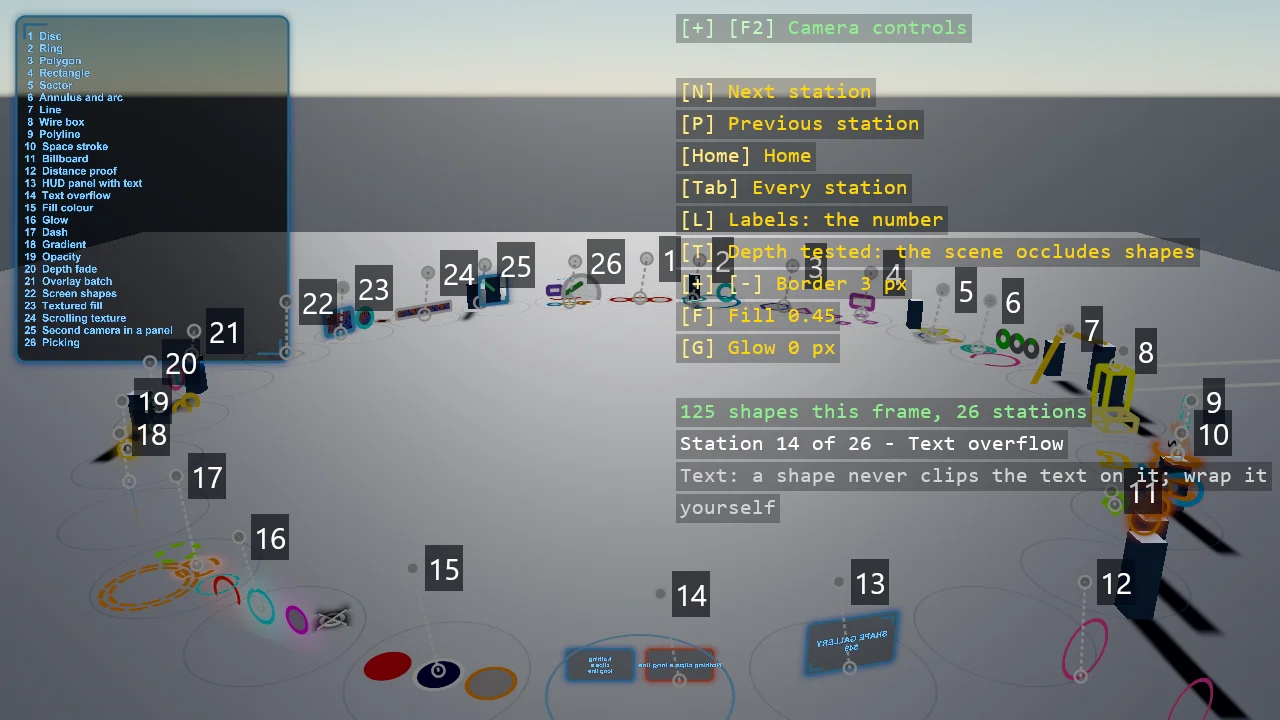
A ring of numbered stations, one ShapeBatch idea each, from a single disc to a scrolling textured panel: discs, rings, polygons and rectangles on any plane, sectors and arcs for pie and progress indicators, thick 3D lines, wire boxes, polyline strokes and space strokes, billboards, a corridor of rings that proves the constant-pixel outline, HUD panels with world text, fill colours, glow, dashes, gradients, opacity, the soft depth fade, overlay versus depth-tested batches, and textured fills. Every station is one method that draws in its own coordinates, so it can be lifted into a game as it is; the ring, labels and index board come from the registry.
The Program.cs file shows how to:
- Registering shape batches with AddShapeBatch, depth-tested, overlay and textured
- One static method per exhibit, drawing in a station's local frame, portable into any game
- A registry that lays out the ring, the labels and the index board on its own
- Numbered labels in screen-space entity text, joined to their exhibit by a dotted pixel line
- An eased camera flight between stations that gives way the moment the visitor takes the controls
- Why a shape never clips the text on it, and why wrapping is the caller's job
- Discs, rings, polygons and rectangles on an arbitrary plane in 3D
- Sectors, annuli and round-capped arcs for pie, donut and progress indicators
- Thick 3D lines and wire boxes from camera-facing capsules
- Polyline strokes with round joins, in pixels or world units, and space strokes through 3D points
- Billboards that keep their shape from any viewpoint, and pixel-radius markers that keep their size
- Why a signed distance function keeps an outline a constant pixel width
- HUD panels with glowing edges and glowing world text, including a live counter
- Fill colours, an outer glow in pixels, dashes animated through their phase, gradients and opacity
- The soft depth fade, where a shape melts into geometry instead of cutting off
- Two batches in one scene, and what the overlay one shows through
- Textured fills from a fill source, clamped for a picture and wrapped for a scrolling stripe
- A second camera rendered into an HDR texture and filled into a shape, built from the engine's own renderers
View on GitHub.
using E11_3D_ShapeBatch_Gallery;
using Example.Common;
using Example.Common.Galleries;
using Stride.CommunityToolkit.Engine;
using Stride.CommunityToolkit.Scripts.Utilities;
using Stride.CommunityToolkit.Shapes;
using Stride.CommunityToolkit.Skyboxes;
using Stride.CommunityToolkit.Windows;
using Stride.Core.Mathematics;
using Stride.Engine;
using Stride.Games;
using Stride.Graphics;
using Stride.Input;

// A gallery of ShapeBatch. Every exhibit is one static method in Stations.*.cs that draws in its
// station's own coordinates and knows nothing about where it stands, so any of them can be copied
// into a game as it is. The ring, the ground, the pillars, the numbered labels with their dotted
// lines and the index board at the centre all come from the registry in Stations.cs: add a demo
// there and the gallery grows to fit, every number after it shifting along.
//
// Every shape is flat - a polygon evaluated per fragment as a signed distance function - but flat
// shapes cover a lot of ground once they can sit on any plane, face the camera, or swing about an
// axis. The point of all of it is the outline: a fixed number of PIXELS wide no matter how far away
// the shape is, because the shader measures it per fragment against the fragment's own clip w
// rather than building it as geometry. Fly down station 12's corridor of rings to see it.
//
// Keys: N and P fly to the next and previous station, Home flies home to the index board, Tab shows
// one station at a time, L widens the labels, T switches the shapes between the depth-tested batch
// and the overlay, G, F and + / - change the glow, the fill and the border for every station.

// "--station 7" starts the visitor at a station instead of the index board - handy for screenshots
var startStation = args.Length >= 2 && args[0] == "--station" && int.TryParse(args[1], out var number) ? number : 0;

Gallery<ShapeStation>? gallery = null;
GalleryBatches? batches = null;
var depthTested = true;
var submitted = 0;

var style = new GalleryStyle();

// Per-monitor DPI awareness, so a 150% display gets a sharp window rather than a stretched one;
// it has to happen before the window exists
WindowsDpiManager.EnablePerMonitorV2();

using var game = new Game();

game.Run(start: Start, update: Update);

void Start(Scene rootScene)
{
    game.Window.AllowUserResizing = true;
    game.Window.Title = "Shape Gallery - Stride Community Toolkit";

    game.SetupBase3D();
    game.Add3DCameraController();
    game.AddSkybox();
    game.AddProfiler();

    // Depth-tested: scene geometry occludes these, so a disc on the floor goes behind a pillar.
    // Overlay: drawn on top of everything, which is what you want for gizmos and debug marks.
    // Two more carry a fill source - a picture, clamped at its edges, and the same picture tiled -
    // because a shader composition is one fill per batch.
    var picture = GalleryPicture.Create(game.GraphicsDevice);
    var pictures = game.AddShapeBatch(depthTest: true);
    var stripes = game.AddShapeBatch(depthTest: true);

    pictures.FillWith(picture);

    batches = new GalleryBatches(
        Scene: game.AddShapeBatch(depthTest: true),
        Overlay: game.AddShapeBatch(depthTest: false),
        Pictures: pictures,
        Stripes: stripes,
        Stripe: stripes.FillWith(picture, scale: new Vector2(4f, 1f), addressMode: TextureAddressMode.Wrap));

    // The text renderers, appended after the camera renderer that draws the shapes, so text lands
    // on top of a panel's fill; neither writes depth, so coplanar is fine
    game.AddWorldTextRenderer();
    game.AddEntityTextRenderer();

    // The frame comes from Example.Common; what a ShapeBatch station needs on top of it - the
    // batches, the visitor's style, which batch to draw through this frame - is put there by these
    var galleryBatches = batches;

    gallery = new Gallery<ShapeStation>(game, rootScene, Stations.All, configure: station =>
    {
        station.Batches = galleryBatches;
        station.Style = style;
    });

    gallery.Prepare = station =>
    {
        station.Shapes = depthTested ? galleryBatches.Scene : galleryBatches.Overlay;
        station.ResetAll();
    };
    gallery.UpdateLabels();

    if (startStation > 0) gallery.GoTo(startStation - 1, instant: true);
    else gallery.GoHome(instant: true);

    DebugOverlay.GetOrCreate(game).AddSection("Gallery", BuildOverlayLines);
}

void Update(Scene scene, GameTime gameTime)
{
    if (gallery is null) return;

    HandleInput(gallery);

    // How many shapes the stations submitted: the gallery's own furniture goes through batches of its own
    var before = Submitted();

    gallery.Update(gameTime);
    submitted = Submitted() - before;
}

void HandleInput(Gallery<ShapeStation> gallery)
{
    if (game.Input.IsKeyPressed(Keys.N)) gallery.Step(+1);
    if (game.Input.IsKeyPressed(Keys.P)) gallery.Step(-1);
    if (game.Input.IsKeyPressed(Keys.Home)) gallery.GoHome();
    if (game.Input.IsKeyPressed(Keys.Tab)) gallery.Solo = !gallery.Solo;
    if (game.Input.IsKeyPressed(Keys.T)) depthTested = !depthTested;

    if (game.Input.IsKeyPressed(Keys.L))
    {
        gallery.LabelDetail = (gallery.LabelDetail + 1) % 3;
        gallery.UpdateLabels();
    }

    if (game.Input.IsKeyPressed(Keys.G))
    {
        style.GlowWidth = style.GlowWidth switch
        {
            < 1f => 4f,
            < 6f => 10f,
            < 16f => 24f,
            _ => 0f,
        };
    }

    if (game.Input.IsKeyPressed(Keys.F))
    {
        style.FillAlpha = style.FillAlpha switch
        {
            < 0.1f => 0.25f,
            < 0.3f => 0.45f,
            < 0.5f => 0.7f,
            _ => 0f,
        };
    }

    if (game.Input.IsKeyPressed(Keys.OemPlus) || game.Input.IsKeyPressed(Keys.Add))
        style.BorderWidth = MathF.Min(style.BorderWidth + 1f, 16f);

    if (game.Input.IsKeyPressed(Keys.OemMinus) || game.Input.IsKeyPressed(Keys.Subtract))
        style.BorderWidth = MathF.Max(style.BorderWidth - 1f, 0f);
}

int Submitted() => batches is null ? 0 : batches.Scene.Count + batches.Overlay.Count + batches.Pictures.Count + batches.Stripes.Count;

IReadOnlyList<TextElement> BuildOverlayLines()
{
    if (gallery is null) return [];

    List<TextElement> lines =
    [
        new("N", "Next station", Color.Gold),
        new("P", "Previous station", Color.Gold),
        new("Home", "Home", Color.Gold),
        new("Tab", gallery.Solo ? "One station at a time" : "Every station", Color.Gold),
        new("L", gallery.LabelDetail switch { 0 => "Labels: the number", 1 => "Labels: the number and the method", _ => "Labels: everything" }, Color.Gold),
        new("T", depthTested ? "Depth tested: the scene occludes shapes" : "Overlay: shapes draw on top", Color.Gold),
        new(["+", "-"], $"Border {style.BorderWidth:0} px", Color.Gold),
        new("F", $"Fill {style.FillAlpha:0.00}", Color.Gold),
        new("G", $"Glow {style.GlowWidth:0} px", Color.Gold),
        new(""),
        new($"{submitted} shapes this frame, {gallery.Stations.Count} stations", Color.LightGreen),
    ];

    // The index board at the centre is the full list; here, only where the visitor stands
    if (gallery.CurrentStation is not { } station)
    {
        if (gallery.Stations.Count > 0) lines.Add(new($"Home - {gallery.Stations.Count} stations; N, P or a pad to visit", Color.White));

        return lines;
    }

    lines.Add(new($"Station {station.Number} of {gallery.Stations.Count} - {station.Exhibit.Title}", Color.White));
    lines.AddRange(OverlayText.Wrap($"{station.Exhibit.Method}: {station.Exhibit.Summary}", Color.LightGray));

    return lines;
}