Simple Geometry (Labelled Triangle)
The smallest possible custom mesh - one triangle from three vertices - with each vertex labelled on screen so the relationship between the numbers in the code and the shape on screen is visible. The labels come from EntityTextComponent, which needs its renderer registered once, and the ground gizmo shows which way the axes point. Useful as a scratchpad when a mesh comes out inside out or facing the wrong way.
The Program.cs file shows how to:
- Building a single triangle from a vertex and index buffer
- Choosing a vertex format: VertexPositionTexture and its Layout
- Labelling vertices on screen to debug a mesh
- Registering the label renderer with AddSceneRenderer(new EntityTextRenderer())
- Orienting yourself with a named-axis ground gizmo
- Using helpers: SetupBase3DScene, AddSkybox, AddGroundGizmo, AddProfiler, CreateFlatMaterial
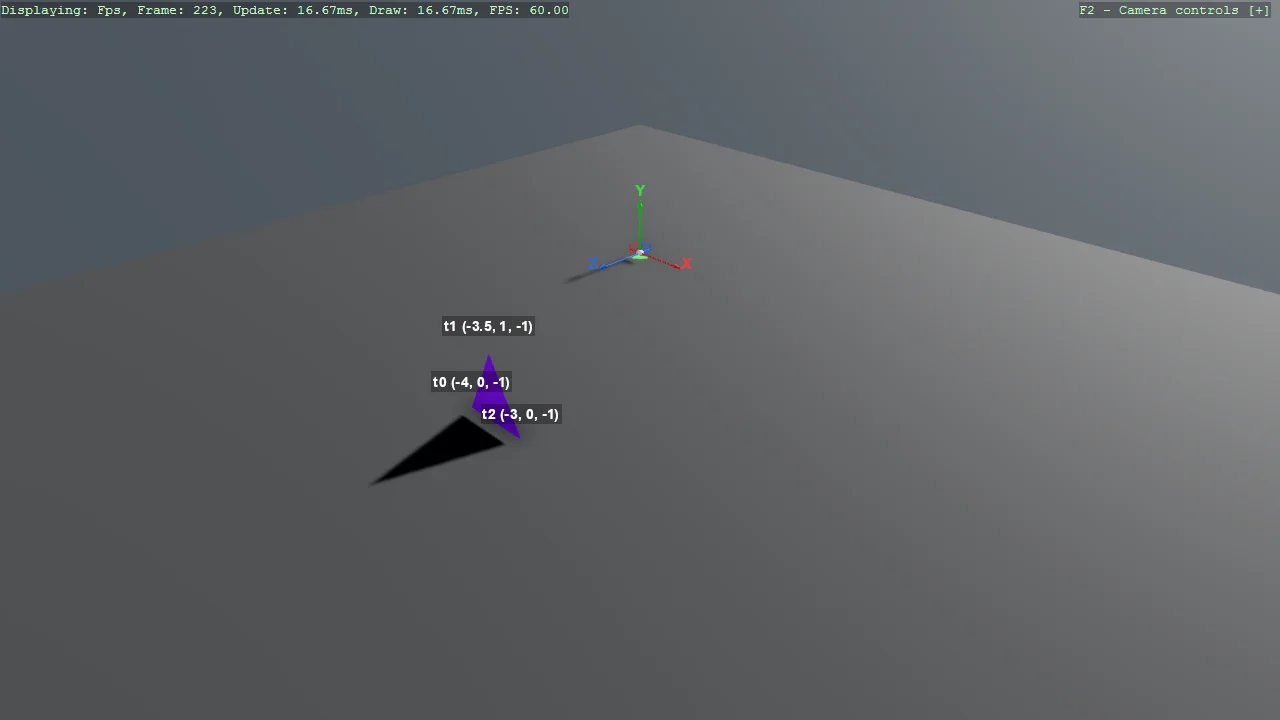
View on GitHub.
using Stride.CommunityToolkit.Bepu;
using Stride.CommunityToolkit.Engine;
using Stride.CommunityToolkit.Rendering.Text;
using Stride.CommunityToolkit.Skyboxes;
using Stride.Core.Mathematics;
using Stride.Engine;
using Stride.Graphics;
using Stride.Rendering;
using Stride.Rendering.ProceduralModels;

using var game = new Game();

game.Run(start: scene =>
{
    game.SetupBase3DScene();
    game.AddSkybox();
    game.AddGroundGizmo(new(-4, 0, -4), showAxisName: true);
    game.AddProfiler();

    // Add 2D text renderer that renders screen-space labels for entities with EntityTextComponent
    game.AddSceneRenderer(new EntityTextRenderer());

    AddTriangleEntity(scene);

    //var myModel = new QuadPrimitiveModel();
    //var model2 = myModel.Generate(game.Services);
    //model2.Materials.Add(game.CreateFlatMaterial(Color.Green));

    //var meshEntity2 = new Entity("a", new Vector3(1, 1, 1));
    //meshEntity2.Components.Add(new ModelComponent(model2));

    //// Add screen-space labels for quad vertices (local positions, shown in world via renderer)
    //if (myModel.Vertices.Count > 0)
    //{
    //    AddVertexLabels(scene, meshEntity2, myModel.Vertices, labelPrefix: "q");
    //}

    //meshEntity2.Scene = scene;
});

// Create and add a simple triangle entity to the scene
void AddTriangleEntity(Scene scene)
{
    const float startX = -4f;
    const float startZ = -1f;

    var vertices = new VertexPositionTexture[3];
    vertices[0].Position = new Vector3(startX, 0f, startZ);
    vertices[1].Position = new Vector3(startX + 0.5f, 1f, startZ);
    vertices[2].Position = new Vector3(startX + 1f, 0f, startZ);

    var vertexBuffer = Stride.Graphics.Buffer.Vertex.New(game.GraphicsDevice, vertices, GraphicsResourceUsage.Dynamic);
    int[] indices = [0, 1, 2];
    var indexBuffer = Stride.Graphics.Buffer.Index.New(game.GraphicsDevice, indices);

    var mesh = new Mesh
    {
        Draw = new MeshDraw
        {
            PrimitiveType = PrimitiveType.TriangleList,
            DrawCount = indices.Length,
            IndexBuffer = new IndexBufferBinding(indexBuffer, true, indices.Length),
            VertexBuffers = [ new VertexBufferBinding(vertexBuffer,
                                  VertexPositionTexture.Layout, vertexBuffer.ElementCount) ],
        }
    };

    var model = new Model() { Meshes = [mesh] };
    model.Materials.Add(game.CreateFlatMaterial(Color.BlueViolet));

    var entity = new Entity("Triangle", new Vector3(2f, 0, 2f));
    entity.Components.Add(new ModelComponent(model));

    // Add labels for each triangle vertex (local space positions)
    AddVertexLabels(scene, entity, [vertices[0].Position, vertices[1].Position, vertices[2].Position], labelPrefix: "t");

    entity.Scene = scene;
}

// Small reusable helper: attaches child entities with EntityTextComponent for each local-space point
void AddVertexLabels(Scene scene, Entity parent, IReadOnlyCollection<Vector3> localPositions, string? labelPrefix = null)
{
    int i = 0;
    foreach (var p in localPositions)
    {
        var labelEntity = new Entity($"{labelPrefix ?? "v"}{i}")
        {
            new EntityTextComponent
            {
                Text = $"{(labelPrefix ?? "v")}{i} ({p.X:0.##}, {p.Y:0.##}, {p.Z:0.##})",
                FontSize = 14,
                Offset = new Vector2(0, -18),
                TextColor = Color.White,
                // Anchor, not Alignment: this is what actually centres a label over its vertex.
                // TextAlignment only arranges lines within a multi-line block and does nothing at
                // all to a single line, so the label used to sit to the right of the point.
                Anchor = TextAnchor.BottomCenter,
                EnableBackground = true,
                BackgroundColor = new Color4(0, 0, 0, 0.5f),
                Padding = new Vector2(2)
            }
        };

        // Place in the same local space as mesh vertices so the label follows parent transforms
        labelEntity.Transform.Position = p;
        //labelEntity.Scene = scene;
        parent.AddChild(labelEntity);

        i++;
    }
}

public class QuadPrimitiveModel : PrimitiveProceduralModelBase
{
    // A custom property that shows up in Game Studio
    /// <summary>
    /// Gets or sets the size of the model.
    /// </summary>
    public Vector3 Size { get; set; } = Vector3.One;

    /// <summary>
    /// Local-space vertex positions used for the generated quad. Useful for debug labels.
    /// </summary>
    public IReadOnlyList<Vector3> Vertices { get; private set; } = Array.Empty<Vector3>();

    protected override GeometricMeshData<VertexPositionNormalTexture> CreatePrimitiveMeshData()
    {
        // First generate the arrays for vertices and indices with the correct size
        var vertexCount = 4;
        var indexCount = 6;
        var vertices = new VertexPositionNormalTexture[vertexCount];
        var indices = new int[indexCount];

        // Create custom vertices, in this case just a quad facing in Y direction
        var normal = Vector3.UnitZ;
        vertices[0] = new VertexPositionNormalTexture(new Vector3(-0.5f, 0.5f, 0) * Size, normal, new Vector2(0, 0));
        vertices[1] = new VertexPositionNormalTexture(new Vector3(0.5f, 0.5f, 0) * Size, normal, new Vector2(1, 0));
        vertices[2] = new VertexPositionNormalTexture(new Vector3(-0.5f, -0.5f, 0) * Size, normal, new Vector2(0, 1));
        vertices[3] = new VertexPositionNormalTexture(new Vector3(0.5f, -0.5f, 0) * Size, normal, new Vector2(1, 1));

        // Capture positions for external use (labels)
        Vertices =
        [
            vertices[0].Position,
            vertices[1].Position,
            vertices[2].Position,
            vertices[3].Position
        ];

        // Create custom indices
        indices[0] = 0;
        indices[1] = 1;
        indices[2] = 2;
        indices[3] = 1;
        indices[4] = 3;
        indices[5] = 2;

        // Create the primitive object for further processing by the base class
        return new GeometricMeshData<VertexPositionNormalTexture>(vertices, indices, isLeftHanded: false) { Name = "MyModel" };
    }
}