2D Spawn Menu
Drive a scene from the keyboard without filling the screen with instructions. DebugTextDropdown shows a single collapsed line until its key is pressed, then expands into a list where every entry has its own key, label, colour and callback. Press C to open the menu and 1-7 to drop that shape into the 2D scene; the menu is configured to stay open so shapes can be added one after another. The dropdown reads no input by itself and does not draw itself either: the example feeds it the InputManager each frame and registers its lines as a DebugOverlay section, so it shares one screen position and one hide key with the camera controller's help instead of being drawn separately.
The Program.cs file shows how to:
- Building a collapsible keyboard menu with DebugTextDropdown
- Giving each entry its own key, label, colour and callback
- Keeping a menu open for repeated use with CloseOnSelect
- Sharing one on-screen block with the camera help through a DebugOverlay section
- Spawning entities at runtime from keyboard input
- Creating 2D primitives (Circle, Capsule, Rectangle, Square, RegularPolygon, Triangle, Polygon)
- Using helpers: SceneSetup2D, CreatePrimitive, CreateFlatMaterial, AddGrabber
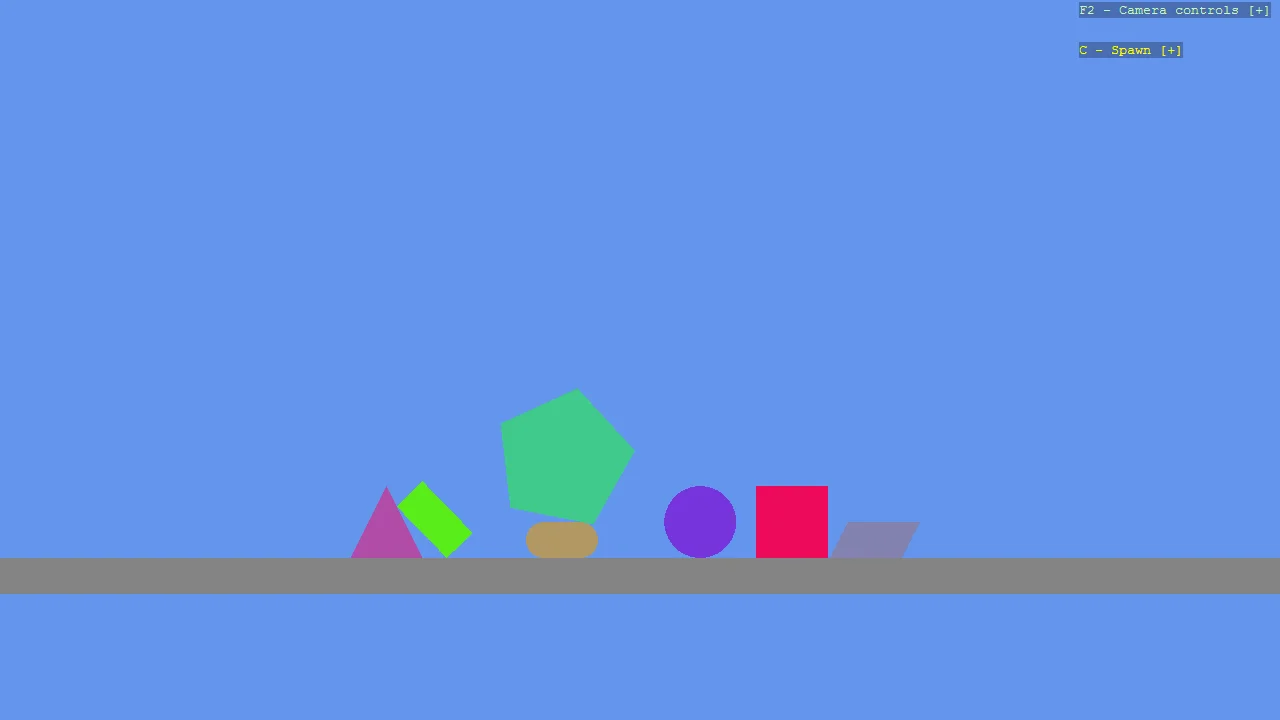
View on GitHub.
using Stride.CommunityToolkit.Bepu;
using Stride.CommunityToolkit.Engine;
using Stride.CommunityToolkit.Mathematics;
using Stride.CommunityToolkit.Rendering.ProceduralModels;
using Stride.CommunityToolkit.Rendering.Text;
using Stride.Core.Mathematics;
using Stride.Engine;
using Stride.Games;
using Stride.Input;

// A scene with seven shapes to choose from would normally cost seven lines of on-screen instructions,
// permanently. DebugTextDropdown collapses them into one line until you press its key.
//
// The dropdown owns no input of its own: Update() reads the keyboard you give it, and GetLines()
// hands its current appearance to a DebugOverlay section. That is what puts it in the same block as
// the camera controller's help, sharing one screen position and one hide key, rather than being a
// second patch of text somewhere else that F3 could end up drawing on top of.
//
// Each entry names its own key and carries its own callback, so what a choice does is entirely up to
// the caller - here, dropping a shape into the scene.
//
// CloseOnSelect = false keeps the list up after a choice, which is what you want for something used
// repeatedly. Leave it at the default to have the list collapse as soon as a choice is made.

var random = new Random(1);
var parallelogramVertices = new Vector2[]
{
    new(-0.5f, -0.25f),
    new(0.5f, -0.25f),
    new(0.75f, 0.25f),
    new(-0.25f, 0.25f),
};

List<ShapeItem> shapes = [
    new(Primitive2D.Circle()),
    new(Primitive2D.Capsule()),
    new(Primitive2D.Rectangle()),
    new(Primitive2D.Square()),
    new(Primitive2D.RegularPolygon(1, 5)),
    new(Primitive2D.Triangle()),
    new(Primitive2D.Polygon(parallelogramVertices), "Parallelogram")
];

Scene? scene = null;
DebugTextDropdown? spawnMenu = null;

using var game = new Game();

game.Run(new SceneSetup2D().UseBepu(), start: Start, update: Update);

void Start(Scene rootScene)
{
    // Left mouse grabs any body, drags it and throws it on release
    game.AddGrabber();

    scene = rootScene;

    // The starting column, one of each shape
    foreach (var (index, shape) in shapes.Index())
    {
        Spawn(shape, new Vector3(0, 10 + index * 1.5f, 0));
    }

    spawnMenu = new DebugTextDropdown
    {
        Title = "Spawn",
        ToggleKey = Keys.C,
        TitleColor = Color.Yellow,

        // Stay open so shapes can be dropped one after another
        CloseOnSelect = false,

        // Entries are generated from the list above, so adding a shape there adds it to the menu.
        // Keys are yours to pick, which is why a menu is not limited to the ten digits
        Items = [.. shapes.Index().Select(pair => new DebugTextDropdownItem(
            Key: (Keys)(Keys.D1 + pair.Index),
            Text: pair.Item.Name ?? pair.Item.Type.Name,
            Action: () => Spawn(pair.Item, new Vector3((random.NextSingle() - 0.5f) * 6f, 14, 0))))]
    };

    // No order given, so it lands after the camera controller's help, which registers at -100
    var overlay = DebugOverlay.GetOrCreate(game);
    overlay.SectionGap = 0;
    overlay.AddSection("Spawn", () => [new("Left mouse", "Grab a shape, drag it, let go to throw", Color.Gold), .. spawnMenu.GetLines()]);
}

void Spawn(ShapeItem shape, Vector3 position)
{
    var bepuOptions = new Bepu2DPhysicsOptions()
    {
        Material = game.CreateFlatMaterial(random.NextColor()),
    };

    // The pentagon is the big one, so its collider gets a depth to match
    if (shape.Type is Primitive2D.RegularPolygonShape) bepuOptions.Depth = 4;

    var entity = game.CreatePrimitive(shape.Type, bepuOptions);

    entity.Transform.Position = position;
    entity.Scene = scene;
}

void Update(Scene rootScene, GameTime time)
{
    // Only the input. The overlay draws the menu for us, every frame, from GetLines()
    spawnMenu?.Update(game.Input);
}

/// <summary>One shape the menu can spawn. <paramref name="Name"/> overrides the label, so two
/// entries built from the same primitive type can still be told apart.</summary>
public record ShapeItem(Primitive2D Type, string? Name = null);