Split Screen
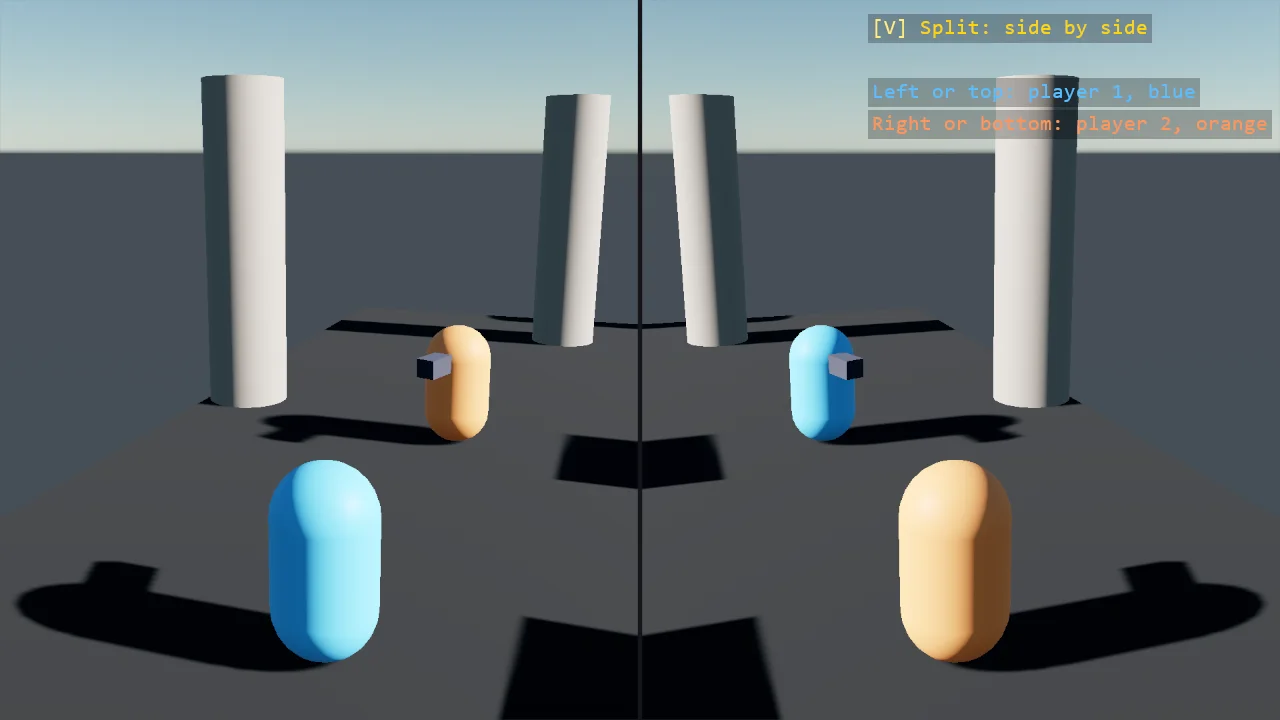
Two players in one window. Each has a camera that draws into a texture through AddRenderTextureCamera, and the window shows the two textures side by side as screen-space rectangles, one ShapeBatch filled with each; V turns the split from side by side to top and bottom. The halves are drawn after the post effects, where the feeds do not see them, and each feed tone-maps itself.
The Program.cs file shows how to:
- One render-texture camera per player, placed behind it every frame
- A screen-space rectangle filled with a feed's texture, one ShapeBatch per feed, with the camera's aspect following the rectangle
- The split as geometry, side by side or top and bottom by a key
- Halves drawn after the post effects, out of the feeds' sight, with a tone map on each feed
- Using helpers: SceneSetup3D, UseBepu, UseSkybox, CreatePrimitive, CreateMaterial, AddRenderTextureCamera, FillWith, FaceDirection, LookAt, TextOverlay
View on GitHub.
using Stride.CommunityToolkit.Bepu;
using Stride.CommunityToolkit.Engine;
using Stride.CommunityToolkit.Rendering.Compositing;
using Stride.CommunityToolkit.Rendering.Overlay;
using Stride.CommunityToolkit.Rendering.ProceduralModels;
using Stride.CommunityToolkit.Rendering.Text;
using Stride.CommunityToolkit.Shapes;
using Stride.CommunityToolkit.Skyboxes;
using Stride.Core.Mathematics;
using Stride.Engine;
using Stride.Games;
using Stride.Input;
using Stride.Rendering.Images;

// Two players, one window. Each player has a camera of its own that draws into a texture, through
// AddRenderTextureCamera, and the window shows the two textures side by side: two screen-space
// rectangles filled with them, through a ShapeBatch each, since a batch has one fill source. The game's
// own camera still exists and still renders, underneath; the rectangles cover it. That is the whole
// recipe: no second window, no compositor surgery, and the split is a matter of where the rectangles
// are, so V turns it from side by side to top and bottom.
//
// The halves are drawn after the post effects, in the stage the feeds do not render: a feed draws the
// same stages as the main view, so halves drawn with the scene would appear inside each feed, a picture
// within the picture. That stage has no tone map, so each feed brings its own.
//
// E09_3D_RenderToTexture is the example for the feeds themselves.

const float TrackRadius = 7f;
const float PlayerSpeed = 0.5f;

var players = new Entity[2];
var cameras = new Entity[2];
var feeds = new RenderTextureCamera[2];
var batches = new ShapeBatch[2];
Color[] colours = [new(90, 190, 255), new(255, 150, 90)];
var vertical = false;

using var game = new Game();

var sceneSetup = new SceneSetup3D
{
    Camera = CameraSetup.Perspective(position: new Vector3(0f, 30f, 0.01f), rotation: new Vector3(0f, -89f, 0f)),
    WindowTitle = "Split screen - Stride Community Toolkit",
    Resizable = true,
    DpiAware = true,
}.UseBepu().UseSkybox();

game.Run(sceneSetup, start: Start, update: Update);

void Start(Scene scene)
{
    BuildScenery(scene);

    for (var i = 0; i < 2; i++)
    {
        players[i] = AddPlayer(scene, $"Player {i + 1}", colours[i]);

        // The camera entity is placed each frame; the feed is a texture the batch below draws with
        cameras[i] = new Entity($"Camera {i + 1}") { Scene = scene };
        feeds[i] = game.AddRenderTextureCamera(cameras[i], 960, 1080, postEffects: fx => fx.ColorTransforms.Transforms.Add(new ToneMap()));
        batches[i] = game.AddShapeBatch(afterPostEffects: true);
        batches[i].FillWith(feeds[i].Texture);
    }

    TextOverlay.GetOrCreate(game).AddSection("Split screen", BuildOverlayLines);
}

void Update(Scene scene, GameTime time)
{
    if (game.Input.IsKeyPressed(Keys.V)) vertical = !vertical;

    var seconds = (float)time.Total.TotalSeconds;

    for (var i = 0; i < 2; i++)
    {
        MovePlayer(i, seconds);
        FollowPlayer(i);
        DrawFeed(i);
    }
}

/// <summary>A capsule with a nose, so the way it faces is visible from behind.</summary>
Entity AddPlayer(Scene scene, string name, Color colour)
{
    var player = game.CreatePrimitive(Primitive3D.Capsule(0.35f, 0.6f), new PrimitiveEntityOptions
    {
        EntityName = name,
        Body = BodyMode.None,
        Material = game.CreateMaterial(colour, metalness: 0f, glossiness: 0.5f),
    });

    var nose = game.CreatePrimitive(Primitive3D.Box(new Vector3(0.2f, 0.2f, 0.5f)), new PrimitiveEntityOptions
    {
        EntityName = $"{name} nose",
        Body = BodyMode.None,
        Material = game.CreateMaterial(new Color(60, 60, 70)),
    });

    nose.Transform.Position = new Vector3(0f, 0.3f, -0.45f);
    player.AddChild(nose);
    player.Scene = scene;

    return player;
}

// The players walk circles in opposite directions, each facing the way it goes
void MovePlayer(int index, float seconds)
{
    var direction = index == 0 ? 1f : -1f;
    var angle = seconds * PlayerSpeed * direction + index * MathUtil.Pi;
    var position = new Vector3(MathF.Cos(angle) * TrackRadius, 0.65f, MathF.Sin(angle) * TrackRadius);
    var heading = new Vector3(-MathF.Sin(angle), 0f, MathF.Cos(angle)) * direction;

    players[index].Transform.Position = position;
    players[index].Transform.FaceDirection(heading);
}

// Each camera hangs behind and above its player and looks a little ahead of it
void FollowPlayer(int index)
{
    var player = players[index].Transform;
    var forward = Vector3.Transform(-Vector3.UnitZ, player.Rotation);
    var camera = cameras[index].Transform;

    camera.Position = player.Position - forward * 5f + Vector3.UnitY * 2.5f;
    camera.LookAt(player.Position + forward * 2f + Vector3.UnitY * 0.8f);
}

/// <summary>The feed's half of the window: a screen-space rectangle filled with its texture, plus a divider on the seam.</summary>
void DrawFeed(int index)
{
    var batch = batches[index];
    var size = batch.ScreenSize;
    var half = vertical ? new Vector2(size.X, size.Y * 0.5f) : new Vector2(size.X * 0.5f, size.Y);
    var centre = vertical
        ? new Vector2(size.X * 0.5f, size.Y * (0.25f + index * 0.5f))
        : new Vector2(size.X * (0.25f + index * 0.5f), size.Y * 0.5f);

    // The helper gave the camera its texture's aspect, 960 by 1080; the half changes with the window and the split,
    // so the camera's aspect follows the rectangle, and the picture keeps its proportions whatever the window
    feeds[index].Camera.AspectRatio = half.X / half.Y;

    batch.Screen = true;
    batch.Fill.Set(Color.White, 1f);
    batch.BorderWidth = 0f;
    batch.DrawRectangle(new Vector3(centre, 0f), Vector3.UnitX, Vector3.UnitY, half, Color.White);

    // The seam: a dark line between the two pictures, drawn by whichever batch is drawn second
    if (index == 1)
    {
        batch.Textured = false;
        batch.DrawPixelLine(
            vertical ? new Vector3(0f, size.Y * 0.5f, 0f) : new Vector3(size.X * 0.5f, 0f, 0f),
            vertical ? new Vector3(size.X, size.Y * 0.5f, 0f) : new Vector3(size.X * 0.5f, size.Y, 0f),
            3f, new Color(20, 20, 24));
        batch.Textured = true;
    }

    batch.Screen = false;
}

/// <summary>A ground, a ring of pillars round the track and a few blocks inside it, so the feeds have something to pass.</summary>
void BuildScenery(Scene scene)
{
    var stone = game.CreateMaterial(new Color(150, 140, 130), metalness: 0f, glossiness: 0.3f);

    for (var i = 0; i < 10; i++)
    {
        var angle = i * MathUtil.TwoPi / 10f;
        var pillar = game.CreatePrimitive(Primitive3D.Cylinder(0.5f, 4f), new PrimitiveEntityOptions
        {
            EntityName = "Pillar",
            Body = BodyMode.Static,
            Material = stone,
            ShareModel = true,
            Position = new Vector3(MathF.Cos(angle) * (TrackRadius + 3f), 2f, MathF.Sin(angle) * (TrackRadius + 3f)),
        });

        pillar.Scene = scene;
    }

    for (var i = 0; i < 4; i++)
    {
        var angle = i * MathUtil.PiOverTwo + MathUtil.PiOverFour;
        var block = game.CreatePrimitive(Primitive3D.Cube(1.5f), new PrimitiveEntityOptions
        {
            EntityName = "Block",
            Body = BodyMode.Static,
            Material = stone,
            ShareModel = true,
            Position = new Vector3(MathF.Cos(angle) * 3f, 0.75f, MathF.Sin(angle) * 3f),
        });

        block.Scene = scene;
    }
}

IReadOnlyList<TextElement> BuildOverlayLines() =>
[
    new("V", vertical ? "Split: top and bottom" : "Split: side by side", Color.Gold),
    new(""),
    new("Left or top: player 1, blue", colours[0]),
    new("Right or bottom: player 2, orange", colours[1]),
];