3D Text Shaders
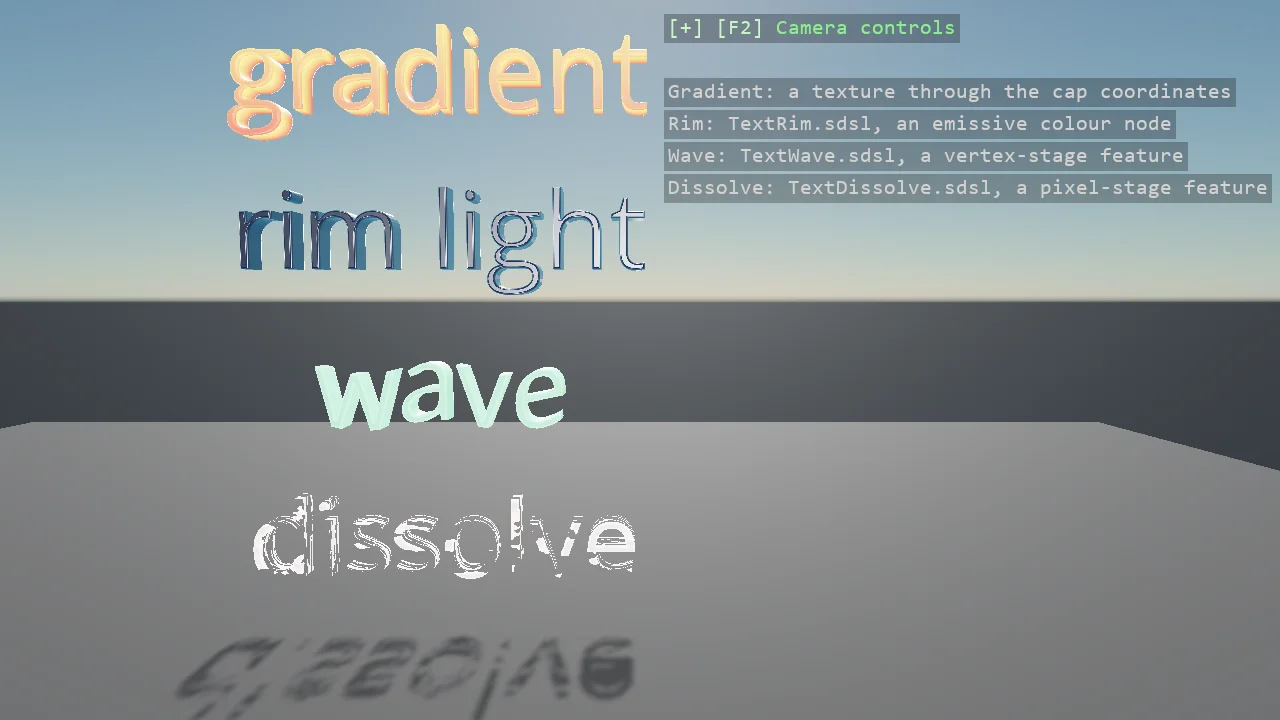
Four materials on the same solid lettering, which is geometry like any other with normals and texture coordinates: a gradient texture read through the caps' coordinates, a rim light from a shader class of twenty lines as an emissive node, a wave that moves the vertices along the word on the engine's clock through a feature in the vertex stage, and a dissolve with a glowing edge through a feature in the pixel stage, its amount driven every frame. Each shader is in the example's Effects folder and compiled at build like any other.
The Program.cs file shows how to:
- A text mesh's texture coordinates - caps across the block, walls along the outline and through the depth
- A texture node in the diffuse slot - ComputeTextureColor with clamped addressing
- A shader class as a colour node - ComputeShaderClassColor with MixinReference, keys set on the pass
- A material feature in the vertex stage - IMaterialDisplacementFeature and SetStreamFinalModifier, Global.Time
- A material feature in the pixel stage - IMaterialTransparencyFeature with a discard, driven per frame
- Using helpers: SceneSetup3D, AddAllDirectionLighting, TextMesh, TextBevel, DebugOverlay
View on GitHub.
using E03_3D_TextShaders;
using Stride.CommunityToolkit.Engine;
using Stride.CommunityToolkit.Rendering.Text;
using Stride.CommunityToolkit.Skyboxes;
using Stride.Core.Mathematics;
using Stride.Engine;
using Stride.Games;
using Stride.Graphics;
using Stride.Rendering;
using Stride.Rendering.Materials;
using Stride.Rendering.Materials.ComputeColors;

// Four materials on the same solid lettering. A text mesh is geometry like any other, with normals and
// texture coordinates (across the text block on the caps, along the outline and through the depth on
// the walls), so everything the material system can do to a sphere it can do to a word:
//
//   1. Gradient: a one-pixel-wide texture read through the caps' texture coordinates, top to bottom.
//      No shader of this example's own; a texture node in the diffuse slot.
//   2. Rim: an emissive colour from a shader class of twenty lines (TextRim.sdsl), bright where the
//      surface turns away from the eye. A node of your own in a slot.
//   3. Wave: the vertex stage lifts every vertex by a wave running along the word, on the engine's
//      own clock (TextWave.sdsl through WaveFeature). A feature of your own in a stage.
//   4. Dissolve: the pixel stage discards by noise over the texture coordinates and glows at the edge,
//      with the amount driven every frame (TextDissolve.sdsl through DissolveFeature).
//
// The shader classes are in Effects and compiled by the asset compiler at build, like any shader; the
// keys classes they produce (TextWaveKeys, TextDissolveKeys, TextRimKeys) are generated with them.
// E02_3D_Material_Gallery has the same ideas on primitives, and more of them.

WindowsDpiManager.EnablePerMonitorV2();

Material? dissolve = null;

using var game = new Game();

var sceneSetup = new SceneSetup3D
{
    // Straight in front of the words and a little to the right, so they sit left of the overlay
    Camera = CameraSetup.Perspective(position: new Vector3(1.4f, 2.3f, 6.2f), rotation: new Vector3(0f, -4f, 0f)).WithController(),
    Profiler = true,
}.UseSkybox();

game.Run(sceneSetup, start: Start, update: Update);

void Start(Scene scene)
{
    game.Window.AllowUserResizing = true;
    game.Window.Title = "3D text shaders - Stride Community Toolkit";

    // Six lights down the world axes, so the lettering reads from every side
    game.AddAllDirectionLighting(intensity: 20f, showLightGizmo: false);

    dissolve = DissolveMaterial();

    Place(scene, "gradient", 3.9f, GradientMaterial());
    Place(scene, "rim light", 2.8f, RimMaterial());
    Place(scene, "wave", 1.7f, WaveMaterial());
    Place(scene, "dissolve", 0.6f, dissolve);

    DebugOverlay.GetOrCreate(game).AddSection("Text shaders", static () =>
    [
        new("Gradient: a texture through the cap coordinates", Color.LightGray),
        new("Rim: TextRim.sdsl, an emissive colour node", Color.LightGray),
        new("Wave: TextWave.sdsl, a vertex-stage feature", Color.LightGray),
        new("Dissolve: TextDissolve.sdsl, a pixel-stage feature", Color.LightGray),
    ]);
}

void Update(Scene scene, GameTime time)
{
    // The dissolve breathes: its amount is a pass parameter, set every frame through the generated key
    var amount = 0.3f + 0.25f * MathF.Sin((float)time.Total.TotalSeconds * 0.8f);

    dissolve?.Passes[0].Parameters.Set(TextDissolveKeys.DissolveAmount, amount);
}

/// <summary>One word, bevelled, at a height, with a material.</summary>
void Place(Scene scene, string word, float y, Material material)
{
    var options = new TextMeshOptions { Size = 0.75f, Depth = 0.25f, Anchor = TextAnchor.MiddleCenter, Bevel = new TextBevel(size: 0.015f, thickness: 0.03f, segments: 3) };

    var entity = new Entity($"Text {word}")
    {
        new ModelComponent { Model = TextMesh.CreateModel(game.GraphicsDevice, material, MeshFont.Default, word, options) },
    };

    entity.Transform.Position = new Vector3(0f, y, 0f);
    entity.Scene = scene;
}

/// <summary>
/// A gradient texture, one pixel wide and 64 tall, in the diffuse slot: the caps' texture coordinates
/// run 0..1 top to bottom across the text block, so every letter shades from the top colour to the
/// bottom one; the walls run their v through the depth, so they take the whole gradient front to back.
/// </summary>
Material GradientMaterial()
{
    const int Height = 64;
    var pixels = new Color[Height];
    var top = new Color(255, 215, 90);
    var bottom = new Color(220, 70, 60);

    for (var i = 0; i < Height; i++) pixels[i] = Color.Lerp(top, bottom, i / (float)(Height - 1));

    var gradient = Texture.New2D(game.GraphicsDevice, 1, Height, PixelFormat.R8G8B8A8_UNorm_SRgb, pixels);

    return game.CreateMaterial(new MaterialDescriptor
    {
        Attributes =
        {
            Diffuse = new MaterialDiffuseMapFeature(new ComputeTextureColor(gradient) { AddressModeU = TextureAddressMode.Clamp, AddressModeV = TextureAddressMode.Clamp }),
            DiffuseModel = new MaterialDiffuseLambertModelFeature(),
            MicroSurface = new MaterialGlossinessMapFeature(new ComputeFloat(0.55f)),
            Specular = new MaterialMetalnessMapFeature(new ComputeFloat(0f)),
            SpecularModel = new MaterialSpecularMicrofacetModelFeature(),
        },
    });
}

/// <summary>A dark surface with a rim of light where it turns away from the eye: a shader class as the emissive colour.</summary>
Material RimMaterial()
{
    var material = game.CreateMaterial(new MaterialDescriptor
    {
        Attributes =
        {
            Diffuse = new MaterialDiffuseMapFeature(new ComputeColor(new Color(18, 24, 40))),
            DiffuseModel = new MaterialDiffuseLambertModelFeature(),
            MicroSurface = new MaterialGlossinessMapFeature(new ComputeFloat(0.7f)),
            Specular = new MaterialMetalnessMapFeature(new ComputeFloat(0.2f)),
            SpecularModel = new MaterialSpecularMicrofacetModelFeature(),
            Emissive = new MaterialEmissiveMapFeature(new ComputeShaderClassColor { MixinReference = "TextRim" }) { Intensity = new ComputeFloat(1f), UseAlpha = false },
        },
    });

    // The shader's cbuffer became keys; set once on the pass
    material.Passes[0].Parameters.Set(TextRimKeys.RimColor, new Vector3(0.3f, 1.6f, 2.4f));
    material.Passes[0].Parameters.Set(TextRimKeys.RimPower, 2.5f);

    return material;
}

/// <summary>A plain surface whose vertices move: the feature in the displacement slot does it.</summary>
Material WaveMaterial()
    => game.CreateMaterial(new MaterialDescriptor
    {
        Attributes =
        {
            Diffuse = new MaterialDiffuseMapFeature(new ComputeColor(new Color(120, 200, 150))),
            DiffuseModel = new MaterialDiffuseLambertModelFeature(),
            MicroSurface = new MaterialGlossinessMapFeature(new ComputeFloat(0.5f)),
            Specular = new MaterialMetalnessMapFeature(new ComputeFloat(0f)),
            SpecularModel = new MaterialSpecularMicrofacetModelFeature(),
            Displacement = new WaveFeature(),
        },
    });

/// <summary>A surface that dissolves with a glowing edge: the feature in the transparency slot, and an emissive slot for the edge to write into.</summary>
Material DissolveMaterial()
    => game.CreateMaterial(new MaterialDescriptor
    {
        Attributes =
        {
            Diffuse = new MaterialDiffuseMapFeature(new ComputeColor(new Color(200, 205, 215))),
            DiffuseModel = new MaterialDiffuseLambertModelFeature(),
            MicroSurface = new MaterialGlossinessMapFeature(new ComputeFloat(0.4f)),
            Specular = new MaterialMetalnessMapFeature(new ComputeFloat(0f)),
            SpecularModel = new MaterialSpecularMicrofacetModelFeature(),
            Emissive = new MaterialEmissiveMapFeature(new ComputeColor(Color.Black)) { Intensity = new ComputeFloat(1f) },
            Transparency = new DissolveFeature(),
        },
    });