Time Control
The simulation has a clock of its own, with three knobs: TimeScale runs it slower or faster than the game, Enabled pauses it, and PoseGravity changes while it runs. A dropper releases a ball every half second on the game clock while a kinematic bar spins on the physics clock, so slowing the simulation queues balls in the air over a bar that barely turns, and pausing it hangs them there. A component implementing ISimulationUpdate counts the physics steps, the simulation's clock read exactly.
The Program.cs file shows how to:
- BepuSimulation.TimeScale, Enabled and PoseGravity changed while the game runs
- The game clock and the physics clock side by side, and what runs on which
- A kinematic body turned by a velocity, so its motion follows the physics clock
- ISimulationUpdate on a component, called once per fixed step with the step's length
- MaxStepPerFrame, the cap that lets a fast simulation keep up with the clock
- Using helpers: SceneSetup3D, CreatePrimitive, AddGrabber, TextOverlay
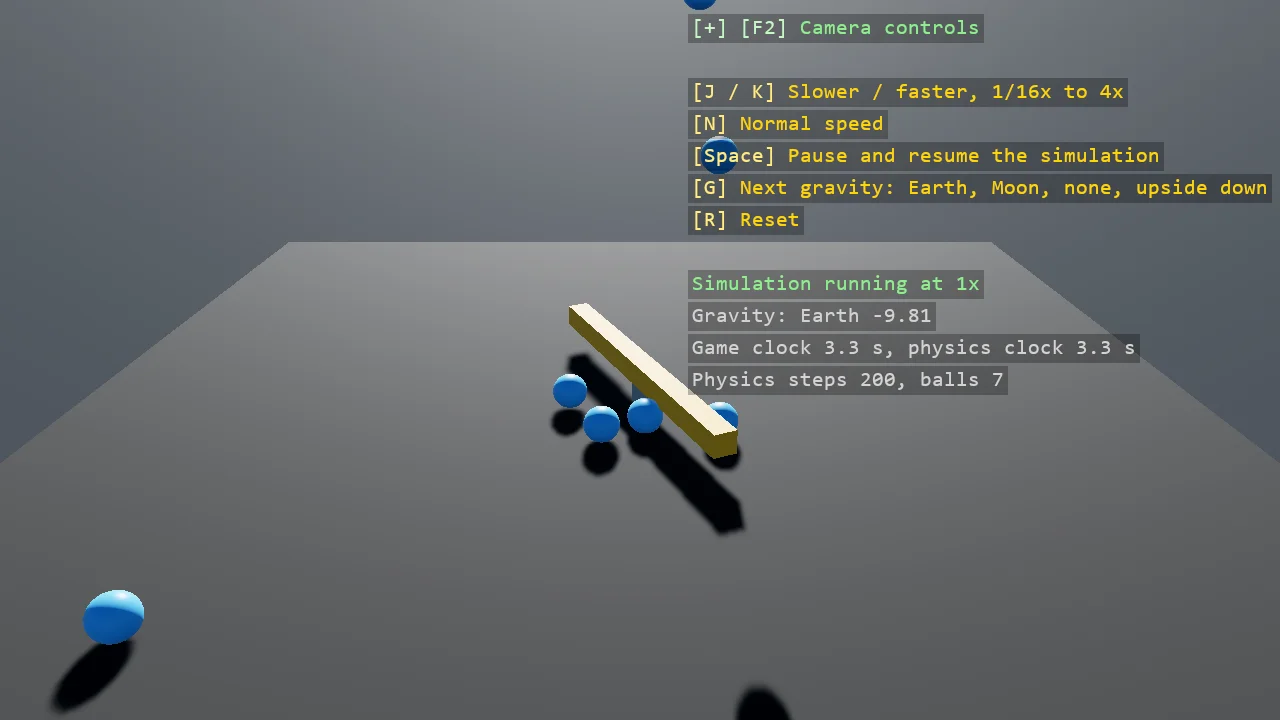
View on GitHub.
using Stride.BepuPhysics;
using Stride.BepuPhysics.Components;
using Stride.CommunityToolkit.Bepu;
using Stride.CommunityToolkit.Engine;
using Stride.CommunityToolkit.Rendering.ProceduralModels;
using Stride.CommunityToolkit.Rendering.Overlay;
using Stride.CommunityToolkit.Rendering.Text;
using Stride.CommunityToolkit.Skyboxes;
using Stride.Core.Mathematics;
using Stride.Engine;
using Stride.Games;
using Stride.Input;
using Stride.Rendering;

// The simulation has a clock of its own, and three knobs on it: TimeScale runs it slower or faster
// than the game, Enabled pauses it, and PoseGravity can change while it runs. A dropper releases a
// ball every half second on the GAME clock while a kinematic bar spins on the PHYSICS clock: slow the
// simulation down and the balls queue up in the air above a bar that barely turns; pause it and
// they hang there. A component that implements ISimulationUpdate counts the physics steps, which is
// the simulation's clock read exactly.
//
// TimeScale stacks with GameTime.Factor, the game-wide one; a game that slows its whole clock slows
// its physics with it. The step cap matters at speed: at 4x and 60 frames a second the simulation
// needs four fixed steps a frame, and the default cap of three would let it fall behind the clock.

const float DropInterval = 0.5f;
const float SpinSpeed = 2.5f;       // Radians per second, on the physics clock
const float BallRadius = 0.3f;
const int BallsKept = 40;

(string Name, Vector3 Value)[] gravities =
[
    ("Earth", new Vector3(0f, -9.81f, 0f)),
    ("Moon", new Vector3(0f, -1.62f, 0f)),
    ("None", Vector3.Zero),
    ("Upside down", new Vector3(0f, 9.81f, 0f)),
];

var gravityIndex = 0;
List<Entity> balls = [];
var clock = new PhysicsClock();
var random = new Random(9);
var nextDrop = 0.0;

BodyComponent spinner = null!;
BepuSimulation? simulation = null;
Material ballMaterial = null!;

using var game = new Game();

var sceneSetup = new SceneSetup3D
{
    Camera = CameraSetup.Perspective(position: new Vector3(0f, 7f, 14f), rotation: new Vector3(0f, -24f, 0f)).WithController(),
    Profiler = true,
    WindowTitle = "Time control - Stride Community Toolkit",
    Resizable = true,
    DpiAware = true,
}.UseBepu().UseSkybox();

game.Run(sceneSetup, start: Start, update: Update);

void Start(Scene scene)
{
    game.AddGrabber();

    ballMaterial = game.CreateMaterial(new Color(80, 170, 255), metalness: 0f, glossiness: 0.6f);

    BuildSpinner(scene);

    // The clock is a component like any other; implementing ISimulationUpdate is what gets it called once per step
    var clockEntity = new Entity("Physics clock") { clock };
    clockEntity.Scene = scene;

    TextOverlay.GetOrCreate(game).AddSection("Time control", BuildOverlayLines);
}

void Update(Scene scene, GameTime time)
{
    // The body carries its simulation from the moment its entity joins the scene; read once, here, and kept
    if (simulation is null)
    {
        simulation = spinner.Simulation;

        if (simulation is null) return;

        // Room for 4x: the default cap of three steps per frame is for a game that never runs fast
        simulation.MaxStepPerFrame = 8;
    }

    if (game.Input.IsKeyPressed(Keys.J)) simulation.TimeScale = MathF.Max(simulation.TimeScale * 0.5f, 1f / 16f);
    if (game.Input.IsKeyPressed(Keys.K)) simulation.TimeScale = MathF.Min(simulation.TimeScale * 2f, 4f);
    if (game.Input.IsKeyPressed(Keys.N)) simulation.TimeScale = 1f;
    if (game.Input.IsKeyPressed(Keys.Space)) simulation.Enabled = !simulation.Enabled;
    if (game.Input.IsKeyPressed(Keys.R)) Reset();

    if (game.Input.IsKeyPressed(Keys.G))
    {
        // Takes effect on the next step, on every awake body; a sleeping one is not woken
        gravityIndex = (gravityIndex + 1) % gravities.Length;
        simulation.PoseGravity = gravities[gravityIndex].Value;
    }

    // The spin is a velocity, so the physics clock turns the bar: at half speed it turns half as far a second
    spinner.AngularVelocity = new Vector3(0f, SpinSpeed, 0f);
    spinner.Awake = true;

    // The dropper runs on the game clock, whatever the simulation does
    if (time.Total.TotalSeconds >= nextDrop)
    {
        nextDrop = time.Total.TotalSeconds + DropInterval;

        DropBall(scene);
    }

    // Balls that flew off, up or down, go
    balls.RemoveAll(ball =>
    {
        if (MathF.Abs(ball.Transform.Position.Y) < 40f) return false;

        ball.Scene = null;

        return true;
    });
}

/// <summary>A kinematic bar at the centre: moved by its velocity, immovable to the balls, so it bats them away.</summary>
void BuildSpinner(Scene scene)
{
    var bar = game.CreatePrimitive(Primitive3D.Box(new Vector3(6f, 0.4f, 0.4f)), new BepuPhysicsOptions
    {
        EntityName = "Spinner",
        Material = game.CreateMaterial(new Color(230, 170, 60), metalness: 0f, glossiness: 0.4f),
        Body = BodyMode.Kinematic,
        Position = new Vector3(0f, 0.6f, 0f),
    });

    bar.Scene = scene;

    spinner = bar.Get<BodyComponent>();

    var post = game.CreatePrimitive(Primitive3D.Cylinder(0.15f, 0.4f), new BepuPhysicsOptions
    {
        EntityName = "Post",
        Material = game.CreateMaterial(new Color(150, 150, 160), metalness: 0f, glossiness: 0.3f),
        Body = BodyMode.Static,
        Position = new Vector3(0f, 0.2f, 0f),
    });

    post.Scene = scene;
}

/// <summary>One ball from above the bar, a little off centre, so the bar meets it on the way down or on the ground.</summary>
void DropBall(Scene scene)
{
    var ball = game.CreatePrimitive(Primitive3D.Sphere(BallRadius), new BepuPhysicsOptions
    {
        EntityName = $"Ball {balls.Count + 1}",
        Material = ballMaterial,
        ShareModel = true,
        Position = new Vector3(random.NextSingle() * 3f - 1.5f, 7f, random.NextSingle() * 3f - 1.5f),
    });

    ball.Scene = scene;

    balls.Add(ball);

    if (balls.Count > BallsKept)
    {
        balls[0].Scene = null;
        balls.RemoveAt(0);
    }
}

/// <summary>Everything back to the start: the balls gone, normal speed, running, Earth gravity, the clock at zero.</summary>
void Reset()
{
    foreach (var ball in balls) ball.Scene = null;

    balls.Clear();
    clock.Reset();
    gravityIndex = 0;

    simulation!.TimeScale = 1f;
    simulation.Enabled = true;
    simulation.PoseGravity = gravities[0].Value;
}

IReadOnlyList<TextElement> BuildOverlayLines()
{
    var scale = simulation?.TimeScale ?? 1f;
    var running = simulation?.Enabled ?? true;
    var speed = scale >= 1f ? $"{scale:0}x" : $"1/{1f / scale:0}";

    return
    [
        new("J / K", "Slower / faster, 1/16x to 4x", Color.Gold),
        new("N", "Normal speed", Color.Gold),
        new("Space", "Pause and resume the simulation", Color.Gold),
        new("G", "Next gravity: Earth, Moon, none, upside down", Color.Gold),
        new("R", "Reset", Color.Gold),
        new(""),
        new(running ? $"Simulation running at {speed}" : $"Simulation paused, set to {speed}", running ? Color.LightGreen : Color.Orange),
        new($"Gravity: {gravities[gravityIndex].Name} {gravities[gravityIndex].Value.Y:0.00}", Color.LightGray),
        new($"Game clock {game.UpdateTime.Total.TotalSeconds:0.0} s, physics clock {clock.Seconds:0.0} s", Color.LightGray),
        new($"Physics steps {clock.Steps}, balls {balls.Count}", Color.LightGray),
    ];
}

/// <summary>
/// The simulation's clock, read exactly: Bepu calls SimulationUpdate once per fixed step, before the
/// step, with the step's length. No per-frame Update at all, so a StartupScript is enough.
/// </summary>
sealed class PhysicsClock : StartupScript, ISimulationUpdate
{
    internal double Seconds { get; private set; }

    internal int Steps { get; private set; }

    internal void Reset()
    {
        Seconds = 0;
        Steps = 0;
    }

    void ISimulationUpdate.SimulationUpdate(BepuSimulation simulation, float simTimeStep)
    {
        Steps++;
        Seconds += simTimeStep;
    }

    void ISimulationUpdate.AfterSimulationUpdate(BepuSimulation simulation, float simTimeStep)
    {
    }
}