View Model
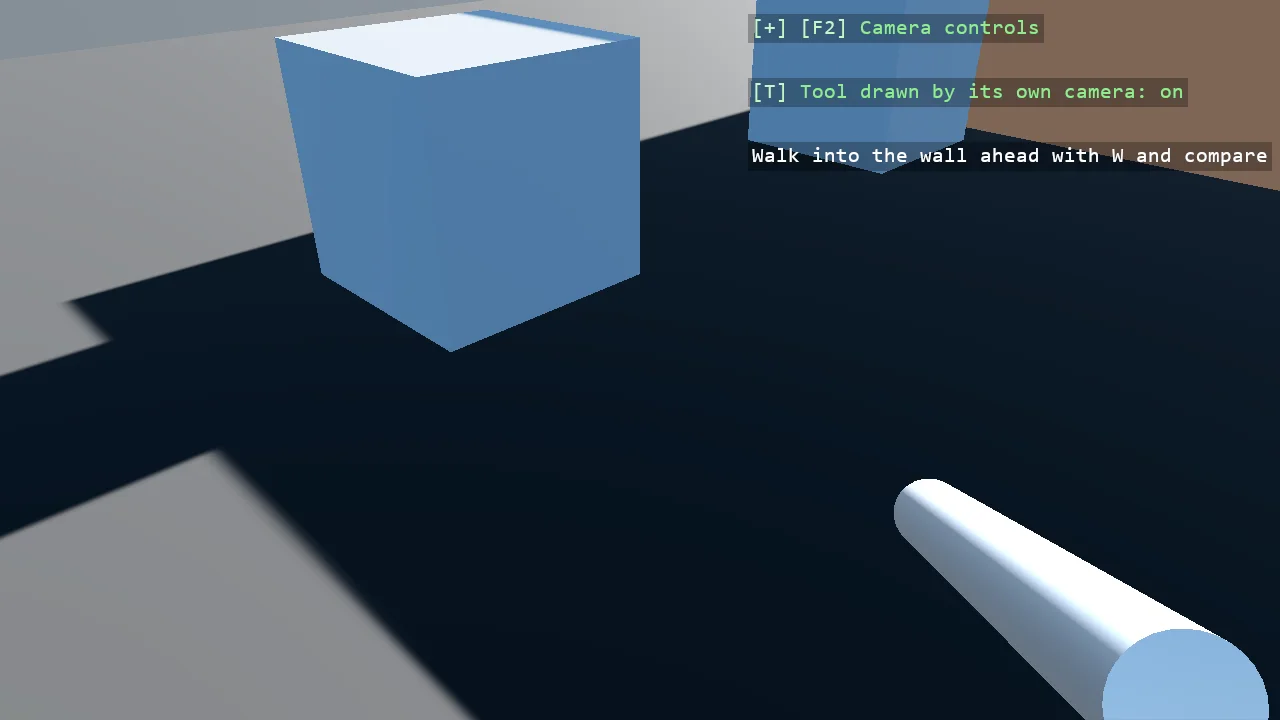
The weapon that never clips: a tool held in front of a first-person camera is drawn by a camera of its own over the finished view. The tool sits on a render group the main camera is told not to draw, a second camera riding on the main one draws only that group into a texture with a transparent background, and a screen-space rectangle lays the texture over the view after the post effects. T switches the trick off, and the wall ahead cuts through the tool again.
The Program.cs file shows how to:
- A render group for the tool, and the main camera renderer's mask without it
- A render-texture camera as a child of the main camera, masked to the tool's group, clearing to transparent
- The feed laid over the view through a ShapeBatch after the post effects
- Finding the compositor's main camera renderer by its single view
- Using helpers: SceneSetup3D, UseBepu, UseSkybox, CreatePrimitive, CreateMaterial, AddRenderTextureCamera, FillWith, TextOverlay
View on GitHub.
using Stride.CommunityToolkit.Bepu;
using Stride.CommunityToolkit.Engine;
using Stride.CommunityToolkit.Rendering.Compositing;
using Stride.CommunityToolkit.Rendering.Overlay;
using Stride.CommunityToolkit.Rendering.ProceduralModels;
using Stride.CommunityToolkit.Rendering.Text;
using Stride.CommunityToolkit.Shapes;
using Stride.CommunityToolkit.Skyboxes;
using Stride.Core.Mathematics;
using Stride.Engine;
using Stride.Games;
using Stride.Input;
using Stride.Rendering;
using Stride.Rendering.Compositing;

// The weapon that never clips. A tool held in front of a first-person camera is a model a few tenths of a
// unit from the lens, and the moment the player walks up to a wall the wall is closer than the tool and
// cuts through it. The fix every shooter uses is to draw the tool with a camera of its own, over the
// finished view: here the tool sits on a render group the main camera is told not to draw, a second
// camera riding on the main one draws only that group into a texture with a transparent background,
// and a screen-space rectangle lays the texture over the view. Depth is never compared between the
// two, so the wall cannot cut the tool.
//
// Walk into the wall ahead with W and press T to switch the trick off: the main camera draws the tool
// again, and the wall goes through it.

const RenderGroup ToolGroup = RenderGroup.Group30;
const RenderGroupMask ToolMask = RenderGroupMask.Group30;

var separate = true;

Entity tool = null!;
RenderTextureCamera feed = null!;
SceneCameraRenderer mainView = null!;
ShapeBatch overlay = null!;

using var game = new Game();

var sceneSetup = new SceneSetup3D
{
    Camera = CameraSetup.Perspective(position: new Vector3(0f, 1.6f, 6f)).WithController(),
    WindowTitle = "View model - Stride Community Toolkit",
    Resizable = true,
    DpiAware = true,
}.UseBepu().UseSkybox();

game.Run(sceneSetup, start: Start, update: Update);

void Start(Scene scene)
{
    BuildRoom(scene);

    var camera = game.GetCameraEntity();

    // The tool: two pieces on the tool's render group, children of the camera so they ride with it
    tool = new Entity("Tool");

    var grip = game.CreatePrimitive(Primitive3D.Box(new Vector3(0.12f, 0.3f, 0.14f)), new PrimitiveEntityOptions
    {
        EntityName = "Grip",
        Body = BodyMode.None,
        RenderGroup = ToolGroup,
        Material = game.CreateMaterial(new Color(50, 50, 55), metalness: 0.2f, glossiness: 0.4f),
        Position = new Vector3(0f, -0.1f, 0.1f),
    });

    var barrel = game.CreatePrimitive(Primitive3D.Cylinder(0.05f, 0.7f), new PrimitiveEntityOptions
    {
        EntityName = "Barrel",
        Body = BodyMode.None,
        RenderGroup = ToolGroup,
        Material = game.CreateMaterial(new Color(170, 175, 185), metalness: 0.7f, glossiness: 0.7f),
        Position = new Vector3(0f, 0.08f, -0.3f),
    });

    barrel.Transform.Rotation = Quaternion.RotationX(MathUtil.PiOverTwo);
    tool.AddChild(grip);
    tool.AddChild(barrel);
    tool.Transform.Position = new Vector3(0.35f, -0.3f, -0.6f);
    tool.Transform.Rotation = Quaternion.RotationY(-0.1f);
    camera.AddChild(tool);

    // The tool's camera: a child of the main one, so it has the same pose, drawing only the tool's group into a
    // texture that is transparent where the tool is not
    var toolCamera = new Entity("Tool camera");

    camera.AddChild(toolCamera);
    feed = game.AddRenderTextureCamera(toolCamera, 1280, 720);
    feed.Renderer.RenderMask = ToolMask;
    feed.Forward.Clear.Color = new Color4(0f, 0f, 0f, 0f);

    // The main view stops drawing the tool's group; the feed is laid over it after the post effects
    mainView = MainView(game);
    overlay = game.AddShapeBatch(afterPostEffects: true);
    overlay.FillWith(feed.Texture);

    Apply();

    TextOverlay.GetOrCreate(game).AddSection("View model", BuildOverlayLines);
}

void Update(Scene scene, GameTime time)
{
    if (game.Input.IsKeyPressed(Keys.T))
    {
        separate = !separate;
        Apply();
    }

    if (!separate) return;

    // The feed over the whole window: the texture's alpha leaves the view showing wherever the tool is not
    var size = overlay.ScreenSize;

    overlay.Screen = true;
    overlay.BorderWidth = 0f;
    overlay.Fill.Set(Color.White, 1f);
    overlay.DrawRectangle(new Vector3(size * 0.5f, 0f), Vector3.UnitX, Vector3.UnitY, size, Color.White);
    overlay.Screen = false;
}

// With the trick on, the main view skips the tool's group and the feed draws it; off, the main view draws everything
void Apply()
{
    mainView.RenderMask = separate ? RenderGroupMask.All & ~RenderGroupMask.Group31 & ~ToolMask : RenderGroupMask.All & ~RenderGroupMask.Group31;
    feed.Renderer.RenderMask = separate ? ToolMask : RenderGroupMask.None;
}

/// <summary>The compositor's main camera renderer: the one whose child is the compositor's single view.</summary>
static SceneCameraRenderer MainView(Game game)
{
    var compositor = game.GetSceneSystem().GraphicsCompositor;

    if (compositor.Game is SceneCameraRenderer single) return single;

    if (compositor.Game is SceneRendererCollection collection)
    {
        foreach (var child in collection.Children)
        {
            if (child is SceneCameraRenderer renderer && ReferenceEquals(renderer.Child, compositor.SingleView)) return renderer;
        }
    }

    throw new InvalidOperationException("The compositor has no main camera renderer to narrow.");
}

/// <summary>A wall ahead to walk into, and a few blocks either side for the eye to measure depth by.</summary>
void BuildRoom(Scene scene)
{
    var wallMaterial = game.CreateMaterial(new Color(180, 120, 90), metalness: 0f, glossiness: 0.3f);
    var blockMaterial = game.CreateMaterial(new Color(120, 140, 170), metalness: 0f, glossiness: 0.4f);

    var wall = game.CreatePrimitive(Primitive3D.Box(new Vector3(8f, 3f, 0.4f)), new BepuPhysicsOptions
    {
        EntityName = "Wall",
        Body = BodyMode.Static,
        Material = wallMaterial,
        Position = new Vector3(0f, 1.5f, 0f),
    });

    wall.Scene = scene;

    for (var i = 0; i < 4; i++)
    {
        var block = game.CreatePrimitive(Primitive3D.Cube(1f), new BepuPhysicsOptions
        {
            EntityName = "Block",
            Body = BodyMode.Static,
            Material = blockMaterial,
            ShareModel = true,
            Position = new Vector3(i % 2 == 0 ? -3f : 3f, 0.5f, 1f + i * 1.5f),
        });

        block.Scene = scene;
    }
}

IReadOnlyList<TextElement> BuildOverlayLines() =>
[
    new("T", separate ? "Tool drawn by its own camera: on" : "Tool drawn by the main camera: it clips", separate ? Color.LightGreen : Color.OrangeRed),
    new(""),
    new("Walk into the wall ahead with W and compare", Color.White),
];