Wav File
Play a .wav read from disk at runtime, with no compiled asset: LoadWav decodes the file into memory and each CreateInstance is an independent playback. Space fires a chime - press it fast and the instances overlap - L toggles a looping pad, J and K set the volume, N and M the pan. The overlay shows what was decoded and how many instances are alive, and finished instances are disposed once they report Stopped.
The Program.cs file shows how to:
- Loading a .wav at runtime with game.Audio.LoadWav instead of the asset pipeline
- One WavSound, many overlapping instances
- Looping, volume and pan on a SoundInstance
- Disposing instances once they have played out
- Why the files are mono: Pan and spatialisation need a single channel
- Using helpers: SetupBase3DScene, Create3DPrimitive, DebugOverlay
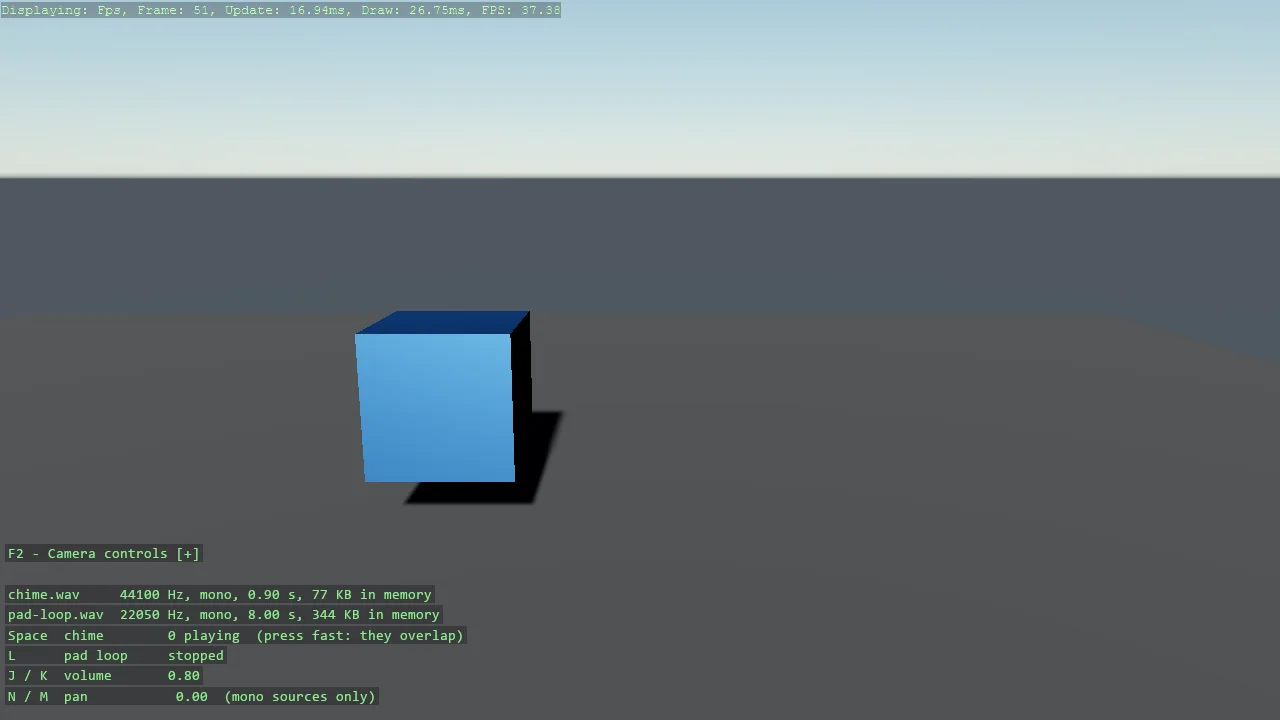
View on GitHub.
using Stride.Audio;
using Stride.CommunityToolkit.Audio;
using Stride.CommunityToolkit.Bepu;
using Stride.CommunityToolkit.Engine;
using Stride.CommunityToolkit.Rendering.ProceduralModels;
using Stride.CommunityToolkit.Scripts.Utilities;
using Stride.CommunityToolkit.Skyboxes;
using Stride.Core.Mathematics;
using Stride.Engine;
using Stride.Input;
using Stride.Media;
using System.Reflection;

// Play a .wav from disk with no compiled asset: read the file at runtime, keep the samples in
// memory, and create as many instances as there are things to play.
//
// This is the toolkit's founding pattern - load at runtime instead of through the asset pipeline
// - applied to the one subsystem where it had no answer. LoadWav decodes RIFF/WAVE (8/16/24/32-bit
// PCM or float, mono or stereo) into a WavSound; each CreateInstance is an independent playback,
// which is what a sound effect needs: press Space quickly and the chimes overlap instead of
// cutting each other off. The pad is one instance set to loop, the usual shape for music.
//
// Two engine rules worth knowing: an instance reports Stopped once it has played out and should be
// disposed then (each holds a native source), and Pan only applies to mono sources - which both
// files are, deliberately.

var directory = Path.GetDirectoryName(Assembly.GetEntryAssembly()!.Location)!;

WavSound? chime = null;
WavSound? pad = null;
SoundInstance? padInstance = null;

var chimes = new List<SoundInstance>();
var volume = 0.8f;
var pan = 0f;

Entity? speaker = null;
var bump = 0f;

using var game = new Game();

game.Run(start: Start, update: Update);

void Start(Scene scene)
{
    game.SetupBase3DScene();
    game.AddSkybox();
    game.AddProfiler();

    game.SetCameraPosition(new Vector3(0, 2.5f, -6));
    game.SetCameraRotation(new Vector3(180, -12, 0));

    speaker = game.Create3DPrimitive(PrimitiveModelType.Cube, new()
    {
        Material = game.CreateMaterial(new Color(90, 160, 255)),
        IncludeCollider = false,
        Position = new Vector3(0, 1, 0),
    });
    speaker.Scene = scene;

    // The files are copied next to the executable by the project file; both are mono 16-bit PCM,
    // generated by build/generate-example-sounds.cs.
    chime = game.Audio.LoadWav(Path.Combine(directory, "chime.wav"));
    pad = game.Audio.LoadWav(Path.Combine(directory, "pad-loop.wav"));

    padInstance = pad.CreateInstance();
    padInstance.IsLooping = true;
    padInstance.Volume = volume * 0.5f;

    AddInstructions();
}

void Update(Scene scene, Stride.Games.GameTime time)
{
    var input = game.Input;

    if (input.IsKeyPressed(Keys.Space) && chime is not null)
    {
        var instance = chime.CreateInstance();
        instance.Volume = volume;
        instance.Pan = pan;
        instance.Play();

        chimes.Add(instance);
        bump = 1;
    }

    if (input.IsKeyPressed(Keys.L) && padInstance is not null)
    {
        if (padInstance.PlayState == PlayState.Playing)
            padInstance.Stop();
        else
            padInstance.Play();
    }

    var dt = (float)time.Elapsed.TotalSeconds;
    var volumeChange = (input.IsKeyDown(Keys.K) ? 1 : 0) - (input.IsKeyDown(Keys.J) ? 1 : 0);
    var panChange = (input.IsKeyDown(Keys.M) ? 1 : 0) - (input.IsKeyDown(Keys.N) ? 1 : 0);

    if (volumeChange != 0)
    {
        volume = Math.Clamp(volume + volumeChange * dt, 0, 1);

        if (padInstance is not null)
            padInstance.Volume = volume * 0.5f;
    }

    if (panChange != 0)
    {
        pan = Math.Clamp(pan + panChange * dt, -1, 1);

        if (padInstance is not null)
            padInstance.Pan = pan;
    }

    // A finished instance still holds a native source: dispose it once it reports Stopped.
    chimes.RemoveAll(instance =>
    {
        if (instance.PlayState != PlayState.Stopped)
            return false;

        instance.Dispose();
        return true;
    });

    if (speaker is not null)
    {
        bump = MathF.Max(0, bump - dt * 4);
        speaker.Transform.Scale = new Vector3(1 + bump * 0.35f);
    }
}

void AddInstructions()
{
    var overlay = DebugOverlay.GetOrCreate(game);

    overlay.AddSection("Wav file", () =>
    {
        var padOn = padInstance?.PlayState == PlayState.Playing;

        return
        [
            new("Space", $"Chime, {chimes.Count} playing (press fast: they overlap)", chimes.Count > 0 ? Color.LightGreen : Color.Yellow),
            new("L", $"Pad loop {(padOn ? "playing" : "stopped")}", padOn ? Color.LightGreen : Color.Yellow),
            new(["J", "K"], $"Volume {volume:0.00}", Color.Yellow),
            new(["N", "M"], $"Pan {pan:+0.00;-0.00;0.00} (mono sources only)", Color.Yellow),
            new(""),
            new($"chime.wav: {Describe(chime)}", Color.LightGray),
            new($"pad-loop.wav: {Describe(pad)}", Color.LightGray),
        ];
    });

    static string Describe(WavSound? sound)
        => sound is null ? "not loaded" : $"{sound.SampleRate} Hz, {(sound.Channels == 1 ? "mono" : "stereo")}, {sound.Duration.TotalSeconds:0.00} s, {sound.Samples.Length * 2 / 1024} KB in memory";
}