World Text (In-Scene)
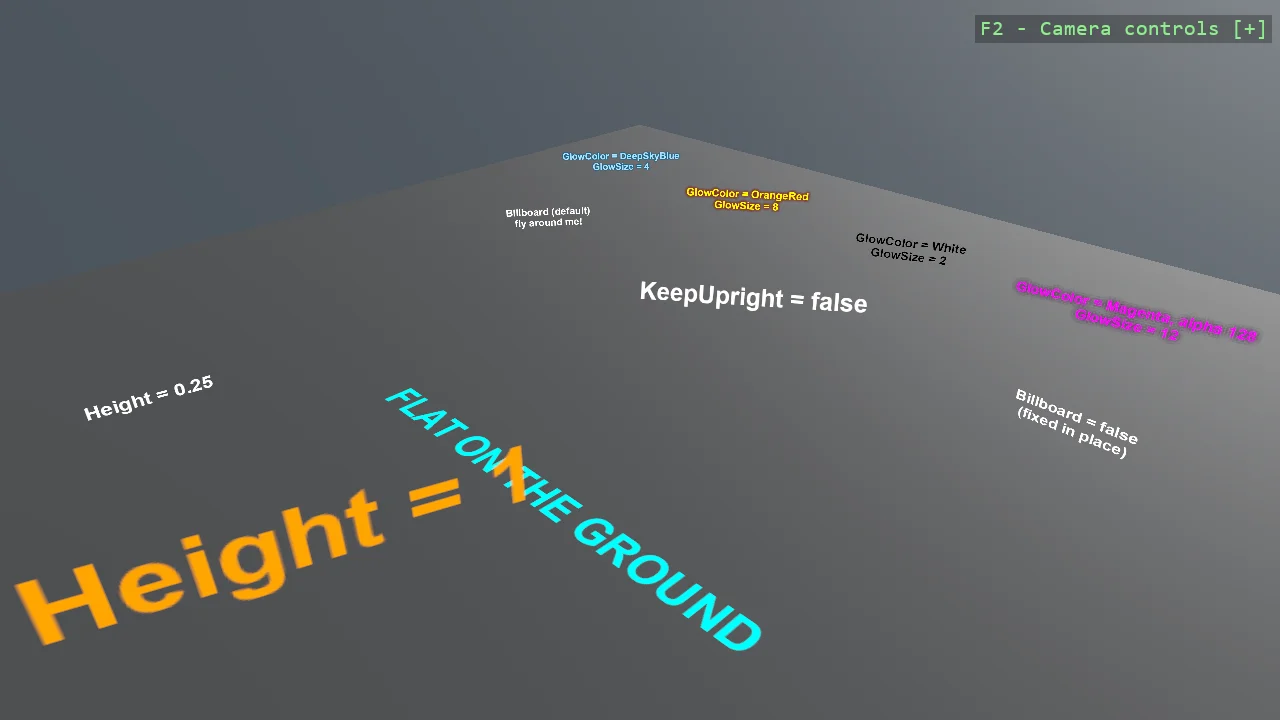
A gallery of everything WorldTextComponent can do, one setting per station: billboarding that stays upright, free billboarding, text fixed in place, text lying flat on the ground, world-unit sizing, depth-tested text hidden behind a wall next to text drawn through it, distance fading, and a glow behind the letters in a few colour combinations - a HUD blue, neon, a readability halo and a soft bloom. World text lives inside the scene - it shrinks with distance and geometry can hide it.
The Program.cs file shows how to:
- Registering the text renderer once: AddWorldTextRenderer
- Billboarding: KeepUpright versus facing the camera freely
- Text fixed to a surface or lying flat with Billboard = false
- Height in world units versus FontSize as sharpness
- Depth-tested text hidden by geometry, and DepthTest = false to draw through
- Distance fading with FadeStartDistance and MaxDistance
- A glow behind the letters with GlowColor and GlowSize, from HUD halo to neon bloom
View on GitHub.
using Stride.CommunityToolkit.Bepu;
using Stride.CommunityToolkit.Engine;
using Stride.CommunityToolkit.Rendering.ProceduralModels;
using Stride.CommunityToolkit.Rendering.Text;
using Stride.CommunityToolkit.Skyboxes;
using Stride.CommunityToolkit.Windows;
using Stride.Core.Mathematics;
using Stride.Engine;

// A gallery of everything WorldTextComponent can do. Each station on the ground demonstrates one
// setting, and the text itself names the setting that produced it.
//
// WorldTextComponent is IN-SCENE text: it is positioned by its entity's transform, shrinks with
// distance like everything else in the world, and - by default - is hidden by geometry in front of
// it. For text that must always be readable at the same size, such as a HUD, see
// E03_3D_EntityText.

WindowsDpiManager.EnablePerMonitorV2();

using var game = new Game();

game.Run(start: Start);

void Start(Scene scene)
{
    game.Window.AllowUserResizing = true;

    game.SetupBase3DScene();
    game.AddSkybox();

    // One call, however much text the scene has. Without the renderer, world text simply never
    // appears - there is no error for a missing renderer.
    game.AddWorldTextRenderer();

    // --- Row 1: orientation --------------------------------------------------------------------

    AddText(scene, new Vector3(-4f, 1.2f, -2), text =>
    {
        // The default: turns to face the camera, but swivels about the world Y axis only, so it
        // stays standing like a signpost and never rolls when the camera tilts
        text.Text = "Billboard (default)\nfly around me!";
    });

    AddText(scene, new Vector3(0f, 1.2f, -2), text =>
    {
        // Faces the camera squarely from any angle, including from directly above
        text.Text = "KeepUpright = false";
        text.KeepUpright = false;
    });

    AddText(scene, new Vector3(4f, 1.2f, -2), text =>
    {
        // No billboarding: the text keeps its entity's rotation, so it foreshortens and disappears
        // edge-on like any other surface in the scene
        text.Text = "Billboard = false\n(fixed in place)";
        text.Billboard = false;
    });

    // Lying flat on the ground, like a road marking: no billboard, rotated face-up
    var floor = AddText(scene, new Vector3(0f, 0.02f, 1.5f), text =>
    {
        text.Text = "FLAT ON THE GROUND";
        text.Billboard = false;
        text.Height = 0.6f;
        text.TextColor = Color.Cyan;
    });

    floor.Transform.Rotation = Quaternion.RotationX(MathUtil.DegreesToRadians(-90));

    // --- Row 2: size ---------------------------------------------------------------------------

    AddText(scene, new Vector3(-4f, 0.6f, 4), text =>
    {
        // Height is world units - this text is a quarter metre tall and always will be. FontSize is
        // only sharpness: raise it if text viewed close up looks soft.
        text.Text = "Height = 0.25";
        text.Height = 0.25f;
    });

    AddText(scene, new Vector3(0f, 1.0f, 4), text =>
    {
        text.Text = "Height = 1";
        text.Height = 1f;
        text.TextColor = Color.Orange;
    });

    // --- Row 3: depth --------------------------------------------------------------------------

    // A wall with text behind it, twice: depth-tested text is hidden by the wall until you fly
    // around it, while DepthTest = false text shows through everything
    var wall = game.Create3DPrimitive(PrimitiveModelType.Cube, new Primitive3DEntityOptions
    {
        EntityName = "Wall",
        Size = new Vector3(3f, 2f, 0.2f),
    });

    wall.Transform.Position = new Vector3(6f, 1f, 4f);
    wall.Scene = scene;

    AddText(scene, new Vector3(6f, 1.3f, 6f), text =>
    {
        text.Text = "DepthTest = true\n(hidden by the wall)";
        text.Height = 0.35f;
    });

    AddText(scene, new Vector3(6f, 0.5f, 6f), text =>
    {
        text.Text = "DepthTest = false\n(drawn through the wall)";
        text.Height = 0.35f;
        text.TextColor = Color.Lime;
        text.DepthTest = false;
    });

    // --- Row 4: distance -----------------------------------------------------------------------

    AddText(scene, new Vector3(-4f, 1.0f, 8), text =>
    {
        text.Text = "Fades from 10, gone at 18\n(walk backwards!)";
        text.Height = 0.4f;
        text.FadeStartDistance = 10;
        text.MaxDistance = 18;
    });

    // --- Row 5: glow (behind row 1, on the far side of the ground, in the default camera view) --

    // A glow is the text drawn again in GlowColor, offset in a ring behind the letters, so it
    // follows every glyph and scales with the text. GlowSize is in font pixels at FontSize, so the
    // same value looks the same at any Height; the glow colour's alpha is its strength.

    AddText(scene, new Vector3(-5.5f, 1.1f, -5), text =>
    {
        // The HUD look: light text over a deeper glow of the same hue reads as lit, not painted
        text.Text = "GlowColor = DeepSkyBlue\nGlowSize = 4";
        text.Height = 0.4f;
        text.TextColor = new Color(170, 225, 255);
        text.GlowColor = Color.DeepSkyBlue;
        text.GlowSize = 4;
    });

    AddText(scene, new Vector3(-2.5f, 1.1f, -5), text =>
    {
        // Neon: a contrasting glow, wide enough to bleed well past the letters
        text.Text = "GlowColor = OrangeRed\nGlowSize = 8";
        text.Height = 0.4f;
        text.TextColor = Color.Yellow;
        text.GlowColor = Color.OrangeRed;
        text.GlowSize = 8;
    });

    AddText(scene, new Vector3(0.5f, 1.1f, -5), text =>
    {
        // Readability rather than looks: dark text with a tight light halo stays legible over a
        // busy or dark background, the way a subtitle does
        text.Text = "GlowColor = White\nGlowSize = 2";
        text.Height = 0.4f;
        text.TextColor = Color.Black;
        text.GlowColor = Color.White;
        text.GlowSize = 2;
    });

    AddText(scene, new Vector3(3.5f, 1.1f, -5), text =>
    {
        // Bloom: the same colour as the text, wide and half strength - the alpha sets how strong
        // the glow is at the letters before it fades
        text.Text = "GlowColor = Magenta, alpha 128\nGlowSize = 12";
        text.Height = 0.4f;
        text.TextColor = Color.Magenta;
        text.GlowColor = new Color(255, 0, 255, 128);
        text.GlowSize = 12;
    });
}

// Creates one gallery station: an entity carrying a world text, handed over for its own settings.
Entity AddText(Scene scene, Vector3 position, Action<WorldTextComponent> configure)
{
    var component = new WorldTextComponent
    {
        Text = string.Empty,
        Height = 0.35f,
        Alignment = Stride.Graphics.TextAlignment.Center,
    };

    configure(component);

    var entity = new Entity("WorldText") { component };

    entity.Transform.Position = position;
    entity.Scene = scene;

    return entity;
}